Operating instructions CS 300 Installation
6.110.98.5.01.40 en 4 - 33
4
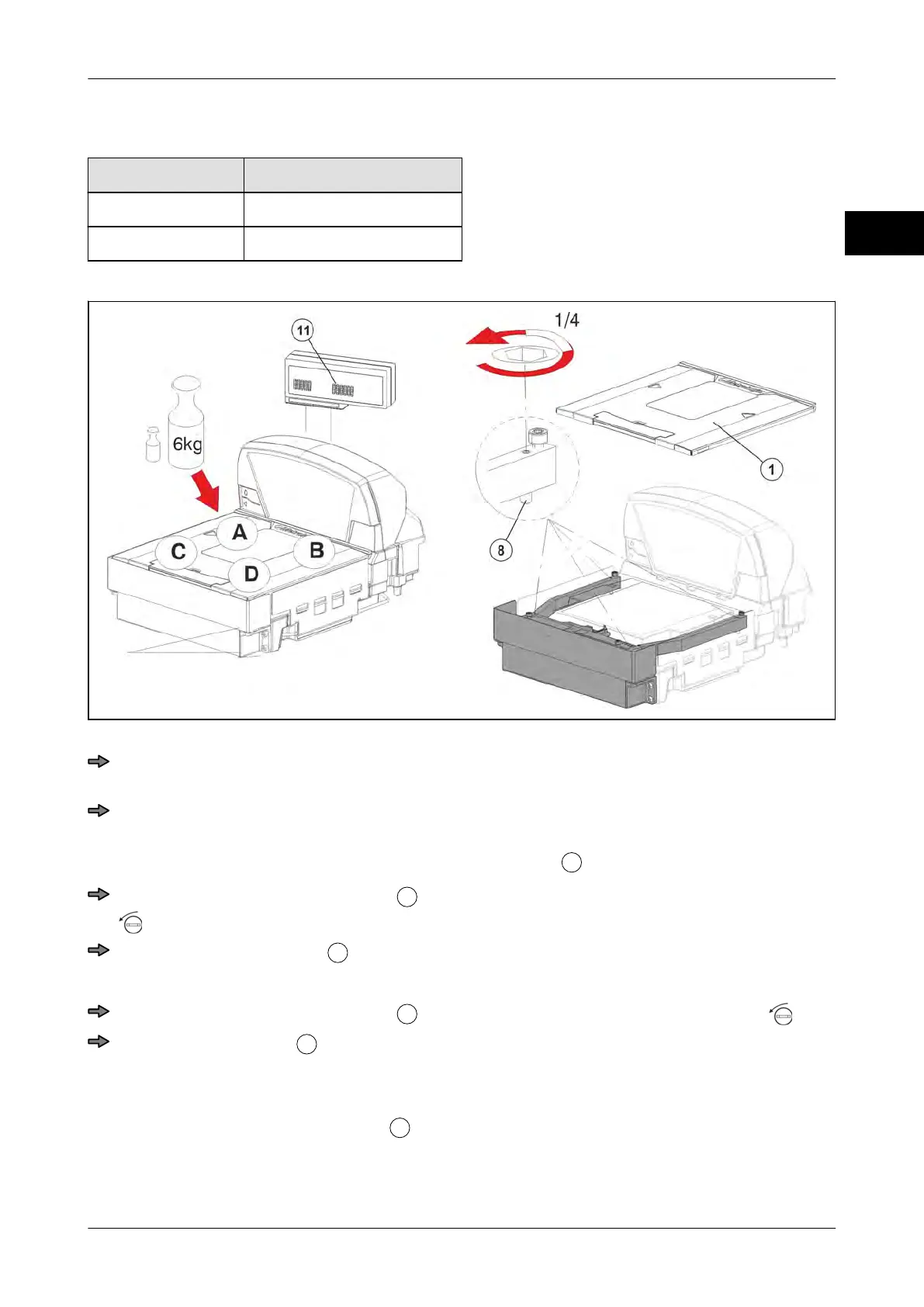
4.6 Setting overload stop
Maximum load 1/30 of the max. load
6 kg 200 g
15 kg 500 g
Fig. 56: Overload stop
Put the max. load plus 1/30 of the max. load (e.g. 6 kg + 200 g or 15 kg + 500 g) in
succession onto positions A-D.
Check if the fine resolution display indicates values between 6.190 kg
and 6.210 kg
or 15.490 kg and 15.510 kg.
If less than the max. load is displayed, e.g. on Pos. A
, remove the load platter.
Carefully turn the overload screw
at position A a quarter turn counterclockwise
.
Reattach the load platter
and put the weights in succession on positions A-D.
If still a value lower than the max. load is displayed, remove load platter again.
Carefully turn the overload screw
another quarter turn counterclockwise .
Reattach load platter
and check fine resolution display using weights. Repeat
process until the fine resolution display indicates values between 6.190 kg and 6.210
kg or 15.490 kg and 15.510 kg for positions A-D.
Switch off fine resolution display



 To Next Page