Device and operating controls Operating instructions CS 300
5 - 4 6.110.98.5.01.40 en
5
It depends on the setting made in Pr204 at which point of time the scale
display switches to the POS display:
–
after moving scale
or
– after approx. 2 sec.
Manual switch from POS display to scale display
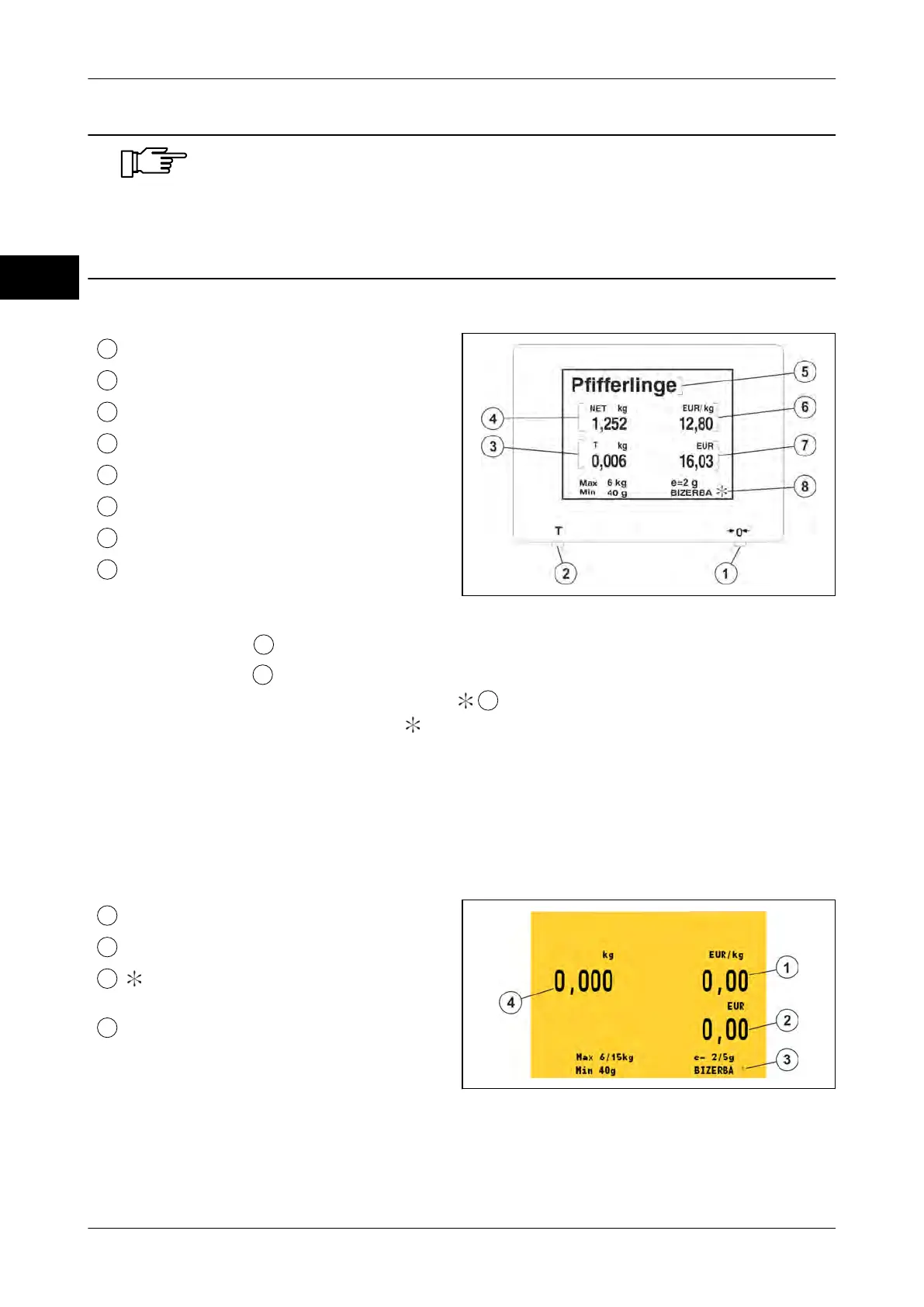
Key <0>
Key <T>
Tare
Weight
PLU text
UNIT PRICE
Selling price
Symbol for: Scale display permanently
switched on
Fig. 64: Example VGA screen
–
Press key <T>
to switch POS display to scale display for approx. 3 sec.
–
Press <0> key
to switch POS display permanently to scale display.
Permanent scale display is indicated by
.
After pressing again the
<0> key,
is deleted and the scale display switches back to
the POS display.
5.2 CS 300 SD (Software Display)
The software module generates the scale display on a screen, e.g. of a POS system.
The weighing results are transmitted from the connected scale to the POS system and dis-
played on the built-in POS screen.
Unit price
Selling price
Symbol for: Scale display perma-
nently switched on
Weight
Fig. 65: Software display



 To Next Page