Operating instructions CS 300 Device and operating controls
6.110.98.5.01.40 en 5 - 7
5
5.4 CS 300 with POSscale (RIK4Checkout)
The POSscale (OEM scale) software runs on the display (window) and weighing software
on the host, e.g. a POS system.
The CS 300 can be connected as external load receptor.
– Parallel operation of P, WS, and CS300SD displays is not possible.
–
Programming as per chapter 7 is not possible.
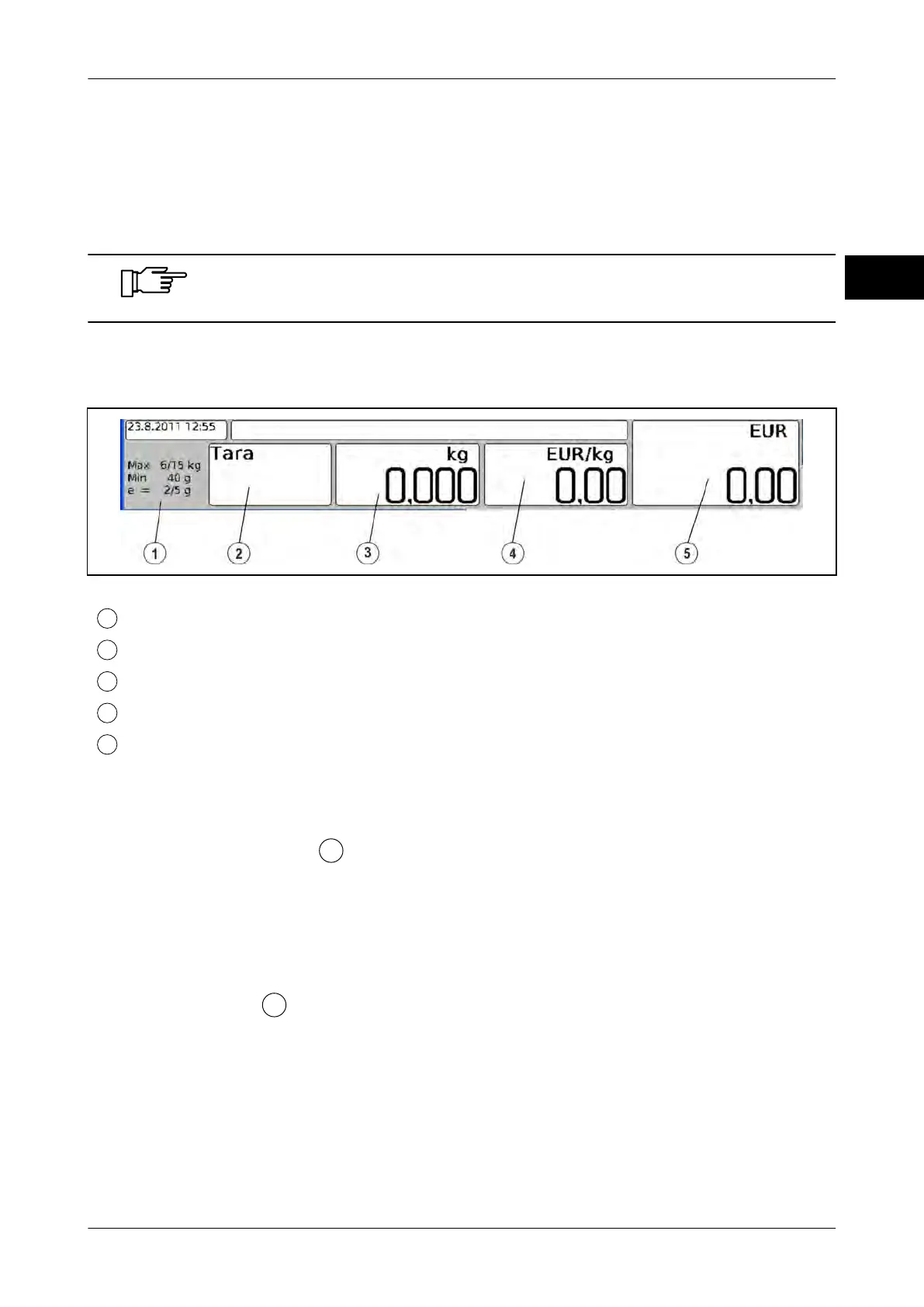
POSscale display example
Quantity and position of the display fields may deviate from the example.
Fig. 71: Display example
Verification field
Tare field
Weight field
Unit price field
Selling price field
Operating and setting options
Logbook monitoring
1.
Touch verification field
for approx. 3-5 seconds.
Activation of fine resolution display via Config/WES
The Config dialog is called up via the Config button during logbook control.
Taring of scale
1.
Touch tare field
for approx. 3-5 seconds.
Function disabled in self-service operation.
2.
If remote keys are connected or integrated in the scanner, press the key <T>.
3. Via the third-party software (API) to POSscale.
Declaration on the functions of the software can be found in the documentation of the
respective manufacturer.



 To Next Page