Page 320 of 479
Animation
This is to do animation with a Polygon in Run Time
Fill
Select “Enable Fill” if filling animation is required on a Polygon object during Run time.
When a tag value changes during Run time, it shows the polygon filling with a defined color
inside the Polygon object. It’s like a bar graph where the filling is within the polygon shape.
Start Fill: Defines a Start value for Fill
End Fill: Defines an End value for Fill
Movement
Used to define a movement position. This is the same as previously explained for the Line
object earlier.
Size
Used to define the amount of size increase/decrease. This is the same as previously
explained for the Line object earlier.
Tag Value
Select a Tag to be linked with the Polygon object. This is useful if animation is required to be
done with the Polygon.
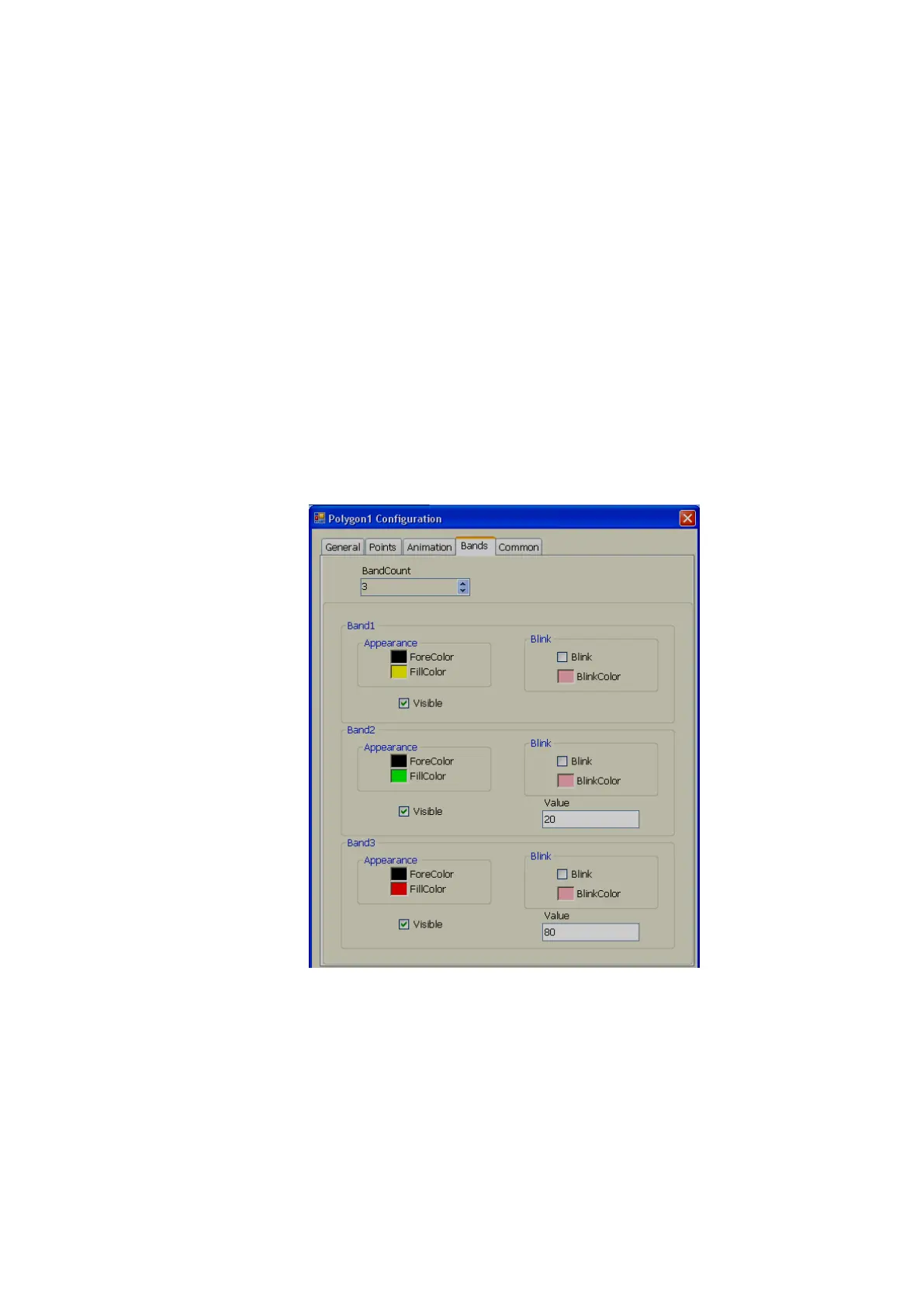
Band editor
A maximum of 32 bands are available.
For example: In the above sample,
If the Tag value is 0 to 20, Polygon fill color = Yellow
If the Tag value is 21 to 80, then, Polygon fill color = Green
If Tag value is above 80, Polygon fill color = RED
If required, it is also possible to configure the blink property and set blink color for any band.



 To Next Page