700M HFID 6-2-15
89
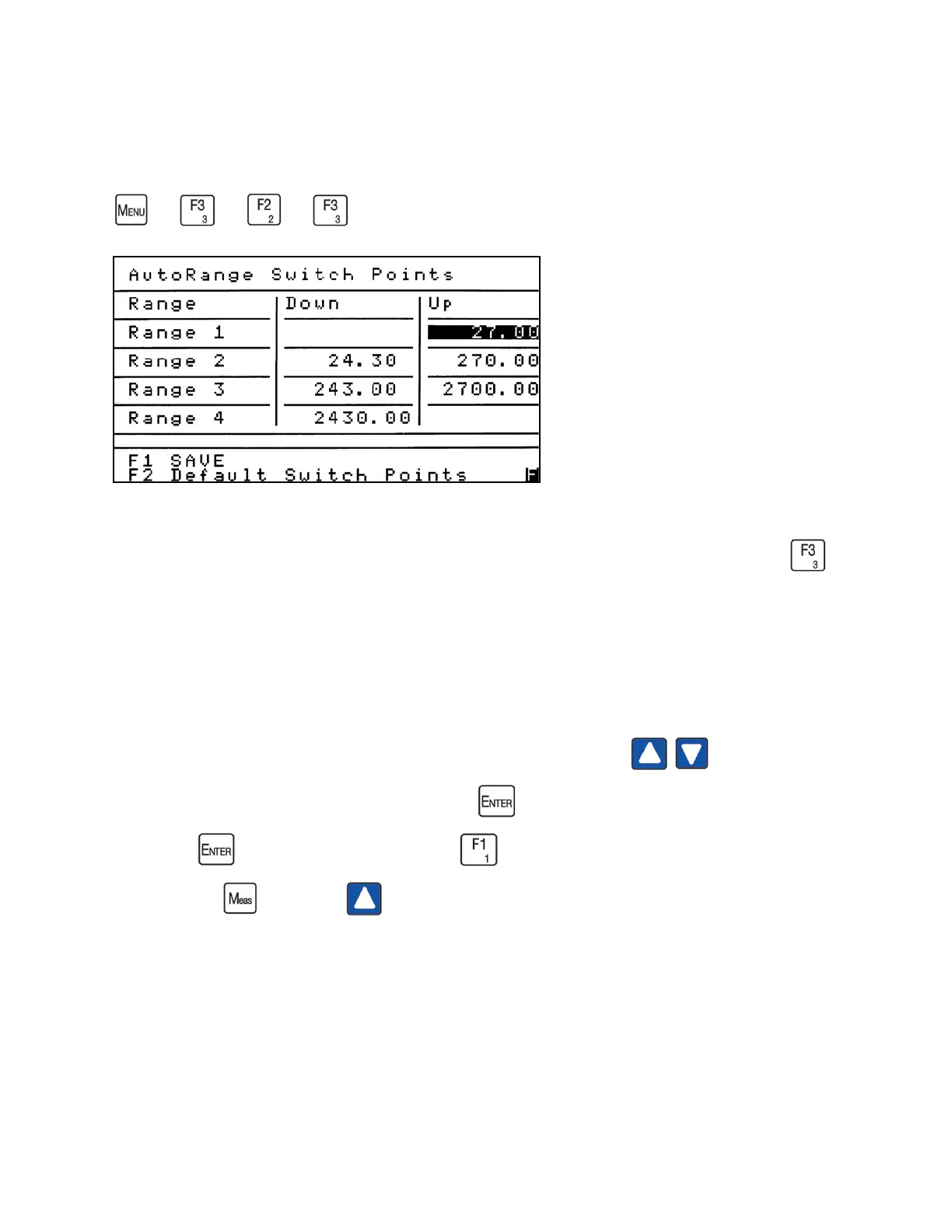
AutoRange Switch Points
→
→
→
AutoRange Switch Points determine when the analyzer automatically changes a range up
or down when the AutoRange function is turned on. From the Range Setup menu press
to access the AutoRange Switch Points screen.
The Default Switch Points are created by the range limits. The Up Switch Point is 90% of the
Range Limit. The Down Switch Point is 90% of the previous range’s Up Switch Point.
To change the AutoRange Switch Points, use the up or down arrows to move the
highlight to the field you intend to change. Press to open the field to change the value in
ppm. Press again to close the field. Press to save your changes. To initiate the saved
changes, press , then press and select new AutoRange Switch Points.
In the example above, if the Range 1 concentration reaches 27.00 ppm, the analyzer will switch
to Range 2. If the concentration for Range 2 gets as low as 24.30 ppm, the analyzer will switch to
Range 1.



 To Next Page