700M HFID 6-2-15
97
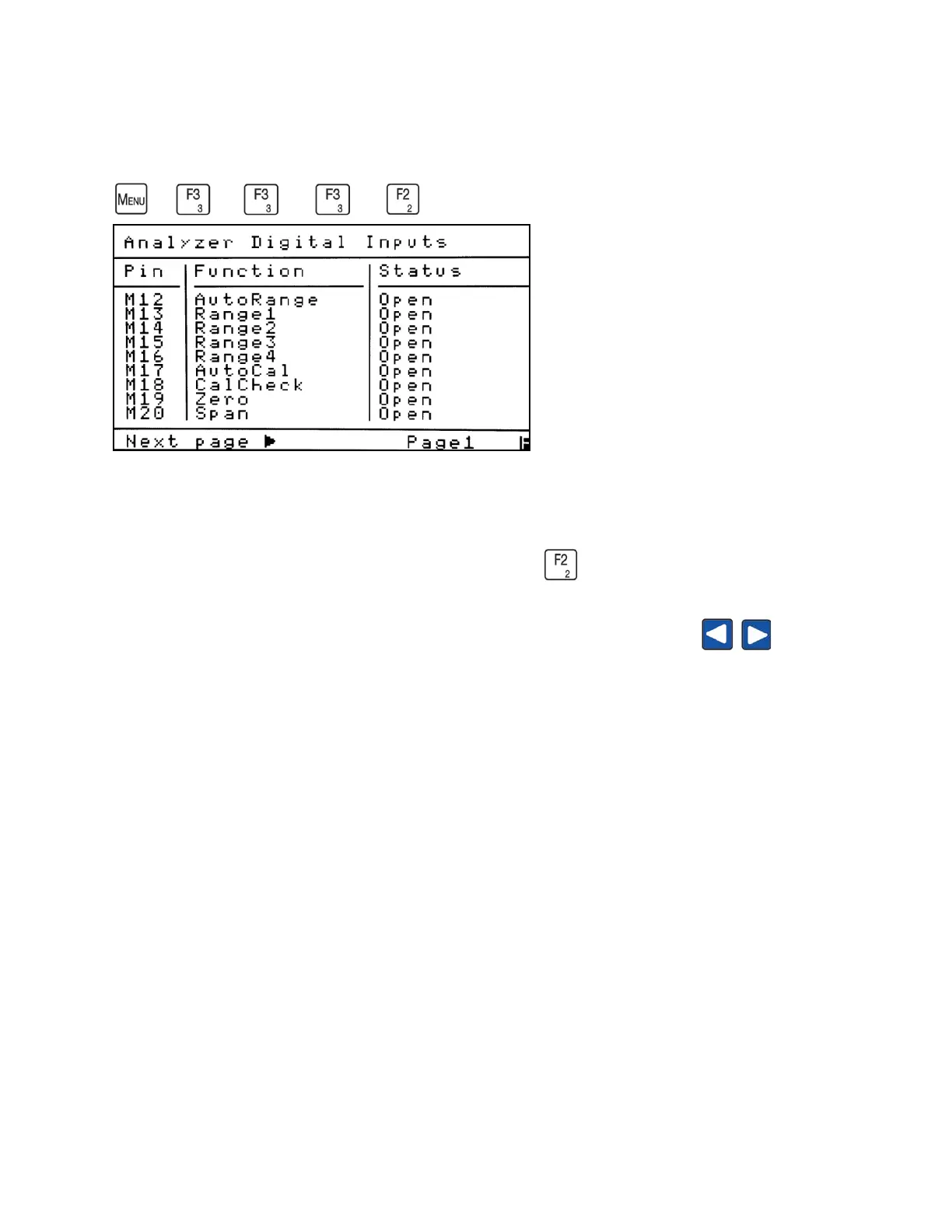
Analyzer Digital Inputs
→
→
→
→
The Analyzer Digital Inputs screen allows the operator to view the status of an analyzer
input (Open or Closed) and where to find the corresponding pin number.
To access the Analyzer Digital Inputs status screen, press from the I/O Status menu.
As indicated at the bottom of the screen, press the left and right arrow buttons to scroll
to different Analyzer Digital Input screens.
The Pin column indicates the connector and the pin number that is used to control the function.
In the example (M12), M is the Main Connector on the analyzer’s back panel, and 12 is the Pin
Number on that connector. The abbreviations are as follows:
M = Main Connector
A = Auxiliary
Int = internal, for CAI use only.
When the analyzer is in Remote Mode and the digital input is pulled to digital ground (Main
Connector, Pin 6), the status will become Closed.
NOTE: These analyzer functions are not user-changeable and have static pin outs. These screens
are for viewing only.



 To Next Page