12-19
Machine Settings
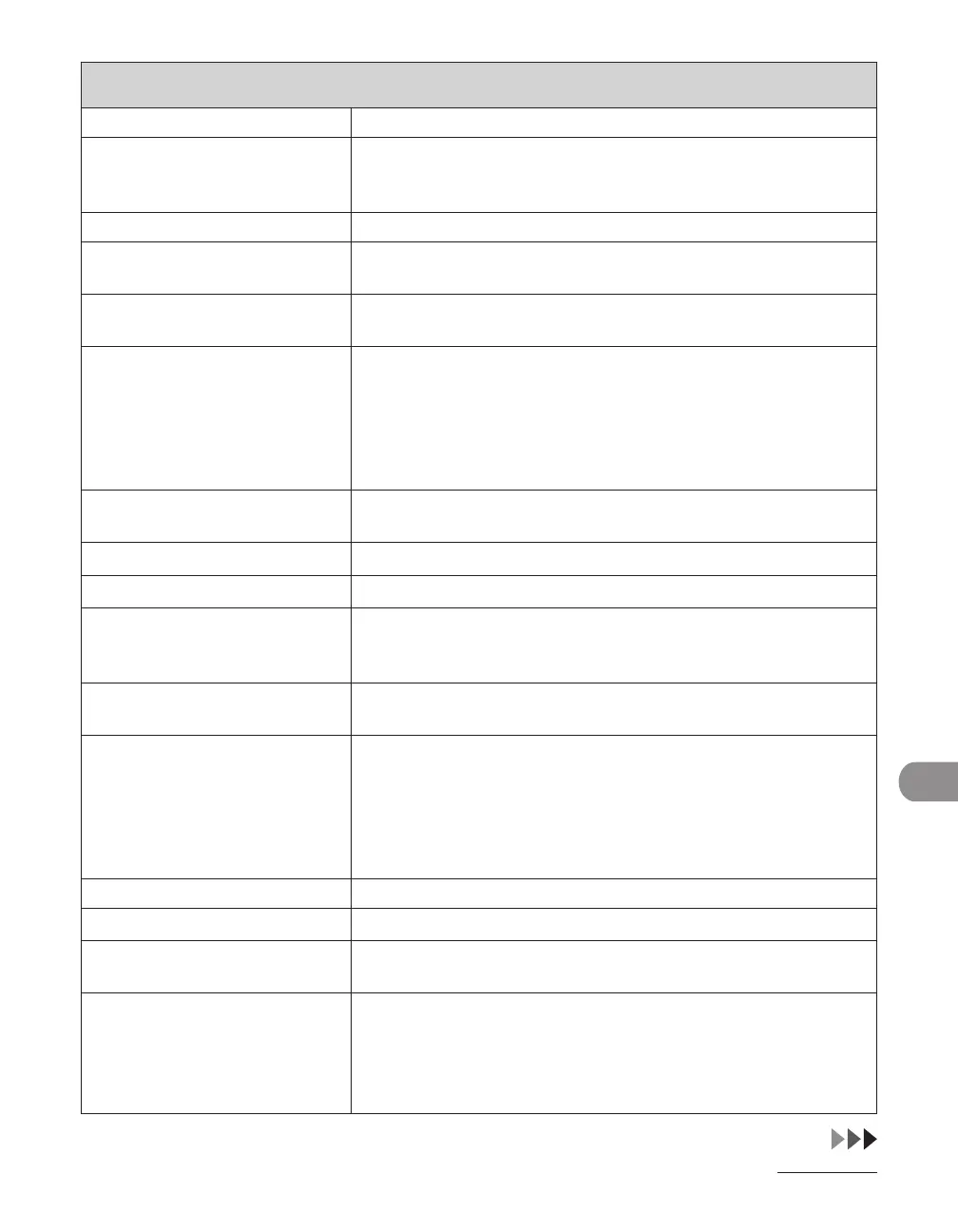
ADDRESS BOOK SET.
Setting Item Description
1. FAVORITES BUTTONS
*
Registers destinations together with a combination of the scan
and send settings for frequent use. (M1–M4: One-touch keys 01
to 04 are used for this feature.)
FAX Registers fax numbers.
1. TEL NUMBER ENTRY Registers the recipient's fax number (max. 120 digits, including
spaces).
2. NAME Registers the recipient's name (max. 16 characters, including
spaces).
3. IMAGEQUALITY Sets the image quality.
FINE
PHOTO
SUPER FINE
ULTRA FINE
STANDARD
–
–
–
–
–
4. OPTIONAL SETTING Selects whether to use the advanced functional settings for each
one-touch key registered in the machine.
OFF The optional setting is not set for this destination.
ON The optional setting is set for this destination.
1. ECM Selects whether to use ECM (Error Correction Mode).
ON
OFF
–
–
2. TX SPEED Select the transmission speed.
(33600bps, 14400bps, 9600bps, 4800bps)
3. INTERNATIONAL Selects a mode for documents you are sending.
DOMESTIC
LONG DISTANCE 1
LONG DISTANCE 2
LONG DISTANCE 3
(See "Registering Fax Numbers," on p. 4-13.)
–
–
–
–
E-MAIL Registers e-mail addresses.
1. E-MAIL ADDRESS Registers the recipient's e-mail address (max. 120 digits).
2. NAME Registers the recipient's name (max. 16 characters, including
spaces).
3. IMAGE FORMAT Sets the file format for the file attached to e-mail message.
PDF
TIFF (B&W)
PDF (COMPACT)
JPEG
–
–
–
–














 To Next Page