Before Using the Machine
1-4
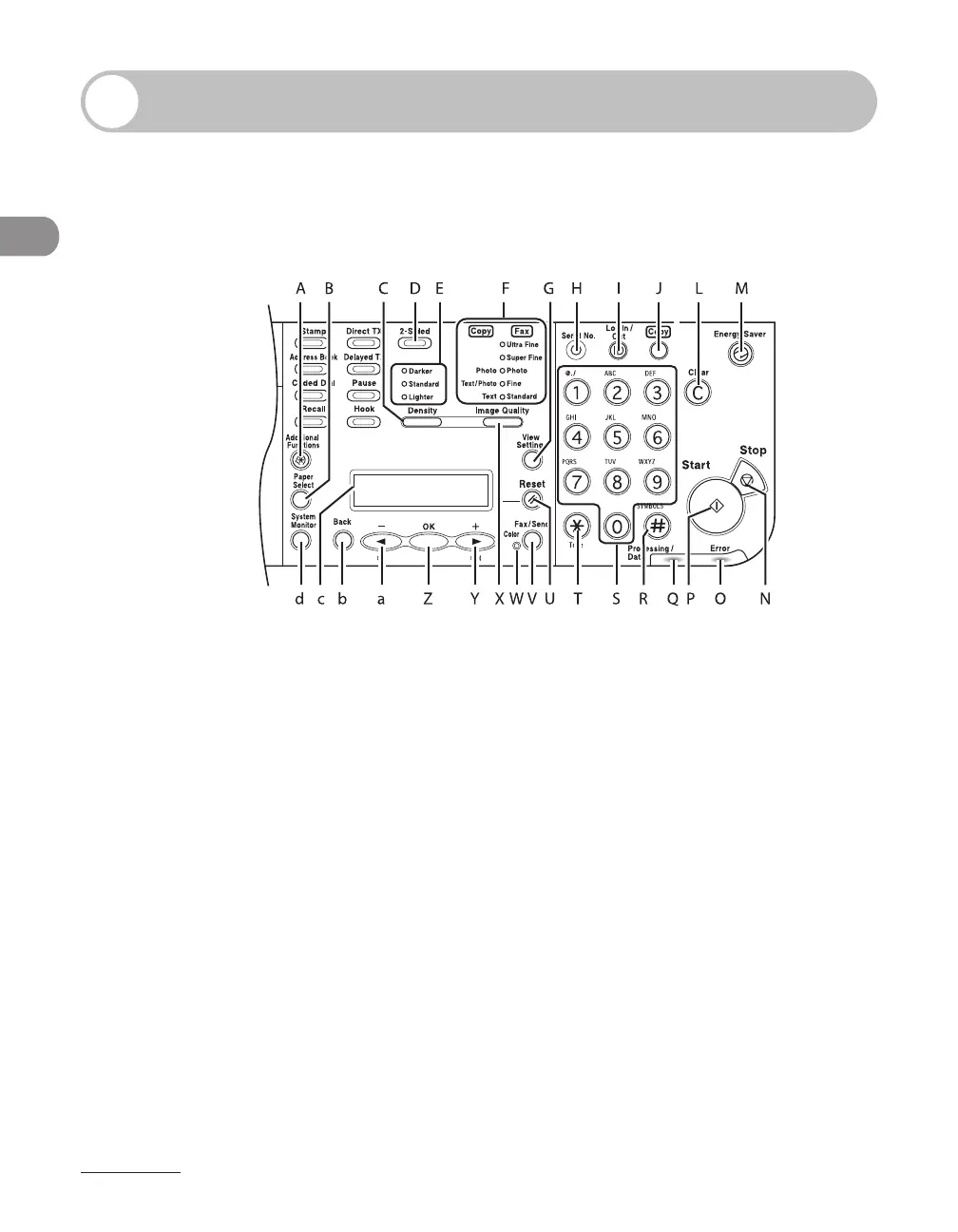
Operation Panel
Right Side of the Operation Panel
LASER CLASS 830i●
A [Additional Functions] key
Press to select or cancel the modes in
Additional Functions.
B [Paper Select] key
Press to select a paper source (paper cassette or
multi-purpose tray).
C [Density] key
Press to adjust the density for copy or
documents you send.
D [2-Sided] key
Press to set two-sided copying or faxing.
E Density indicator
Indicates the density you set in the Copy/Fax
mode.
F Image Quality indicator
Indicates the image quality you set in the Copy/
Fax mode.
G [View Settings] key
Press to confirm settings of the copy function.
H [Serial No.] key
Press to confirm the serial number.
I [Log In/Out] key
Press to operate the machine when the ID
management is activated. Also press to enable
the ID management when you finished using
the machine.
J [Copy] key
Press to switch to Copy mode.














 To Next Page