12-25
Machine Settings
ADDRESS BOOK SET.
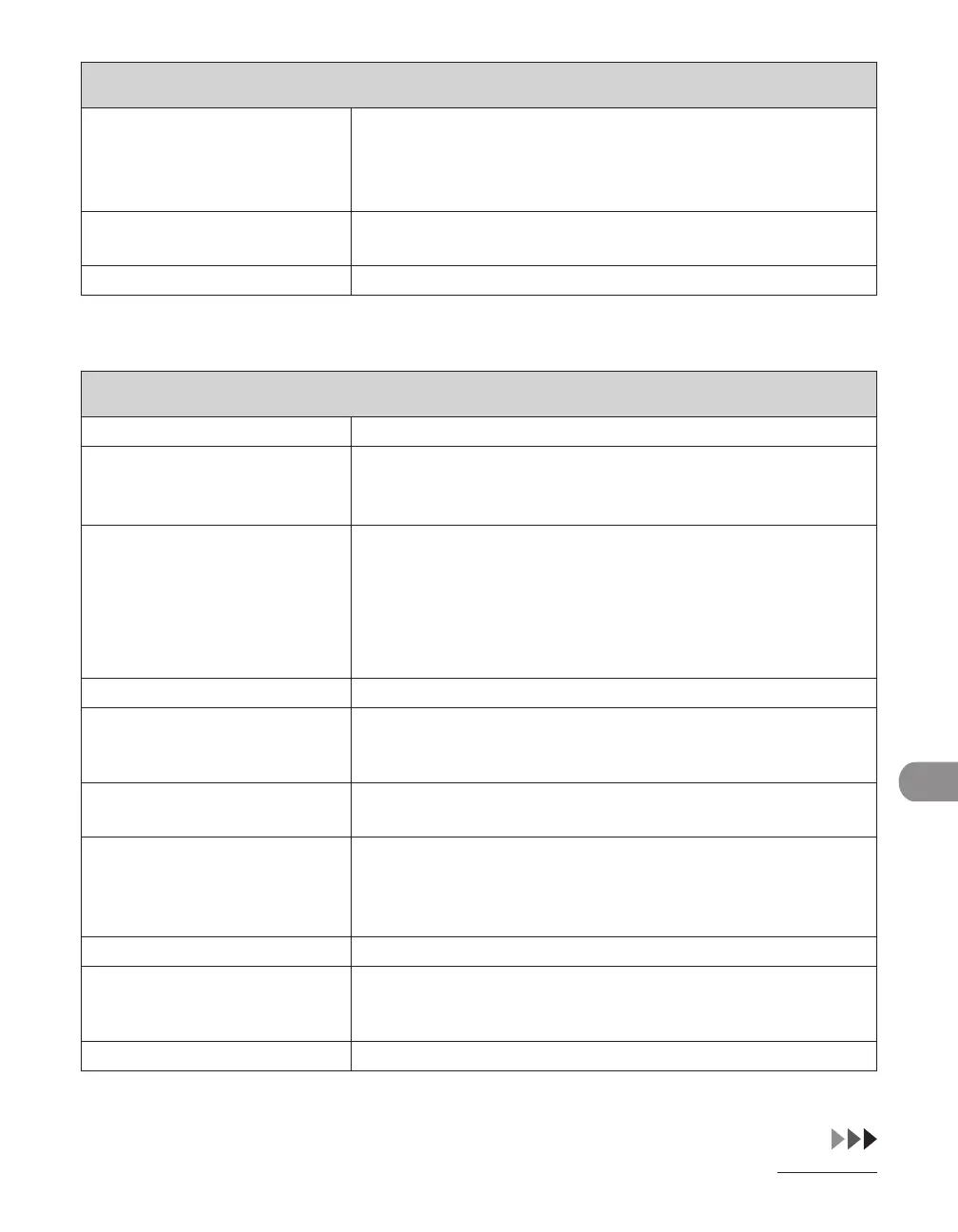
4. GROUP DIAL Registers destinations in group addresses. Up to 199 (LASER
CLASS 810)/499 (LASER CLASS 830i) destinations can be
registered in a group. (See “Storing/Editing One-Touch Keys/
Coded Dial Codes,” on p. 4-13.)
1. SELECT ADD/TEL NO Registers the recipient’s numbers and addresses by specifying
the one-touch keys or coded dial codes.
2. NAME Registers the group name (max. 16 characters, including spaces).
* LASER CLASS 830i Only
PRINTER SETTINGS
*
Setting Item Description
1. DEFAULT PAPERSIZE Sets the default paper size when no paper source is specified.
(A4, B5, A5, LGL, LTR, EXECUTIV, STMT, ISO-B5, ISO-C5, COM10,
MONARCH, DL )
2. DEFAULT PAPERTYPE Sets the default paper type for print jobs. This machine has
internally defined optimal print modes for each specified paper
type.
(PLAIN PAPER, COLOR, RECYCLED, HEAVY PAPER 1, HEAVY
PAPER 2, HEAVY PAPER 3, BOND, TRANSPARENCY, LABELS,
ENVELOPE)
3. COPIES Sets the number of documents printed. (1-999)
4. 2-SIDED PRINTING Sets whether to activate two-sided printing.
OFF
ON
–
–
5. PRINT QUALITY Sets the image quality, density or toner saving mode for
printing.
1. IMAGE REFINEMENT Sets whether to print smoothly the jagged outlines of characters
and graphics.
ON
OFF
–
–
2. DENSITY Adjusts the print density. (1-9)
3. TONER SAVER Sets whether the toner saving mode is enabled.
OFF
ON
–
–
6. PAGE LAYOUT Sets the printing layout.














 To Next Page