Troubleshooting
11-14
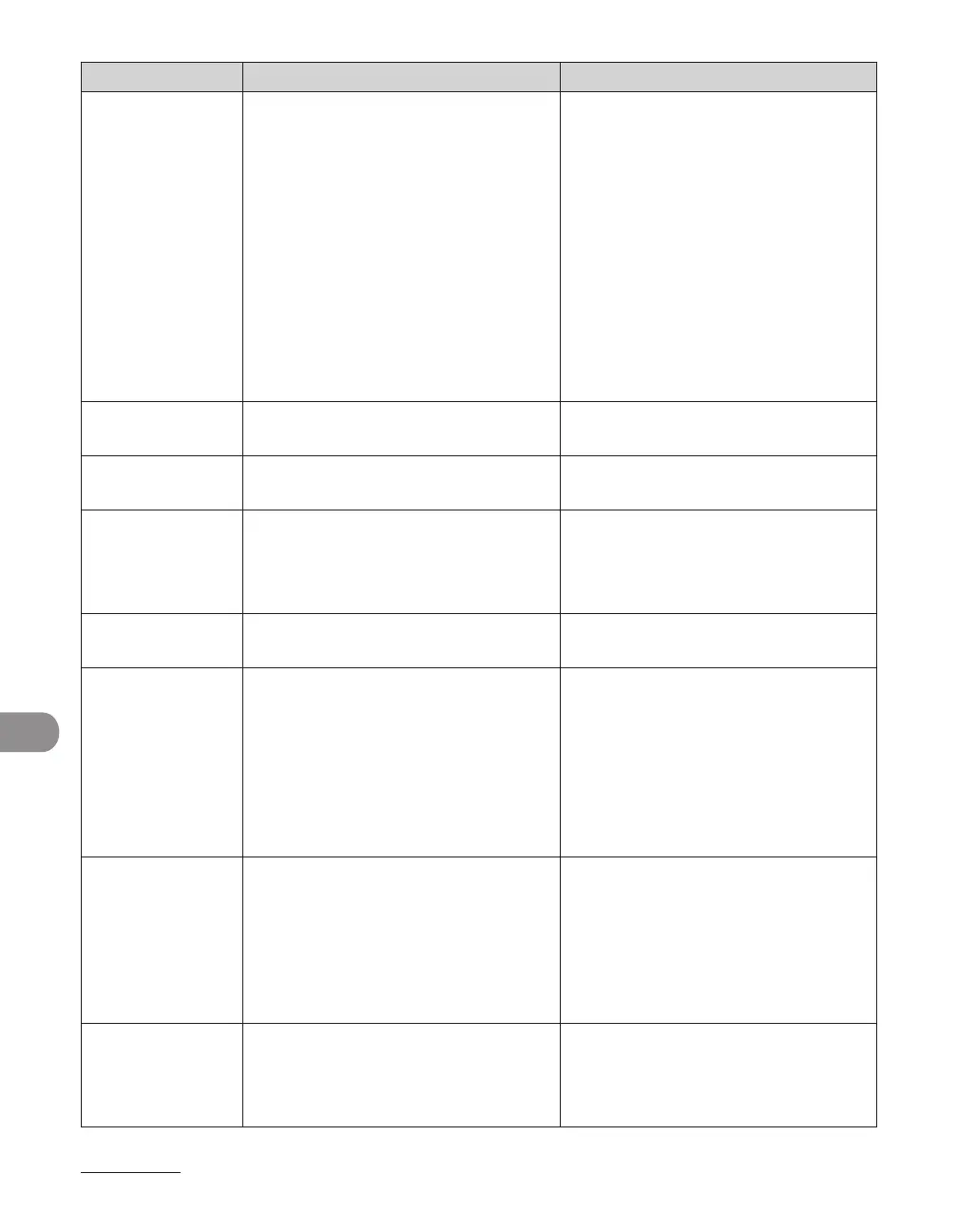
Error Code Description Action
#0005 The other fax machine did not
respond within 35 seconds.
– Send the document again. Contact
the other party and have them
check their fax machine. If you
are making an overseas call, add a
pause to the number.
–
The other party may not be using a
G3 fax machine.
– Check with the other party and
send the document to a G3 fax
machine. If the other party does
not have a G3 fax machine, try
sending your document using
a transmission mode the other
party's fax machine supports.
–
#0009 The paper has run out or the paper
cassette is not set properly.
Load the paper or reset the paper
cassette properly.
#0012 You could not send because the other
party's fax machine is out of paper.
Contact the other party and ask them
to load the paper.
#0018 There is no reply when you redial.
You could not send, because your fax
signal was not returned as the other
party's line was engaged.
Check that the other party's line is
not engaged and try again from the
beginning.
#0037 The memory is full. Print, send, or delete any documents
stored in memory.
#0703 The memory for image data is full
when sending documents.
Wait a few moments, and then try
sending again after other send jobs
are complete.
Erase documents stored in
memory. If the machine still does
not operate normally, turn the
main power OFF, and then back
ON.
–
–
#0705 The send operation was interrupted
because the size of the image data
is larger than that specified in <MAX
TX DATA SIZE> in <E-MAIL/I-FAX> in
<COMMUNICATIONS> in <SYSTEM
SETTINGS>.
Change the setting for <MAX TX
DATA SIZE> in <E-MAIL/I-FAX> in
<COMMUNICATIONS> in <SYSTEM
SETTINGS>.
Select a lower resolution.
Set <DIVIDE INTO PAGES> to <ON>
in send settings.
–
–
–
#0751 The server is not functioning. The
network is down (the server is unable
to connect to the network or was
disconnected).
Check the recipient's address.
Check that the network is up.
–
–














 To Next Page