1-3
Before Using the Machine
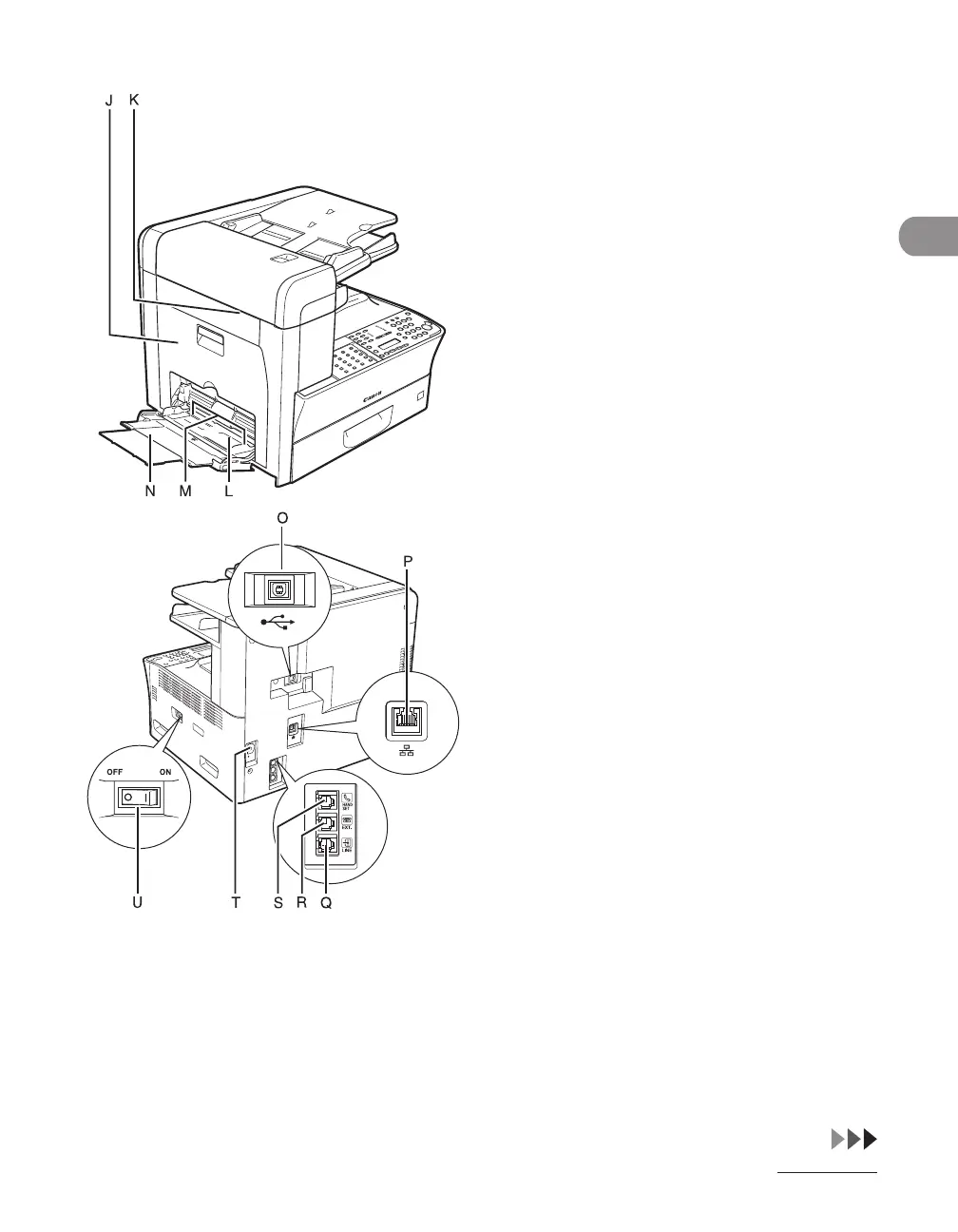
J Left cover
Open this cover when replacing the toner
cartridge or clearing paper jams.
K Scanning area
Scans documents from the ADF.
L Multi-purpose tray
Feeds non-standard size or thick/thin type
paper stacks.
M Slide guides for multi-purpose tray
Adjusts to the width of the paper.
N Multi-purpose tray extension
Pull out to load paper stack.
O USB port
Connect the USB (Universal Serial Bus) cable.
P Ethernet port
Connect the network cable.
For the LASER CLASS 810, the machine is
equipped with an Ethernet port if an optional
printer kit is attached.
Q Telephone line jack
Connect the external telephone cable.
R External device jack
Connect an external device.
S Handset jack
Connect an optional handset cable.
T Power socket
Connect the power cord.
U Main power switch
Turns the power on or off.














 To Next Page