Chapter 3ޓ
3-10
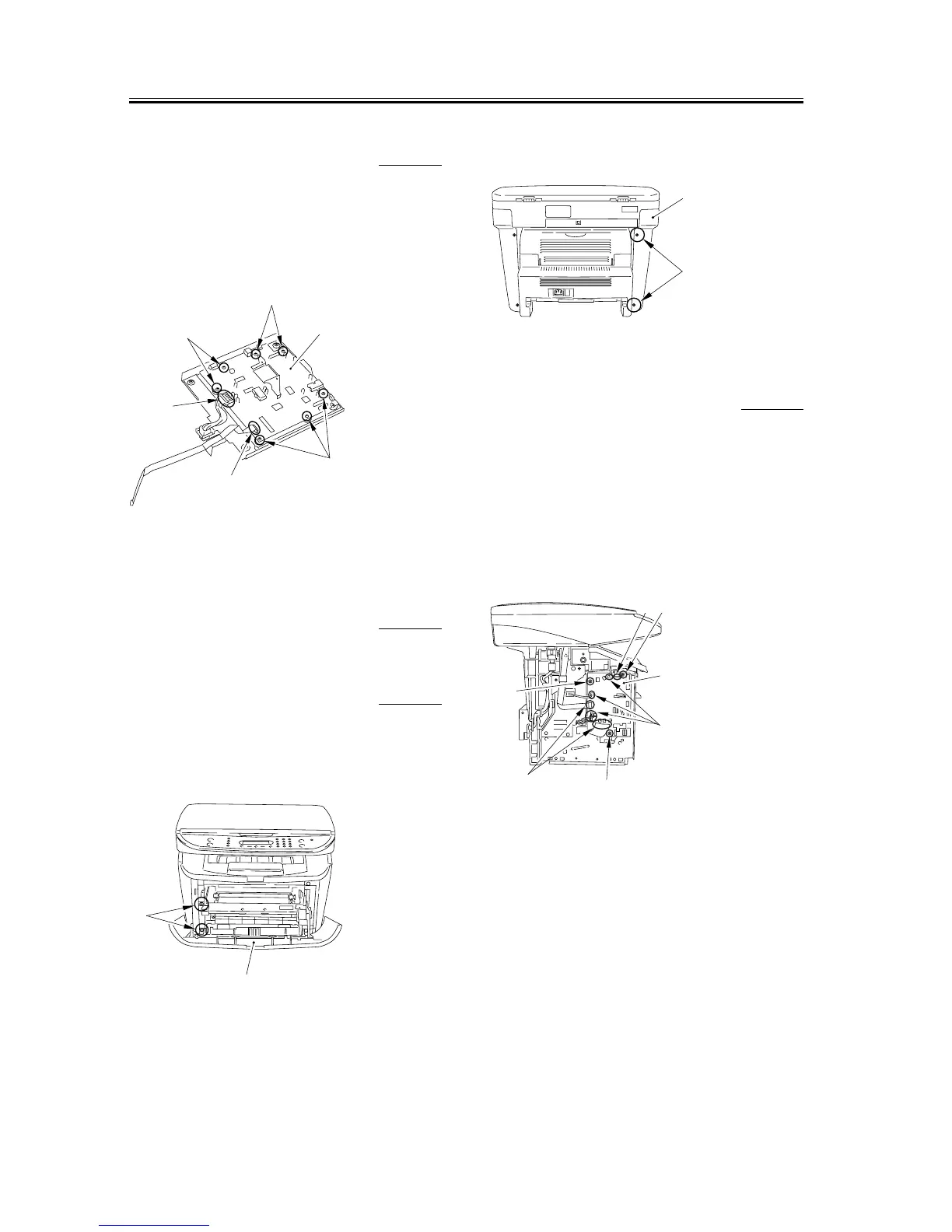
3.1.7.7 Removing the SCNT
Board
0007-7483
1) Remove the connector [1] and the flat cable [2].
2) Remove the 7 screws [3] and remove the SCNT
board [4].
F-3-39
3.1.8 ECNT Board
3.1.8.1 Removing the Cassette 0007-9905
3.1.8.2 Removing the left cover 0007-9240
1) Open the front cover [1], and remove the 2 screws
[2] on the front side.
F-3-40
2) Remove the 2 screws [1] on the back side, and
remove the left cover [2].
F-3-41
3.1.8.3 Removing the ECNT
Board
0007-9239
1) Take off the connectors at 5 spots [1] as well as the
flat cable at 3 spots [2].
2) Remove the 3 screws [3] and, while carefully
watching the sensor flag, removes the ECNT board
[4].
F-3-42
[3]
[3]
[2]
[1]
[3]
[4]
[1]
[2]
[1]
[2]
[3]
[2]
[2]
[1]
[3]
[3]
[4]










 To Next Page