Chapter 3
3-27
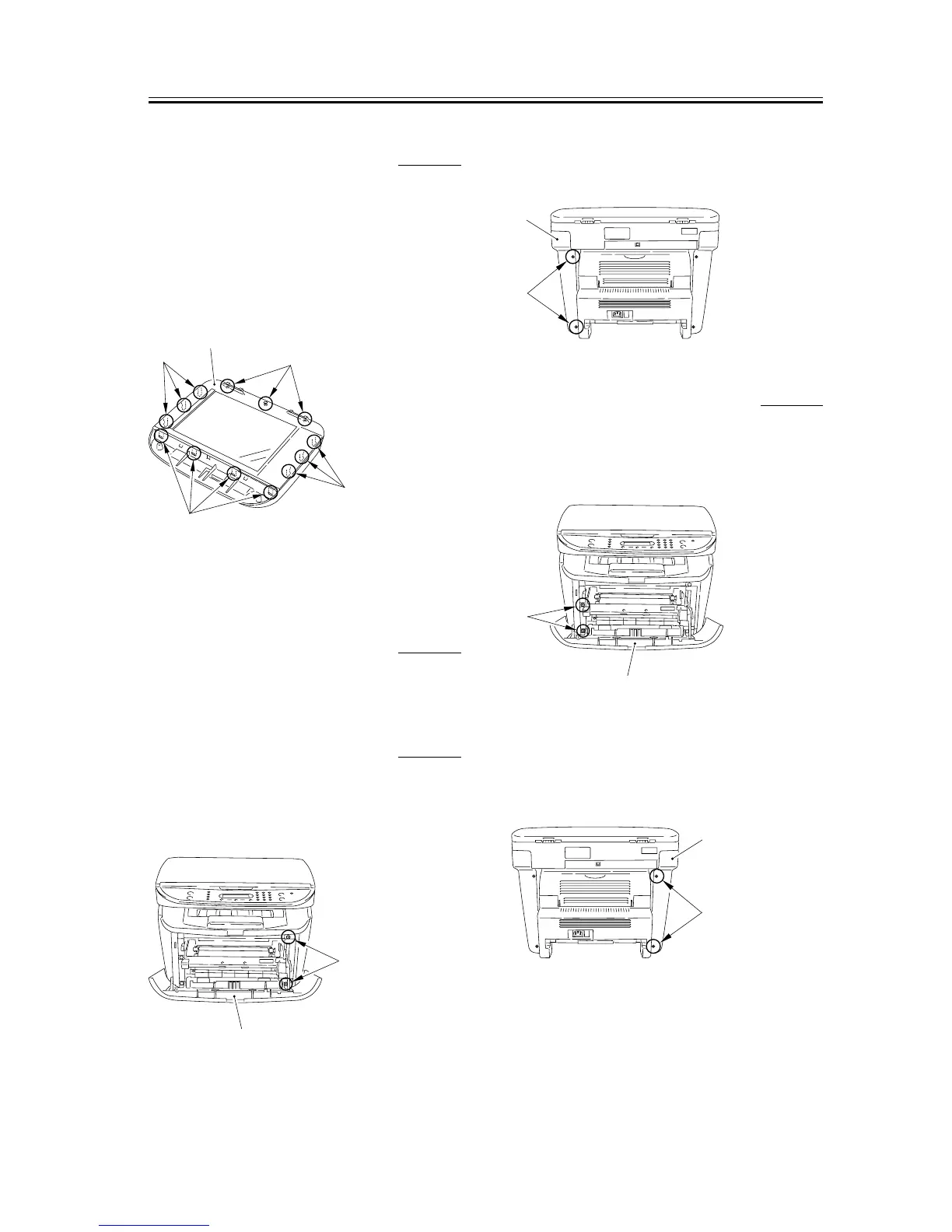
3.2.2.8 Removing the Scanner
Cover Unit
0007-7500
1) Remove the platen glass cover.
2) Remove the 3 screws [1].
3) Remove the 4 front claws [2] and the 6 claws [3] on
the right and left sides, and remove the scanner
cover unit.
F-3-108
3.2.3 CCD Unit
3.2.3.1 Removing the Cassette 0002-7747
1) Remove the cassette by holding the cassette handle.
3.2.3.2 Removing the right
cover
0007-7516
1) Open the front cover [1], and remove the 2 screws
[2] on the front side.
F-3-109
2) Remove the 2 screws [1] on the back side, and
remove the right cover [2].
F-3-110
3.2.3.3 Removing the left cover 0007-7517
1) Open the front cover [1], and remove the 2 screws
[2] on the front side.
F-3-111
2) Remove the 2 screws [1] on the back side, and
remove the left cover [2].
F-3-112
[4]
[3]
[1]
[2]
[3]
[1]
[2]
[1]
[2]
[1]
[2]
[1]
[2]










 To Next Page