Chapter 3ޓ
3-46
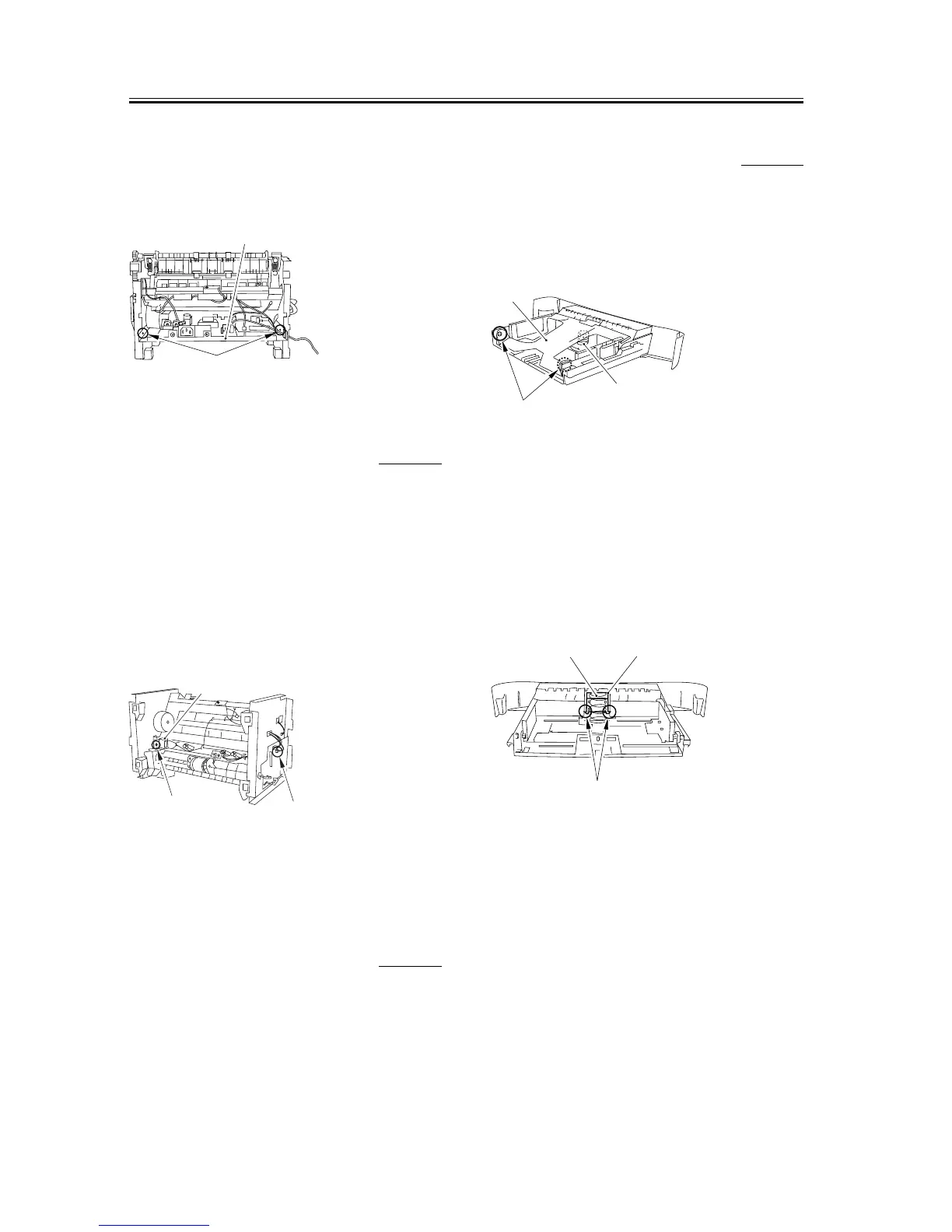
3) As you remove the bosses on both sides [1], lower
the front part of the power supply assembly [2].
Then pull it to remove the power supply assembly.
F-3-180
3.5.2.13 Removing the Cassette
Pickup Solenoid
0007-7833
1) Place the main unit down on its front face (so that
the interior of the main unit is easily visible).
2) Remove the connector [1] on the ECNT board and
take out the cable from the cable guide.
3) Remove the screw [2] to remove the cassette pickup
solenoid [3], which is located behind the main
motor.
F-3-181
3.5.3 Cassette Separation Pad
3.5.3.1 Removing the Rear of
the Cassette
0002-3783
1) Lift the rear of the cassette, and separate the rear
from the front.
3.5.3.2 Removing the Cassette
Separation Pad
0007-7881
1) Remove the shafts [1] on both sides of the lifting
plate. Remove the lifting plate [3] while watching
the lifting plate spring [2] carefully.
F-3-182
2) Remove the 2 claws [1] on both sides of the cassette
separation pad and lift it up while watching the
lifting plate spring [2] carefully. Ensure that the
separation pad spring does not get lost.
3) Remove both the plate and the cassette separation
pad [3] by sliding them to the left.
F-3-183
[1]
[2]
[1]
[2]
[3]
[2]
[3]
[1]
[1]
[3]
[2]










 To Next Page