Battery Cell Insulation Tester 11210 User’s Manual
5-34
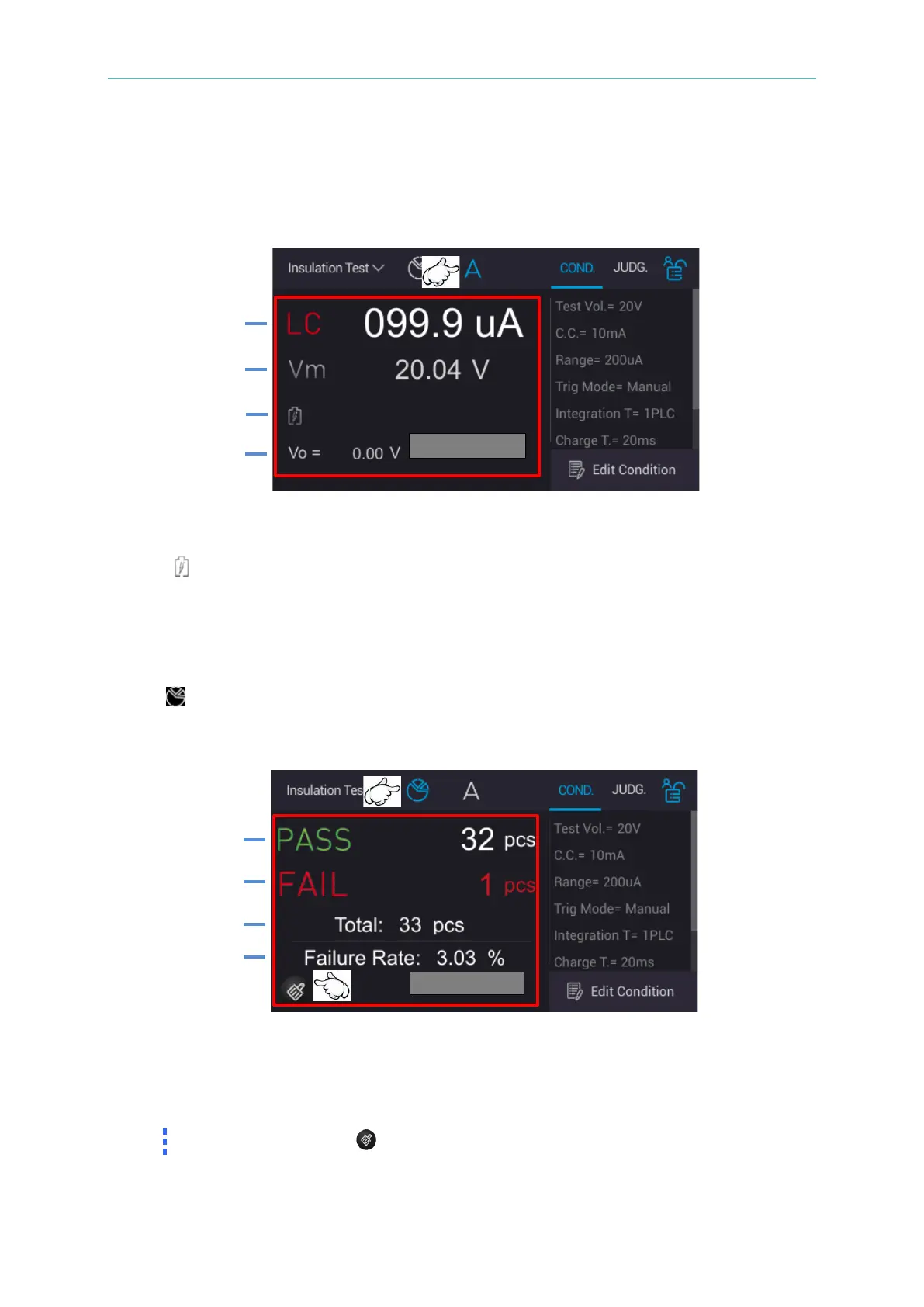
5.3.8.2 Single Execution Result
Select “A (Single Execution Measurement)” on measurement screen and press green START
button on the panel. The display area at the lower side shows measurement procedure and
test result at this time after the measurement is done.
1. L
C/IR: Leakage current/insulation resistance measurement val
ue
2. Vm:
Measurement voltage value for Test Time phase
3. : It displays the current measurement for Charge/Dwell/Measure phase.
4. Vo: It displays real time voltage.
5.3.8.3 Statistical Information Result
Touch “ PIE icon (statistical information)” menu after the main screen is measured and
press green START button on the panel. The display area at the lower side shows “PASS” and
“FAIL” total accumulated count after the measurement is done.
1. P
ASS: DUT “good product” accumulated count
2. FAIL: DUT “no good product” accumulated count
3. Total: It displays the test completed DUT total count.
4. Failure Rate: It displays DUT’s failure rate.
Long press for 1 second : All statistical counts are zeroed.



 To Next Page