Get ting St ar t e d
Getting to Know the NSS 300 Series Smart Storage
Cisco Small Business NSS 322, NSS 324, and NSS 326 Smart Storage Administration Guide 13
2
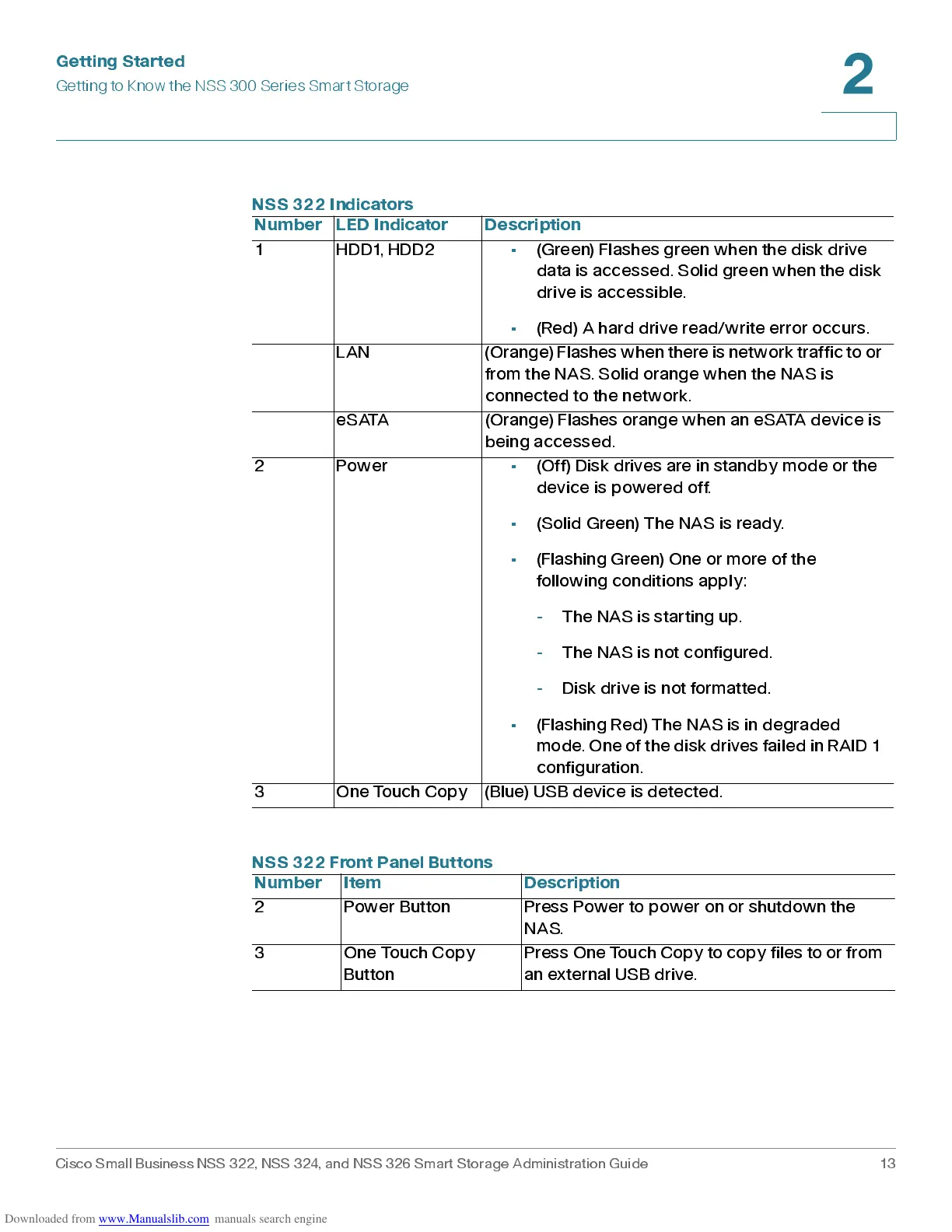
NSS 322 Indicators
Numb er LED In di cator De s cri ption
1 HDD1, HDD2 • (Green) Flashes green wh en the disk dr ive
data is accessed. Solid green when the disk
drive is accessible.
• (Red) A hard drive read/w r ite error occur s .
LAN (Orange) Flashes whe n there is network traffic t o or
from the NAS. Solid orange when the NAS is
connected to the network.
eSATA (Orange) Flashes orange when an eSATA device is
being accessed.
2 Power • (Off) Disk drives are in standby mode or the
device is powered off.
• (Solid Green) The NAS is ready.
• (Flashing Green) One or more of the
following conditions apply:
- The NAS is starting up.
- The NAS is not configured.
- Disk dr ive is not format ted.
• (Flashing Red) The NAS is in degraded
mode. One of the disk drives f ailed in RAID 1
configuration.
3 One Touch Copy (Blue) USB device is detected.
NSS 322 Front Panel Buttons
Number Item Description
2 Power But ton Pres s Power to power on or shutdown the
NAS.
3 One Touch Copy
Button
Press One Touch Copy t o copy fil es t o or from
an external US B dr ive.



 To Next Page