InteliLite
NT
AMF26-P, SW version 2.4, ©ComAp – January 2016 125
AMF26-P-2.4 Reference Guide.pdf
Operator Interface AMF
1
2
3
4
5
6
7
8
9
10
11
12 13 14
15
16
19
17
18
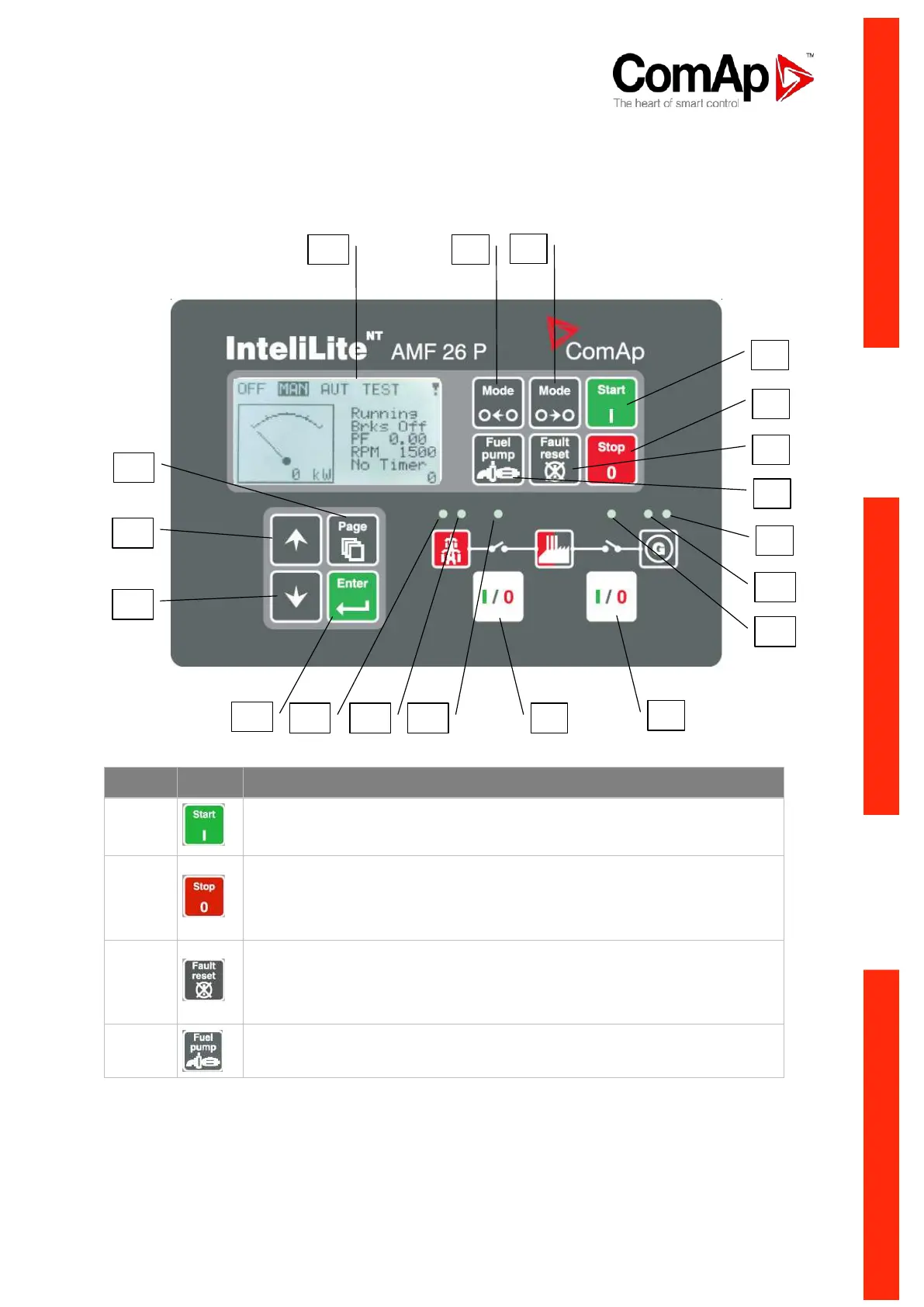
GEN-SET CONTROL BUTTONS
START button. Works in MAN mode only. Press this button to initiate the
start sequence of the engine.
STOP button. Works in MAN mode only. Press this button to initiate the stop
sequence of the gen-set. Repeated pressing or holding the button for more
than 2s will cancel current phase of stop sequence (like cooling) and next
phase will continue.
FAULT RESET button. Use this button to deactivate the horn output (1
st
press) and acknowledge alarms (2
nd
press). Inactive alarms will disappear
immediately and status of active alarms will be changed to "confirmed" so
they will disappear as soon as their reasons dismiss.
FUEL PUMP button. While this button is pressed FUEL PUMP is activated
until Fuel Pump OFF level is reached.












 To Next Page