InteliLite
NT
AMF26-P, SW version 2.4, ©ComAp – January 2016 150
AMF26-P-2.4 Reference Guide.pdf
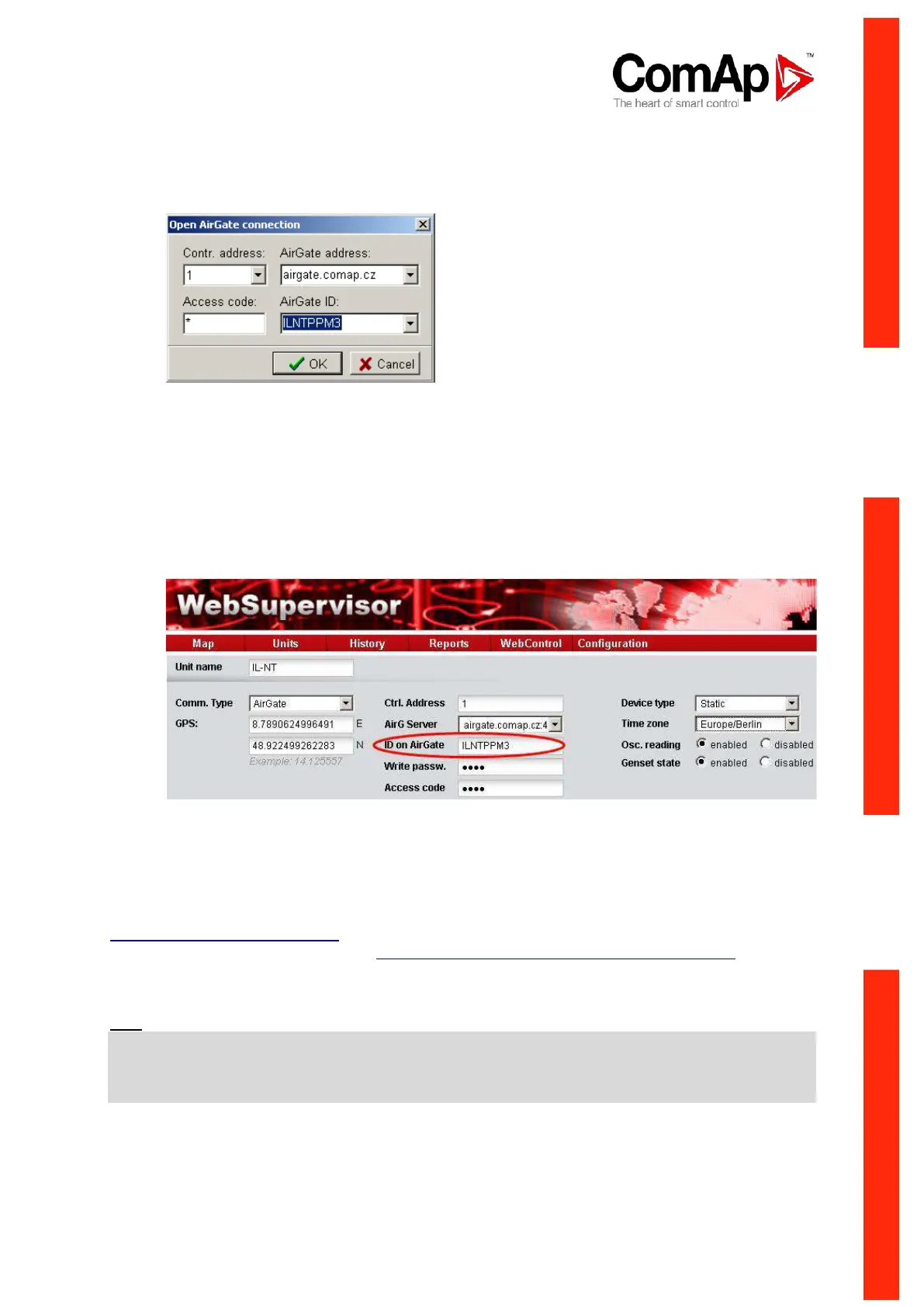
Once this AirGate ID is displayed, connection via AirGate was succesfull. This value will be
needed for LiteEdit or WebSupervisor connection. Kindly make a note for future reference.
AirGate Connection dialog in LiteEdit:
Add new gen-set dialog in WebSupervisor:
Should you encounter any troubles with connection, check the faultcodes on the same screen and find
detailed description in Diagnostic codes listed lower.
12. Open LiteEdit PC software or enter your WebSupervisor account at
http://websupervisor.comap.cz
Hint: For opening a new WebSupervisor account kindly send e-mail to
admin.websupervisor@comap.cz your Name, Login name, E-mail address and Timezone. We will
create free account for you. Details at: http://www.comap.cz/products/detail/WebSupervisor
Communication is now ready for use.
Hint:
To reduce the data traffic over GPRS network you can set in setpoint group „Comms Settings“
the parameter „AirGate IP“ = 80.95.108.26. This will save significant data amount needed for
translation of Airgate server IP address. In case of changing the server IP address this settings has to
be updated or returned to default „airgate.comap.cz“.












 To Next Page