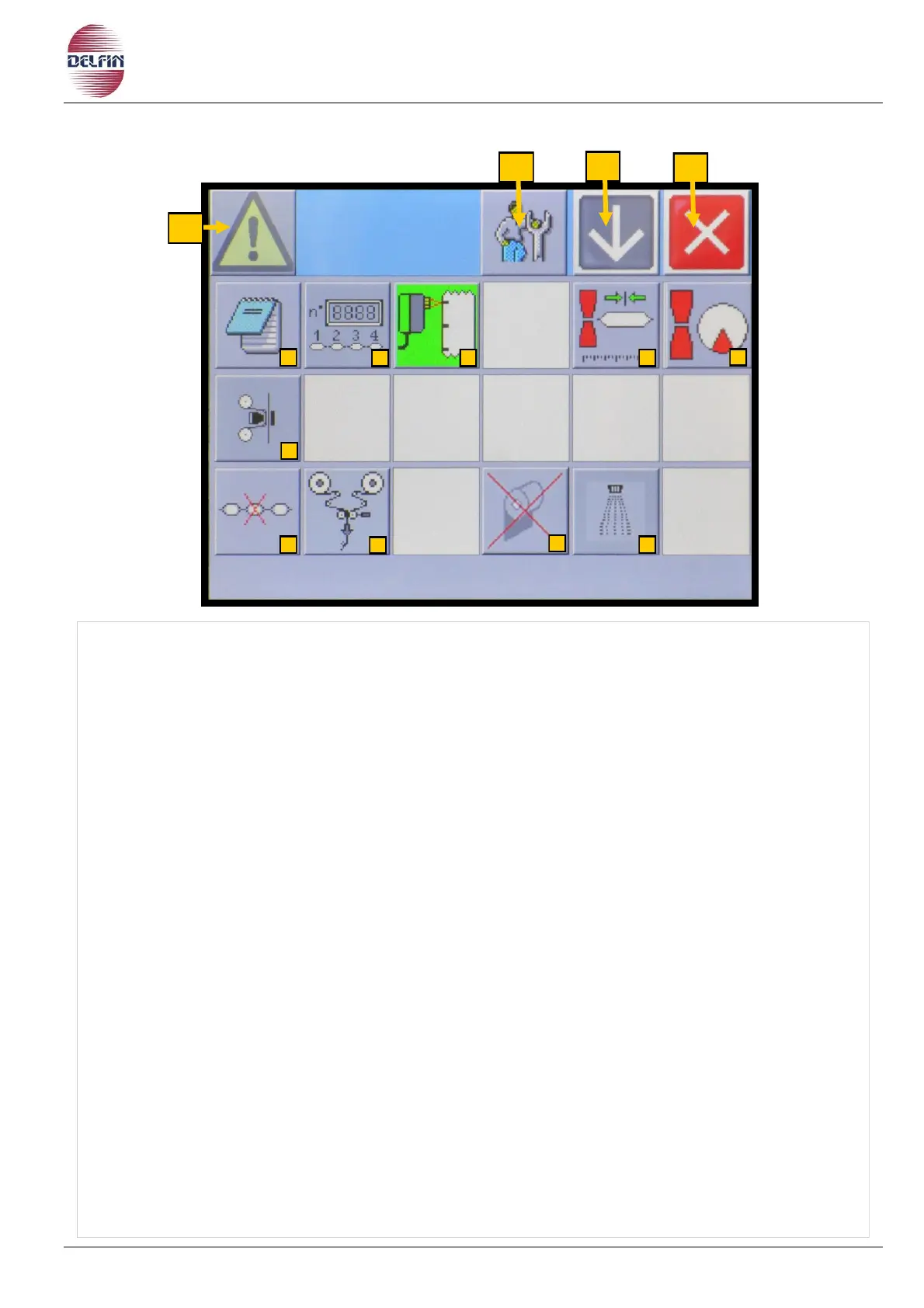
1) Button position 1 to go to page with list of alarms. If an alarm is active the colour of
the triangle will be yellow.
3) Button position 3 is reserved exclusively for the specialized technical personnel.
4) Button position 4 is to go the next page.
5) Button position 5 is to close this page.
6) Button position 6 is to pass to the page block notes.
7) Button position 7 is to pass to the page product counter.
8) Button position 8 is to pass to the page photocell for print registered film (optional).
10) Button position 10 is to pass to the page for the timing procedure of the product with
respect to the transversal sealing unit.
11) Button position 11 is to pass to the page for transversal sealing unit slowdown
control.
12) Button position 12 is to pass to the page of the printer (optional).
18) Button to enter the No product no bag page (optional).
19) Button to enter the automatic junction page (optional).
21) ON/OFF button for the film ending control (optional).
22) Button to enter the gusseting page (optional).


 To Next Page