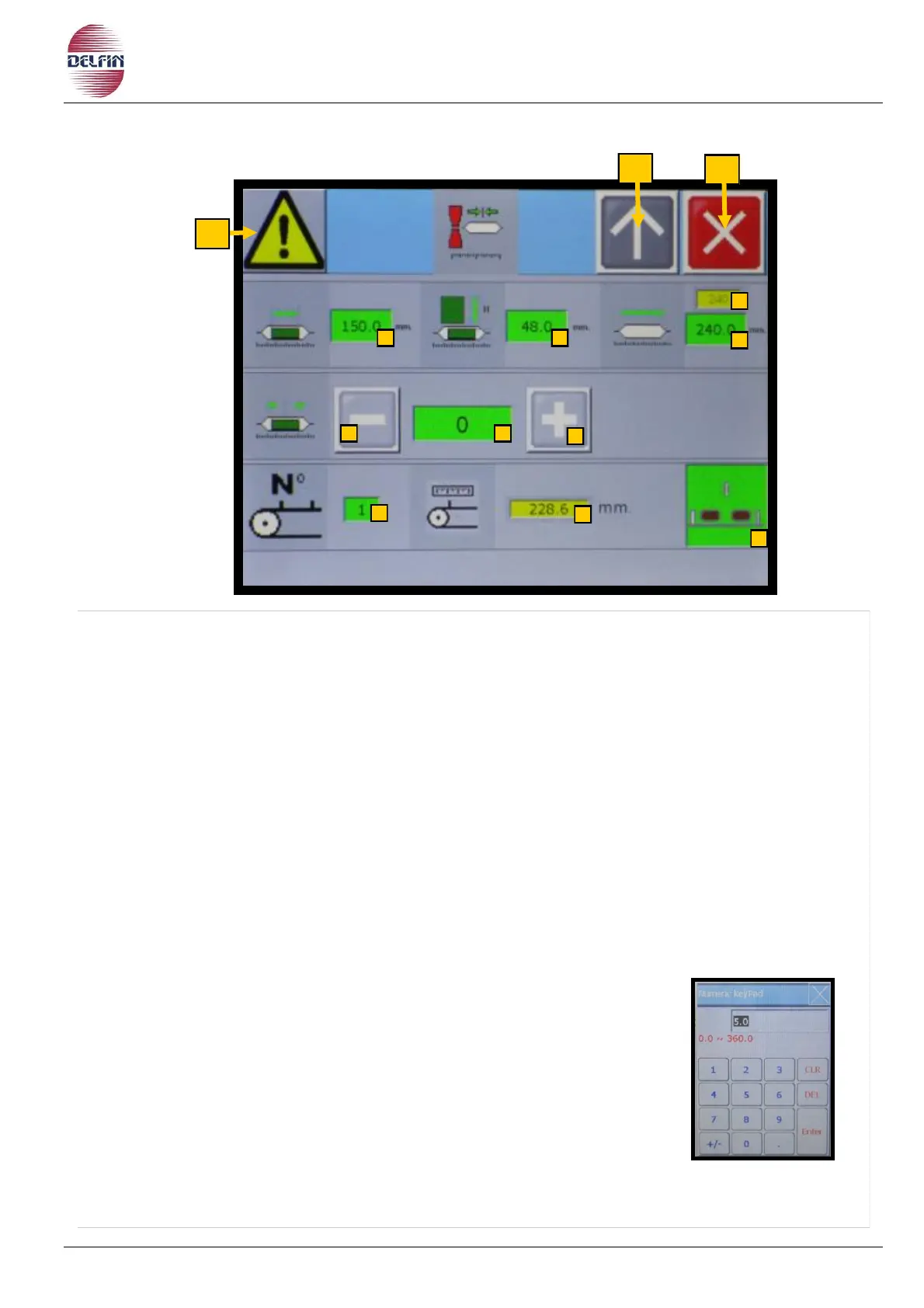
1) Button position 1 to go to page with list of alarms. If an alarm is active the colour of the
triangle will be yellow.
2)
Button position 2 to go back to the previous page
3) Button position 3 to close this page.
4) Button to impose the product length.
5) Button to impose bag height.
6) Button to impose the bag length.
6A) Window to visualize the recommended value for the bag length.
7-8) When pressing these buttons the product will remain further back or go nearer, in
respect to the jaw closing position (product phasing position).
9) Button to impose the value of the product phasing position.
10) Button to choose the infeed conveyor pitch (distance form pusher to pusher).
N.B. Before changing the pitch on the touch screen manually change the distance
from pusher to pusher on the infeed conveyor.
To choose the desired pitch proceed as follows:
Press the button.
Open the numeric table and digit the pitch number 1-2 or 3.
Press Enter to confirm.
11) Window to visualize the value in mm of the pitch chosen
with the previous button 10.
12) Button ON/OFF infeed conveyor step controller.


 To Next Page