Pag 96 / 154
Manuale Lyra 600 sx elettr eng
13 Setting to work the photocell group
Adjustment of the photocell head reading contrast
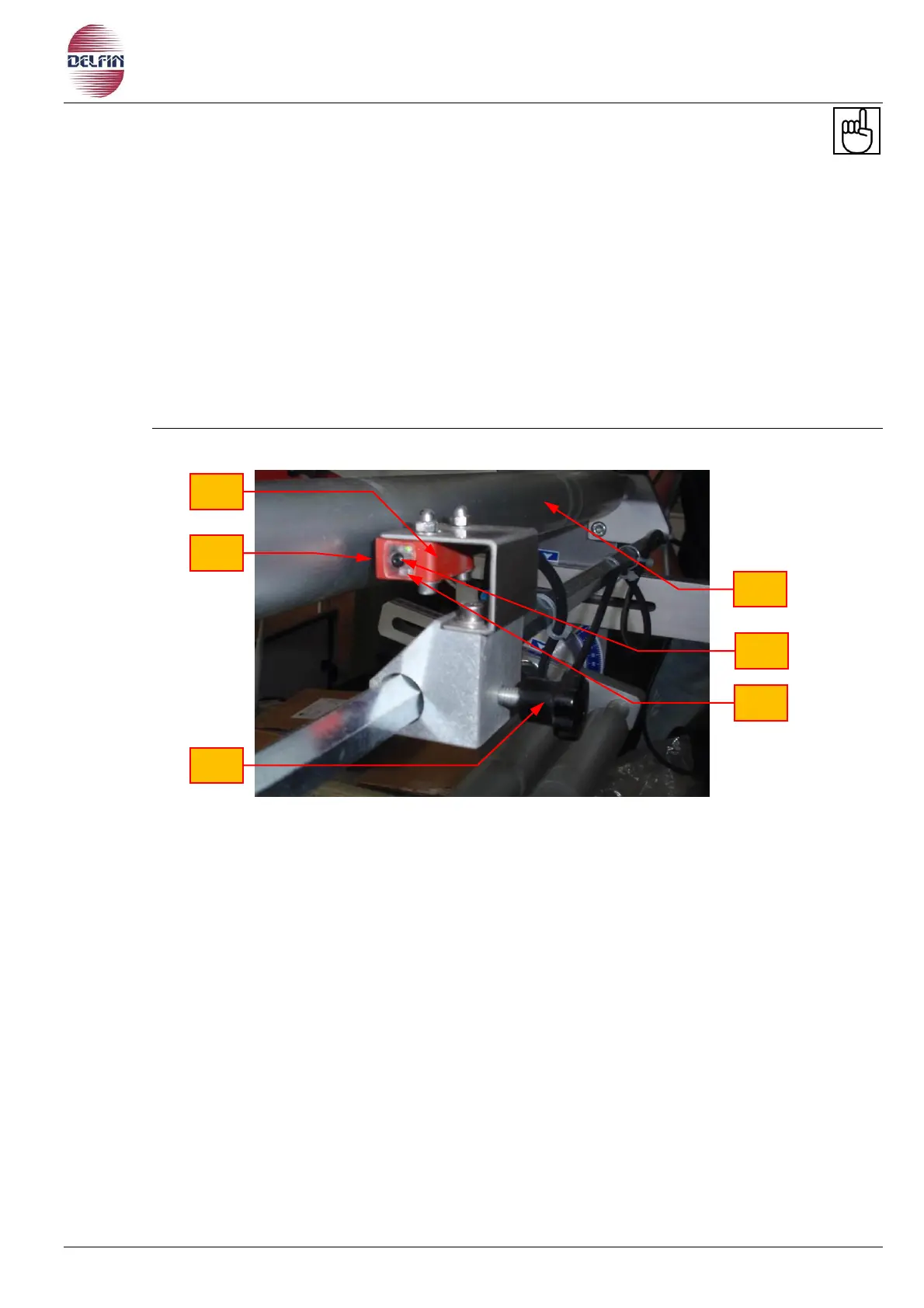
a) Switch on the photocell through its selector. Check that the head (Fig. 13.1 pos.1) located
on the roller conveyor is in working order and that the projector light (Fig. 13.1 pos. 3) is
located exactly above the film spots, adjusting the head by turning the handwheel (Fig.
13.1 pos. 2), if necessary.
b) To configure the photocell with the film, set the background of the film between the roller
(Fig. 13.1 pos. 6) and the projector of the photocell and perform a long press on the
button (Fig. 13.1 pos. 4). Will begin to blink an orange LED (Fig. 13.1 pos. 5), wait a few
seconds. Place a spot of the film between the roller and the projector and run a quick
press on the button (4 fig. 13.1). The photocell is now configured. The orange LED will
light when the film pass through the spot.
Fig. 13.1 Photocell head


 To Next Page