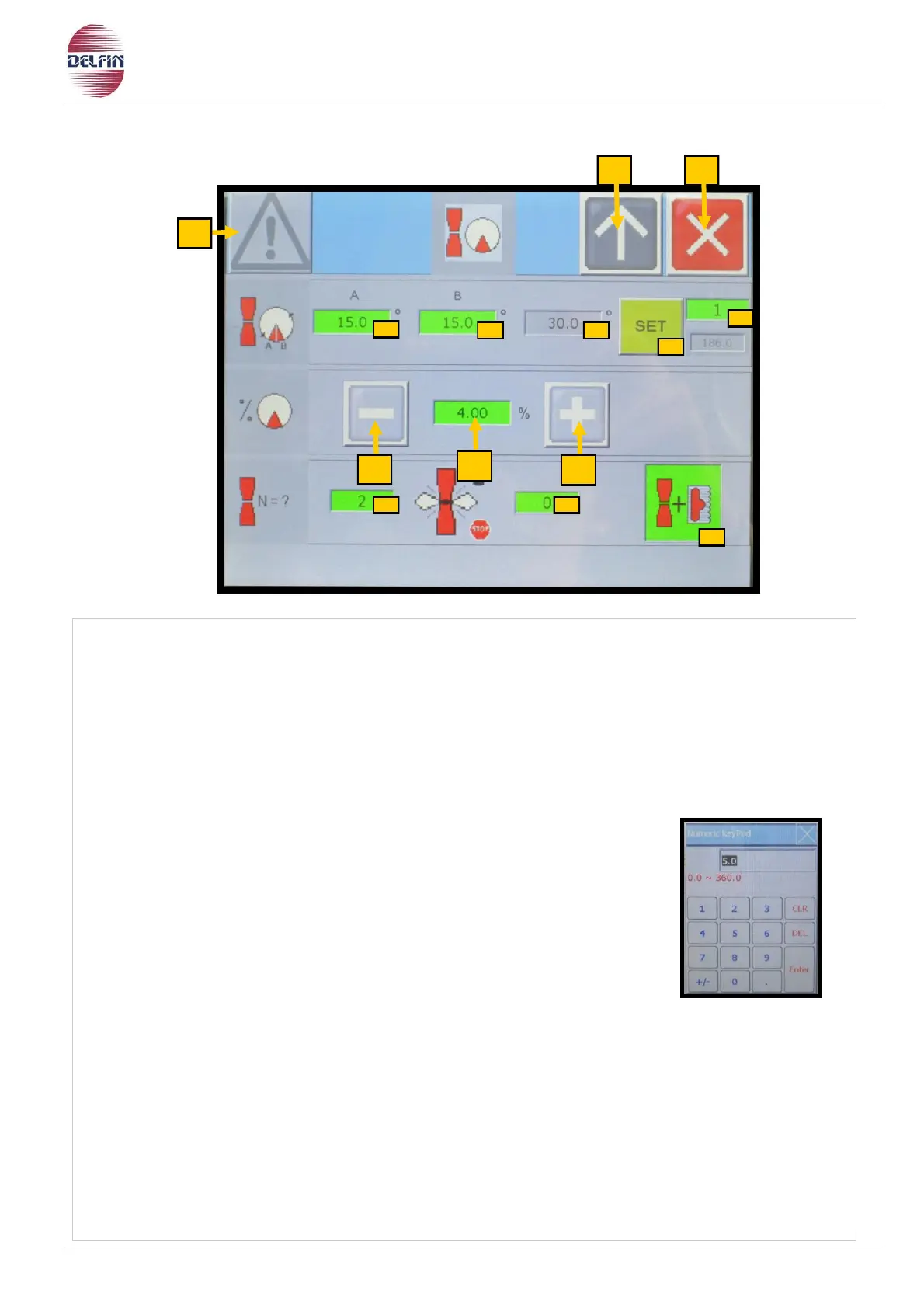
1) Button position 1 to go to page with list of alarms. If an alarm is active the colour of the
triangle will be yellow.
2)
Button position 2 to go back to the previous page
.
3) Button to close the block notes page.
4A) Slowdown on the first stretch.
4B) Slowdown on the second stretch.
4) This box shows how wide the total slowdown is.
5) This box shows the slowdown speed during the sealing process.
If you set 0, the speed will be the same as that.
To set the desired value, follow this procedure:
press the desired button.
use the numeric keypad displayed to key in the desired value.
press Enter to confirm.
Note: The maximum value which can be set is 50.
6-7) Buttons to adjust the slowdown speed of one unit.
8) Button to set the number of jaws, the machine is working with (optional)
9) Button to set the number of discarded bags if the jaws jam.
10) ON/OFF button:
GREEN= to work with the euroslot hole
GRAY= to work without euroslot hole
11) Button to confirm the number of jaws, the machine is working with.
12) Button to set the machine once the number of jaws has been confirmed.


 To Next Page