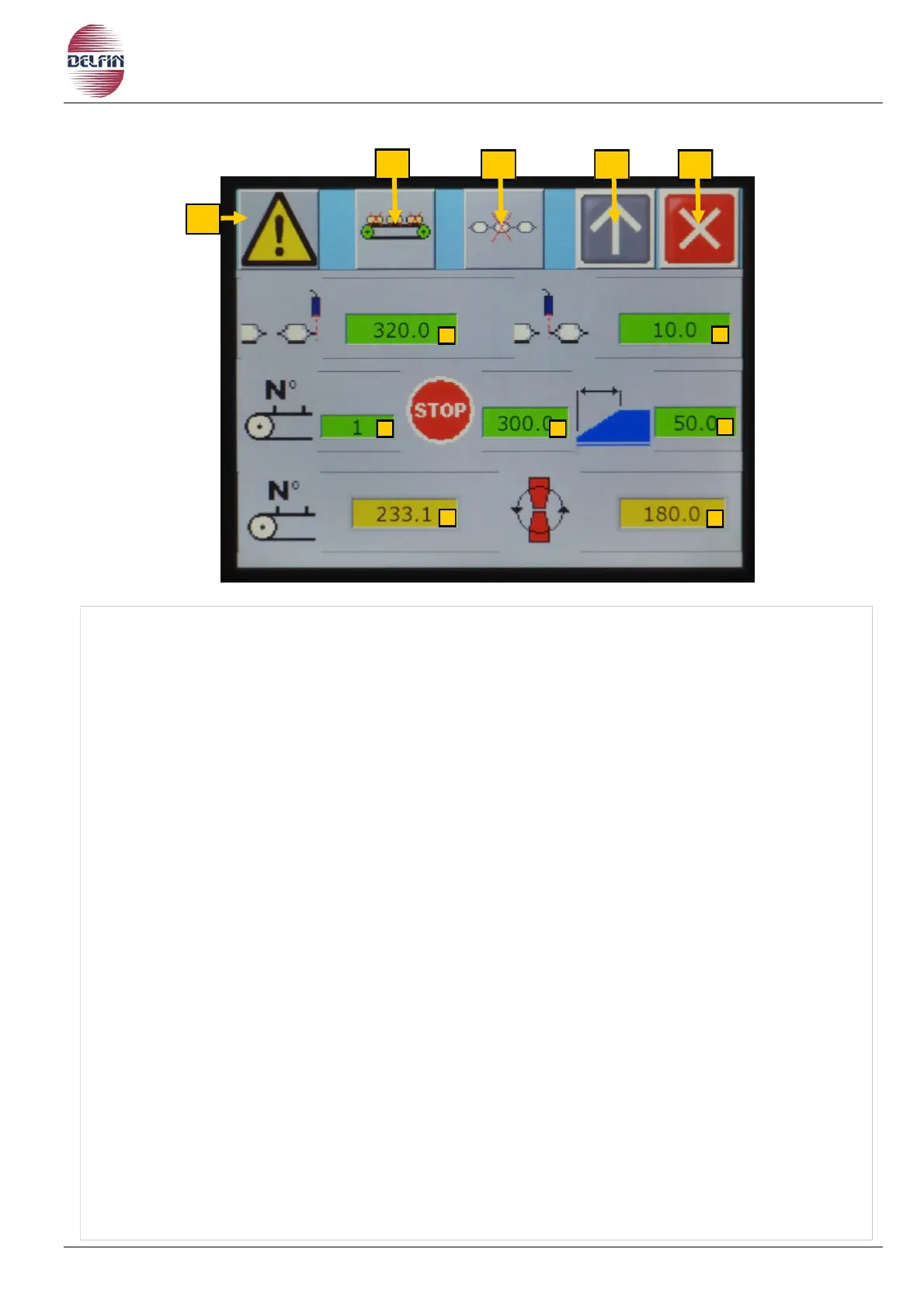
1) Button to go to the alarm page.
In the presence of an active alarm the colour of the triangle button is yellow.
2) ON / OFF of the no product no bag. Green button = ON, Gray button = OFF.
3) Button to return to the previous page.
4) Button to close this page.
5) Start position to control the product presents on the infeed conveyor, in cam degrees.
6) End position of product control on the infeed conveyor, in cam degrees.
7) Number of steps before start the machine running (number of steps without product).
8) Stop position of the machine to bring forward more or less the product (between the
infeed conveyor and fin wheels), in cam degrees.
9) Setting the promptness of the "no product no bag" operations.
10) Display the product presence on the infeed conveyor, in cam degrees.
11) Display the position, in cam degrees, of the transversal cut-seal unit.
12) Button to discharge the machine.
To enter the desired value, proceed as follows:
• Press the green key of interest.
• A numeric keypad appears, type the desired data.
• Confirm with Enter.


 To Next Page