Pag 99 / 154
Manuale Lyra 600 sx elettr eng
PHOTOCELL FOR PRINT-REGISTERED FILM
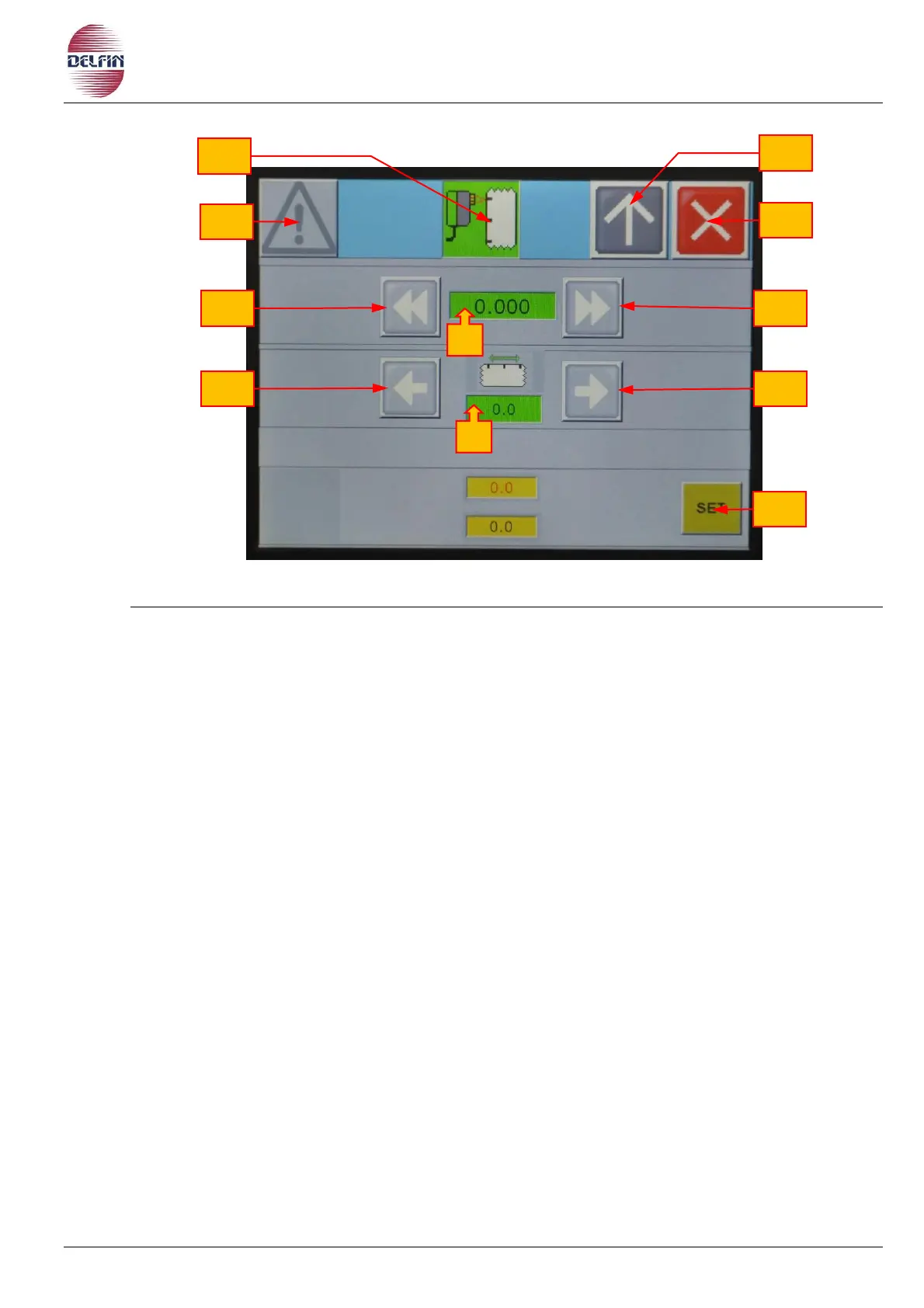
f) Button position 1 to go to page with list of alarms. If an alarm is active the colour of the
triangle will be yellow.
g) Button to switch ON/OFF photocell for print-registered film.
h) When the button is green = ON, when it is grey = OFF.
i) Button to go to previous page.
j) Button to close the page photocell for print-registered film.
If the cutting position is for example 30 mm. away from the desired position proceed as
follows:
Press the button position 5
A numerical table will appear, now digit 30
Press ENT to confirm.
k) By pressing the button position 6 the notch on the film will advance of 30 mm.
l) By pressing the button position 7 the notch on the film will retrieve of 30 mm.
m) If you press button position 8, the notch will move forwards of 1 mm.
n) If you press button position 9, the notch will retrieve of 1 mm.
To exit press button position 4
o) By pressing the button position 10 film move up to film black print mark and after slops
to the setting value (11).


 To Next Page