354 Scanning
FILE LOCATION: C:\Users\fxstdpc-
admin\Desktop\0630_UG??\Mioga_AIO_UG_FM\Mioga_AIO_UG_FM\section19.fm
DELL CONFIDENTIAL – PRELIMINARY 9/13/10 - FOR PROOF ONLY
folder name: John
You should now see
MyShare\MyPic\John
in your directory.
For Microsoft Windows XP Professional:
1
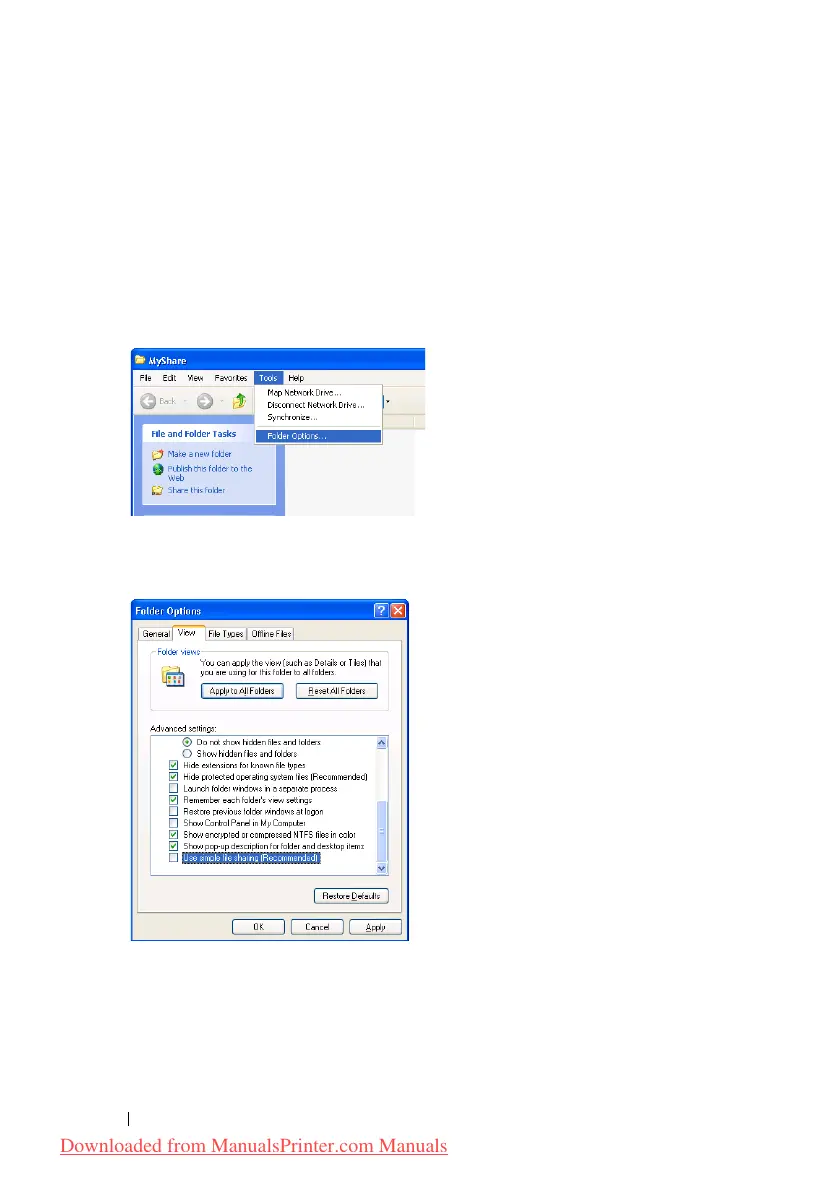
Create a folder in the desired directory on your computer (Example of folder
name,
MyShare
) and double-click the folder.
2
Select
Folder Options
from
Tools
.
3
Click
View
tab, and then deselect the check box of
Use simple file sharing
(Recommended)
.
4
Click
OK
.
5
Right-click the folder, and then select
Properties
.
The
Properties
dialog box appears.
6
Select the
Sharing
tab, and then select
Share this folder
.
Downloaded from ManualsPrinter.com Manuals











 To Next Page