User's Guide
- 107 -
Paper menu
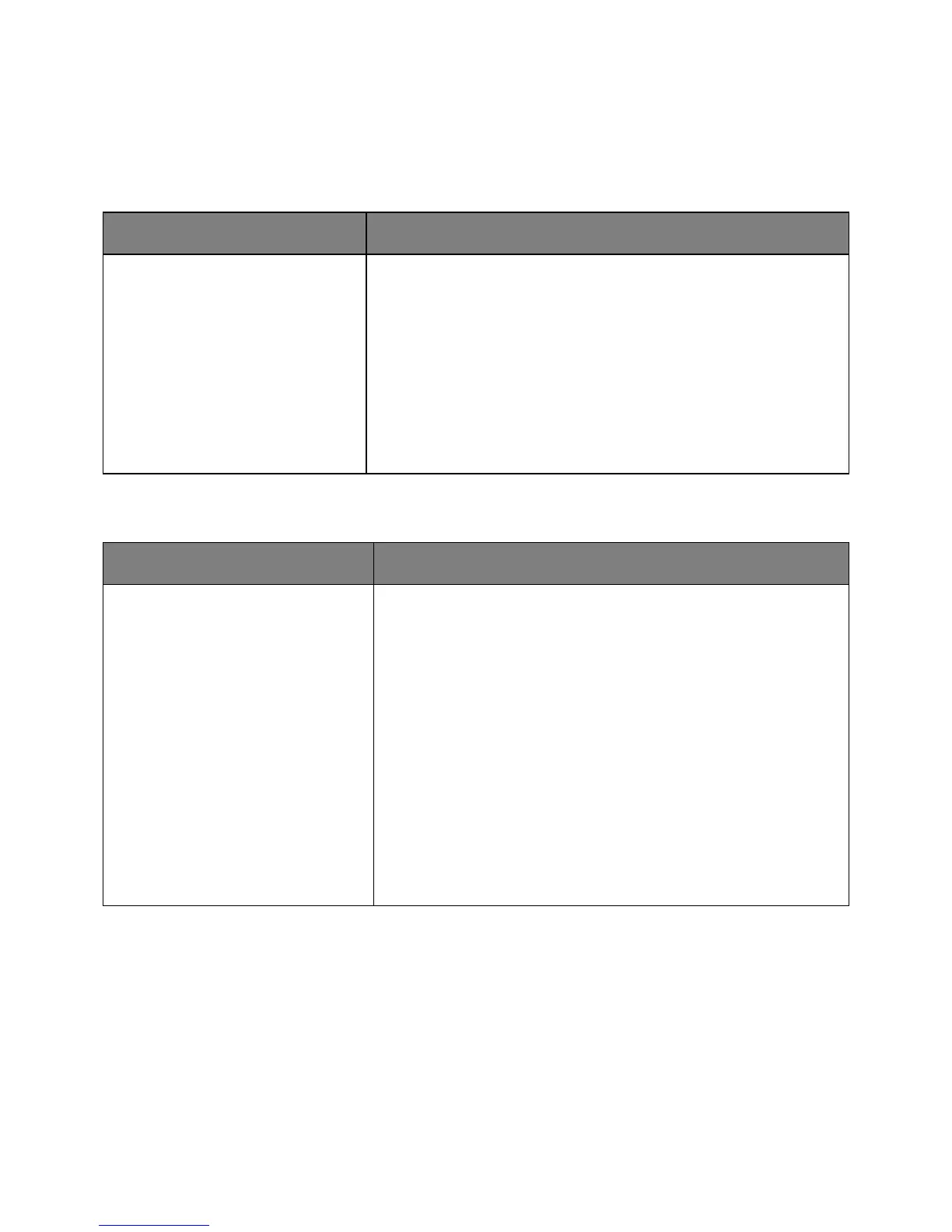
Default Source menu
Tray [x]
MP Feeder
Manual Paper
Manual Envelope
Set a default paper source for all print jobs.
Notes:
• Tray 1 (standard tray) is the factory default setting.
• From the Paper menu, set Configure MP to “Cassette” for MP Feeder
to appear as a menu setting.
• If the same size and type of paper are in two trays and the paper size
and paper type settings match, then the trays are automatically linked.
When one tray is empty, the print job continues using the linked tray.
Paper Size/Type menu
Use To
A4
A5
A6
JIS B5
Letter
Legal
Executive
Oficio (Mexico)
Folio
Statement
Universal
Specify the size of the paper loaded in each tray.
Notes:
• A4 is the factory default setting.
• If the same size and type of paper are loaded in two trays and the
tray settings for paper size and type match, then the trays are
automatically linked. The multipurpose feeder may also be linked.
When one tray is empty, the job prints using paper from the linked
tray.
• A6 is supported only in Tray 1 and in the multipurpose feeder.



 To Next Page