User's Guide
- 88 -
• If you need two phone ports for your devices, but do not want to pay additional cost, then do not plug
the printer into the second phone port. You can use a phone splitter. Plug the phone splitter into the
port labeled Phone Line 1 or Phone Port, and then plug the printer and telephone into the splitter.
Note: Make sure you use a phone splitter, not a line splitter. To make sure that you are using the
correct splitter, plug an analog telephone into the splitter and then listen for a dial tone.
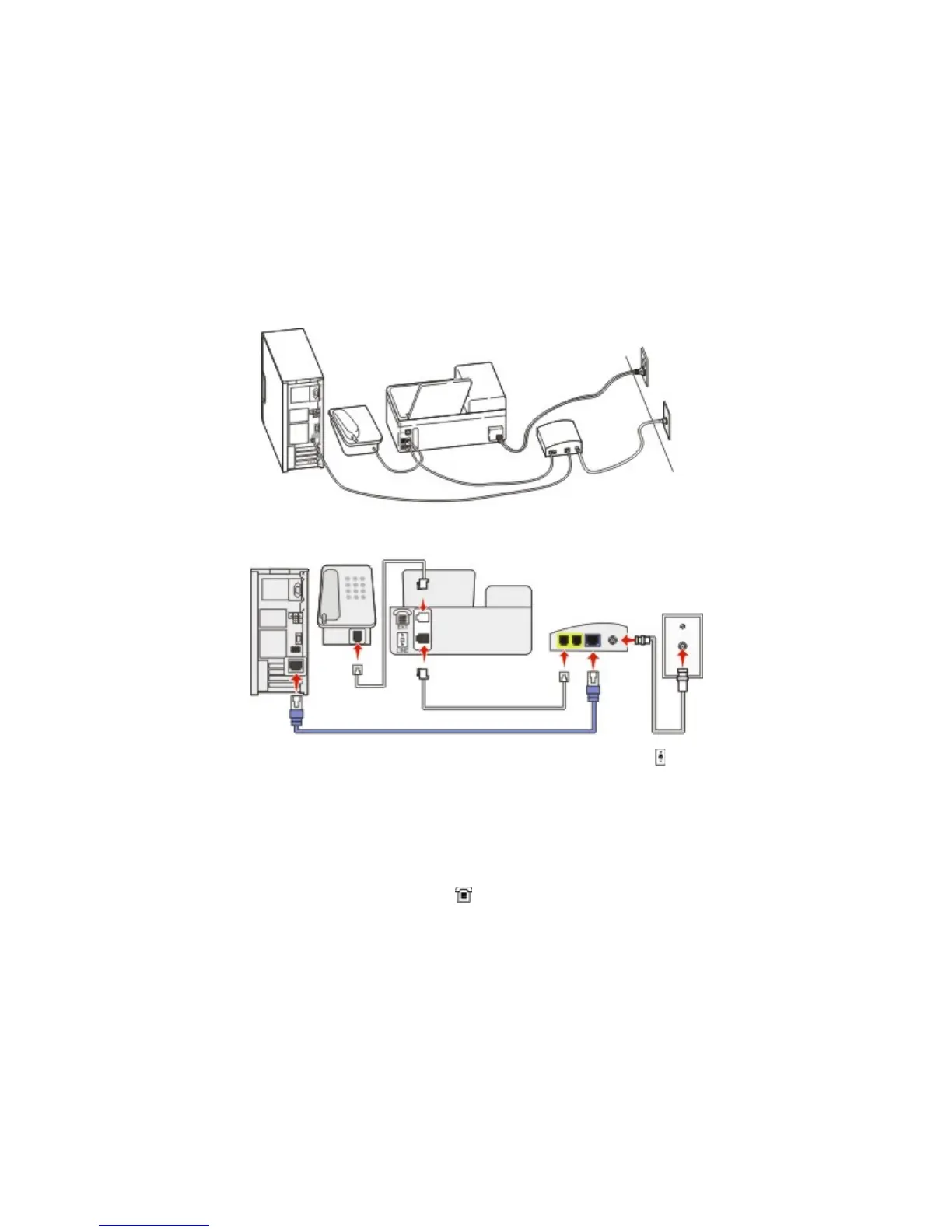
Scenario 4: Digital telephone service through a cable provider
Setup 1: Printer is connected directly to a cable modem
1. Connect one end of the telephone cable that came with your printer to the
port of the printer.
2. Connect the other end of the cable to the port labeled Phone Line 1 or Phone Port on the cable
modem.
Note: The port labeled Phone Line 2 or Fax Port is not always active. VoIP providers may charge
additional cost for activation of the second phone port.
3. Connect your analog telephone phone to the
port of the printer.
Notes:
• To make sure that the telephone port on the cable modem is active, plug an analog telephone into the
telephone port, and then listen for a dial tone. If you hear a dial tone, then the port is active.
• If you need two telephone ports for your devices, but do not want to pay additional cost, then do not
plug the printer into the second telephone port. You can use a phone splitter. Plug the phone splitter
into the Phone Line 1 or Phone Port, and then plug the printer and telephone into the splitter.
• Make sure you use a phone splitter, not a line splitter. To make sure that you are using the correct
splitter, plug an analog telephone into the splitter and then listen for a dial tone.



 To Next Page