BACnet MS/TP Communication Data Bus Fundamentals
128 ECLYPSE User Guide
Table 11-8: Recommended Numbering Scheme for MAC Addresses, Instance
Numbers, and Network Numbers
ECY Series Controller BACnet/IP Device Instance
Numbers: Multiples of 10 000
BACnet MS/TP Network Number: ECY Series
Controller BACnet/IP Device Instance Number/1000 +
0,1,2,3,4 (for each LAN)
BACnet MS/TP Device Instance Number =
ECY Series Controller BACnet MS/TP Network
Number * 1000 + MAC Address
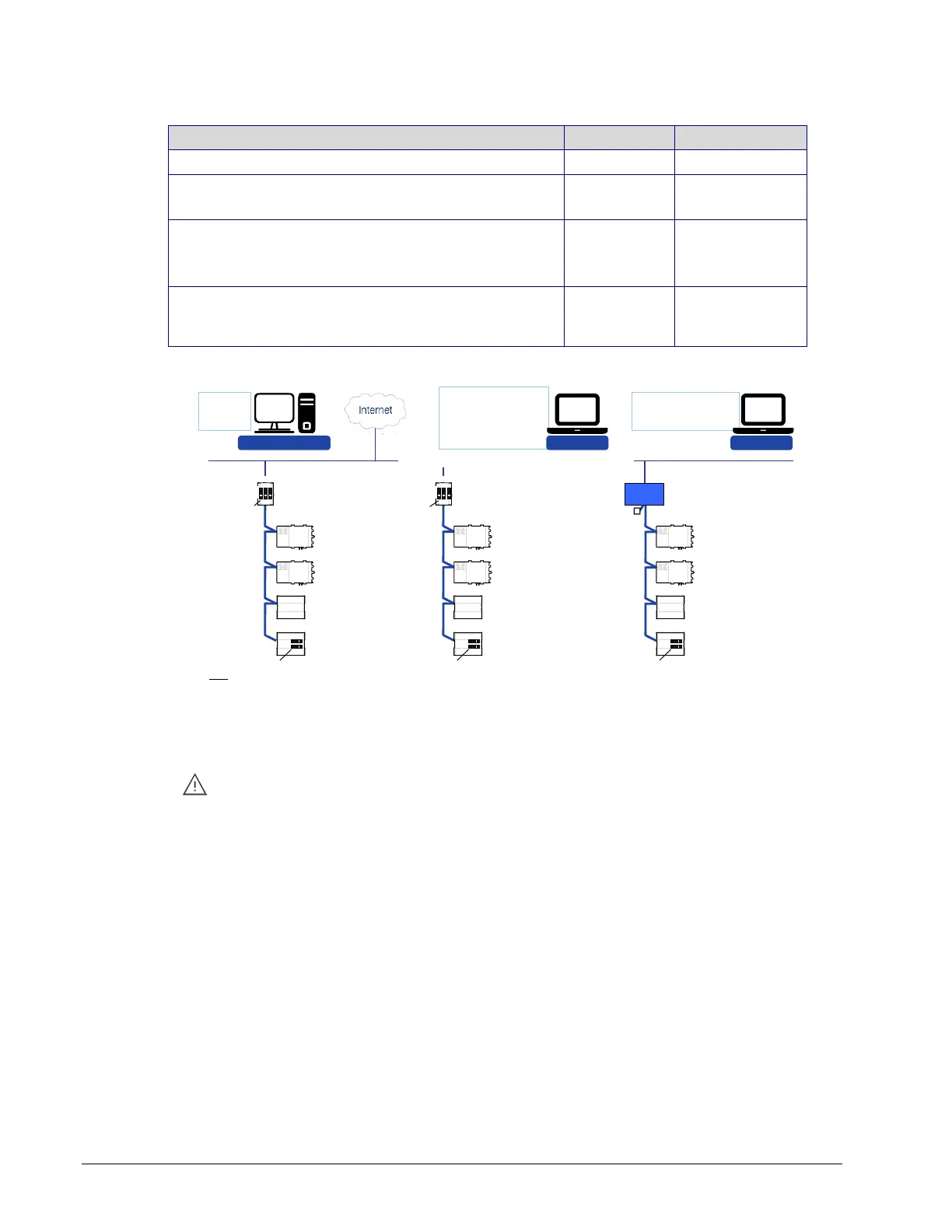
An example of this numbering system is shown below.
- Alarm
- Trend Log
- Schedule
EC-Net
AX
Supervisor
- Data Bus Management
- Data Bus Integration
- Device Configuration and
programming
- Graphical Interface
Configuration
EC-Net
AX
Pro Web Browser
- User Interface
- Remote Access
- Embedded EC-Net
AX
Pro
MAC: 3
DI: 20 003
MAC: 4
DI: 20 004
MAC: 5
DI: 20 005
MAC: 6
DI: 20 006
DI: 20 000
EC-BOS MAC on Network # 20 = 0
MS/TP
Network # 11
MAC: 3
DI: 10 003
MAC: 4
DI: 10 004
MAC: 5
DI: 10 005
MAC: 6
DI: 10 006
IP Network # 1
MS/TP
Network # 10
EOL Terminator
MAC: 3
DI: 30 003
MAC: 4
DI: 30 004
MAC: 5
DI: 30 005
MAC: 6
DI: 30 006
IP Network # 1
DI: 30 000
EC-BOS MAC on Network # 30 = 0
MS/TP
Network # 20
Ethernet, TCP/IP, BACnet/IP, LONWORKS IP, XML, HTTP, oBIX
DI: 10 000
EC-BOS MAC on
Network # 10 = 0
BACnet
Router
KEY:
DI: Device Instance
EOL: End of Line
MAC: Media Access Control
EOL Internally Set EOL Internally Set EOL Internally Set
EOL
ON
EOL
ON
EOL
ON
ECY Series ECY Series
EOL
ON
EOL
ON
EOL Internally
Set
EOL Internally
Set
Figure 11-16: BACnet MS/TP Numbering System for MAC Addresses, Device
Instance Numbers, and Network Numbers
When discovering devices with EC-Net
AX
which has the routing option configured,
it will discover all BACnet devices connected to all ECY Series Controllers when
routing is enabled (see Routing on page 78). Make sure to add only the devices
connected to the MS/TP port of the specific ECY Series Controller being
configured. Using this numbering system will greatly help to identify those devices
that should be added to a given ECY Series Controller.
Setting the ECY Series Controller’s MAC Address
The ECY Series Controller’s MAC address can be set in BACnet Settings of the ECLYPSE
Web Interface on page 67.



 To Next Page