First Time Connection to an ECLYPSE Controller
ECLYPSE User Guide 53
Connecting to the Controller
When connecting to the controller for the first time, the goal is to gain access to the controller
so that you can configure it to work in its future network environment. To do so, you must
connect the controller to form a network.
An ECLYPSE Network Configuration Tool is available that allows you to discover all ECY
Series controllers connected to an IP network’s subnetwork and to perform a range of
operations on many controllers at once: you can set each controller’s Hostname and IP
address, launch EC-gfxProgram to program the controller, or you can access the controller’s
Web interface. It is a software application that runs on a PC that is connected to the same
subnetwork as the controllers. See the ECLYPSE Network Configuration Tool User Guide
for more information.
ECY Series Controller configuration can also be made through the controller’s configuration
Web interface that is accessed through the ECLYPSE Network Configuration Tool. This Web
interface is used to set all the controller’s configuration parameters including the controller’s
IP address according to your network planning. See ECLYPSE Web Interface on page 67.
There are two networking methods connect to a controller:
Wired (Ethernet connection) with a PC. See Ethernet Network Connection on page 54.
Wireless (when the ECLYPSE Wi-Fi Adapter is connected to the controller) with a PC.
See Wi-Fi Network Connection on page 57.
Once you have connected the controller(s) to a network, configure the controller. See
Configuring the Controller on page 58.
Controller Identification
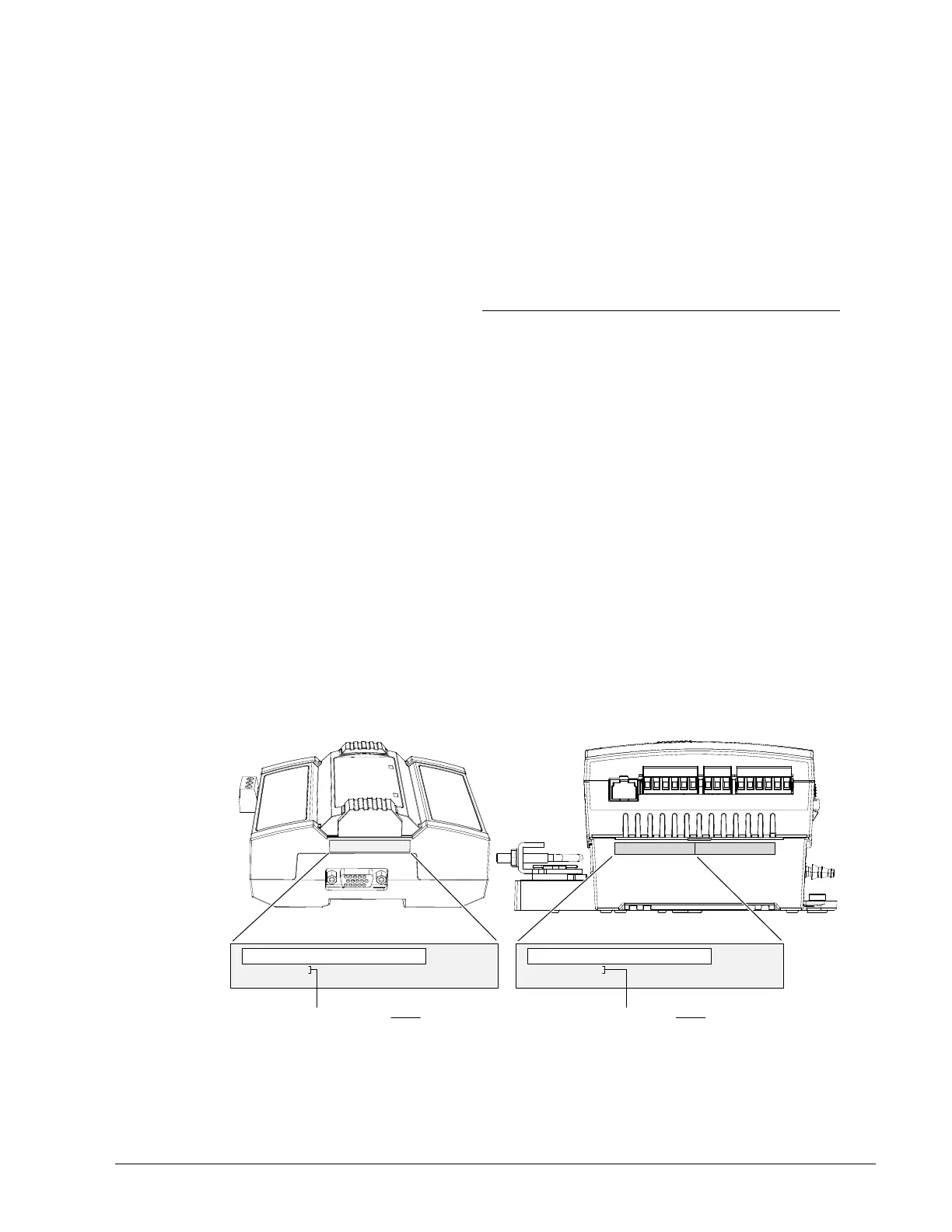
Controllers are uniquely identified on the network by their MAC address. This identifier is
printed on a label located on the side of the controller and another is on the controller’s box.
Get a printed copy of the building’s floor plan. During controller installation, peel the MAC
address sticker off of the controller’s box and put it on the floor plan where the controller has
been installed.
This MAC address is used as part of the controller’s factory-default Wi-Fi access point name
and its hostname.
Bar Code
MAC: MAC Address
Model: ECY-VAVXXXX
For example, for a MAC Address of : 76:a5:04:cd:4a:d1
The factory-default name for the Wi-Fi access point is ECLYPSE-CD4AD1
The factory-default hostname is eclypse-cd4ad1.local
Label
Bar Code
ID: MAC Address
Model: ECY-S1000
For example, for a MAC Address of : 76:a5:04:cd:4a:d1
The factory-default name for the Wi-Fi access point is ECLYPSE-CD4AD1
The factory-default hostname is eclypse-cd4ad1.local
Label
Figure 6-1: Finding the Controller’s MAC Address



 To Next Page