First Time Connection to an ECLYPSE Controller
54 ECLYPSE User Guide
Ethernet Network Connection
Depending on the controller model, the way the controller is connected to the network will
change according to whether the controller is a Power over Ethernet (PoE) model or not.
For non-PoE controller models, see Network Connections for ECY-VAV and ECY-S1000
Model Controllers on page 54.
For the ECY-VAV-PoE controller, see Network Connections for ECY-VAV-PoE Model
Controllers on page 55.
See also Connecting IP Devices to an IP Network for network wiring considerations on page
31.
Network Connections for ECY-VAV and ECY-S1000 Model
Controllers
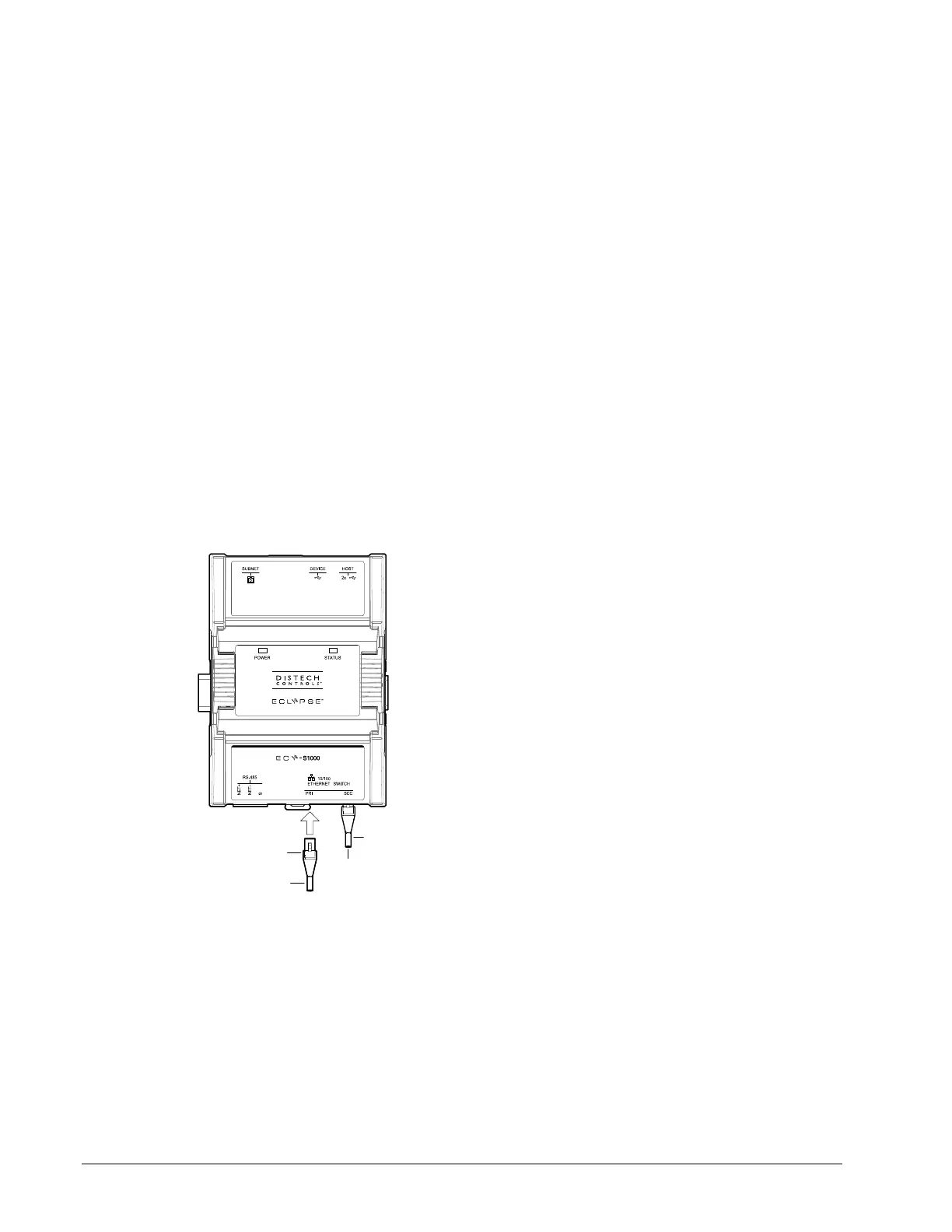
Connect the controller to the network as follows:
1. Connect your PC’s network card to the controller’s PRI Ethernet port using a Category
5e Ethernet cable.
If you are commissioning more than one controller, connect the controllers and PC to a
network switch. Two or more controllers can be connected to the network by daisy-
chaining them together by using Cat 5e network Cables to connect the Ethernet Switch
Sec(ondary) connector of one controller to the Ethernet Switch Pri(mary) connector of
the next controller.
To Router /
Next Device
To Next
Device
RJ-45
Connector
Cat 5e
Network
Cable
Figure 6-2: ECY-S1000 Wired Network Connection: Cat 5e Cables with RJ-45
Connectors are used



 To Next Page