Connecting IP Devices to an IP Network
ECLYPSE User Guide 45
Wi-Fi Client Connection Mode
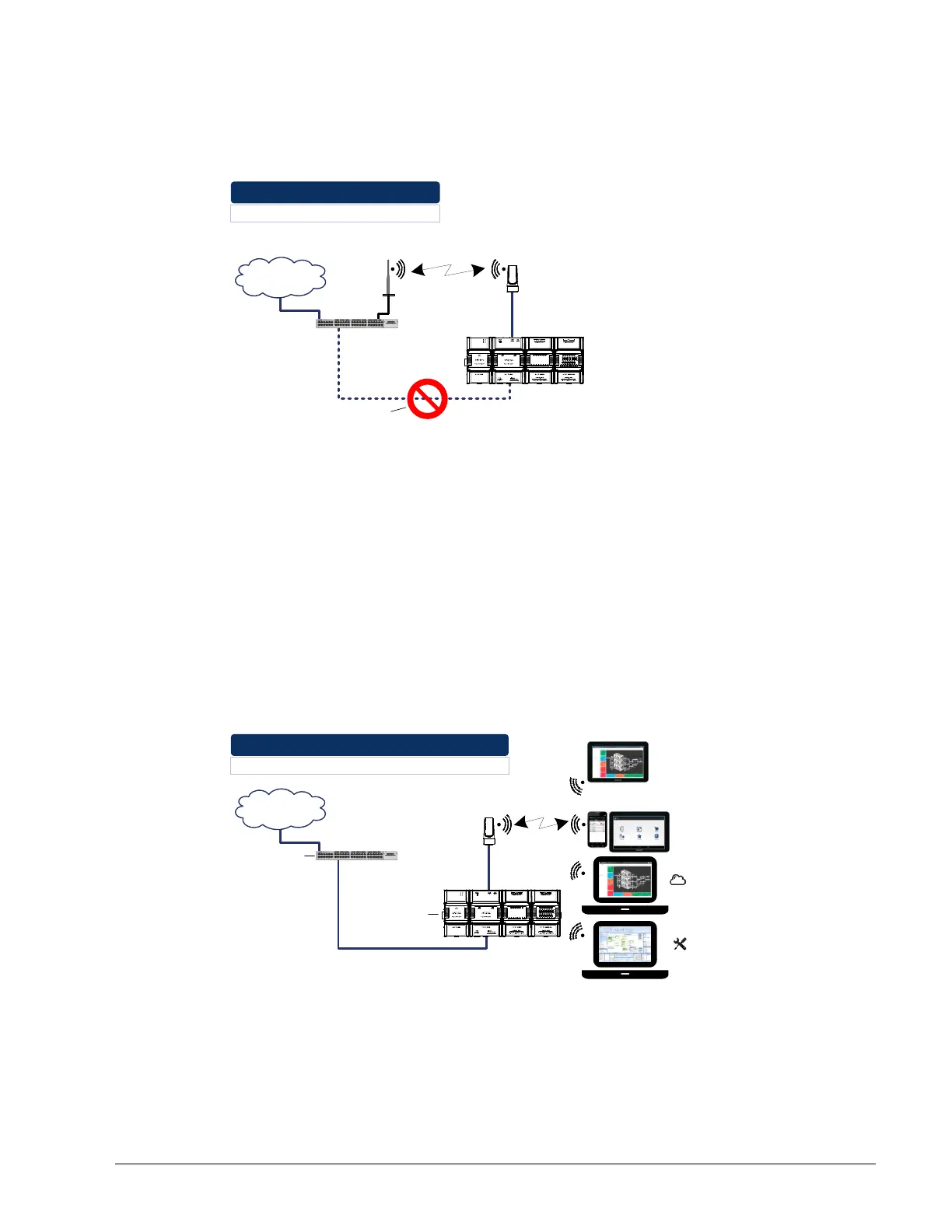
Cut installation costs by leveraging existing wireless infrastructure by eliminating the need
for Ethernet cables. This architecture is characterized by the point-to-point connection
between an access point and a client-controller.
Wireless Router
Interconnection Through Wi-Fi
Router
Internet
Leverage Existing Wireless Infrastructure:
Use Wi-Fi to Eliminate Ethernet Cables
Eliminate Ethernet Cables
Figure 5-18: Leveraging Existing Wireless Infrastructure by Eliminating Ethernet
Cables
To configure the Wi-Fi client connection mode, see Setting up a Wi-Fi Client Wireless
Network on page 97.
Wi-Fi Access Point
Should there be no available access point; an ECLYPSE controller can be configured as a
wired-to-wireless bridge to create an access point which can provide Wi-Fi access to other
Wi-Fi enabled clients. This access point operates off of the same subnetwork and has the
same IP connectivity that the controller has with its wired network connection. The
ECLYPSE Wi-Fi adapter can also be temporarily added to an ECLYPSE controller for
wireless commissioning purposes. A variety of software applications are available for system
monitoring and override, commissioning, configuration and programming. To configure the
Wi-Fi access point connection mode, see Setting up a Wi-Fi Access Point Wireless Network
on page 98.
Router
Internet
Wi-Fi Access Point:
Use the Controller to Provide Wi-Fi Access to other Wireless Devices
Web Browser
Programming Tool
myDC Control
Wireless Access Point
Wired-to-
Wireless Bridge
DHCP Server
Figure 5-19: Using an ECLYPSE Controller Create an Access Point



 To Next Page