Subnetwork Installation Guidelines
ECLYPSE User Guide 141
Non-Plenum Applications (Use in
Conduit - FT4)
Plenum Applications (FT6)
300 m (1000 feet), Cat
5e Cable – Without
Connectors
100 Crimp RJ-45
Connectors
1. Outer cable diameter – This does not take into account the RJ-45 connector.
Cat 5e Cable Subnetwork Bus Topology and End-of-Line
Terminations
The EOL termination settings for the Cat 5e Cable subnetwork data bus will vary depending
on the type of controller the room device or extension module is connected to. By default, all
room devices and ECx-4XX Series I/O Extension Module EOL terminations are factory set to
OFF (except for the EC-Multi-Sensor).
For the Cat 5e Cable subnetwork data bus, only a daisy-chain topology is
acceptable and T-connections are not allowed. For the EC-Multi-Sensor, an
optional ECx Subnet Adapter (Y-splitter) is available to facilitate the daisy-chain
connection of room devices. The male-end of the ECx Subnet Adapter must be
connected directly to the EC-Multi-Sensor and its length cannot be extended.
Figure 12-5: An ECx Subnet Adapter (Y-Splitter)
EOL Terminations for the ECLYPSE Connected VAV Controller and ECY Series Controller
Series Controllers
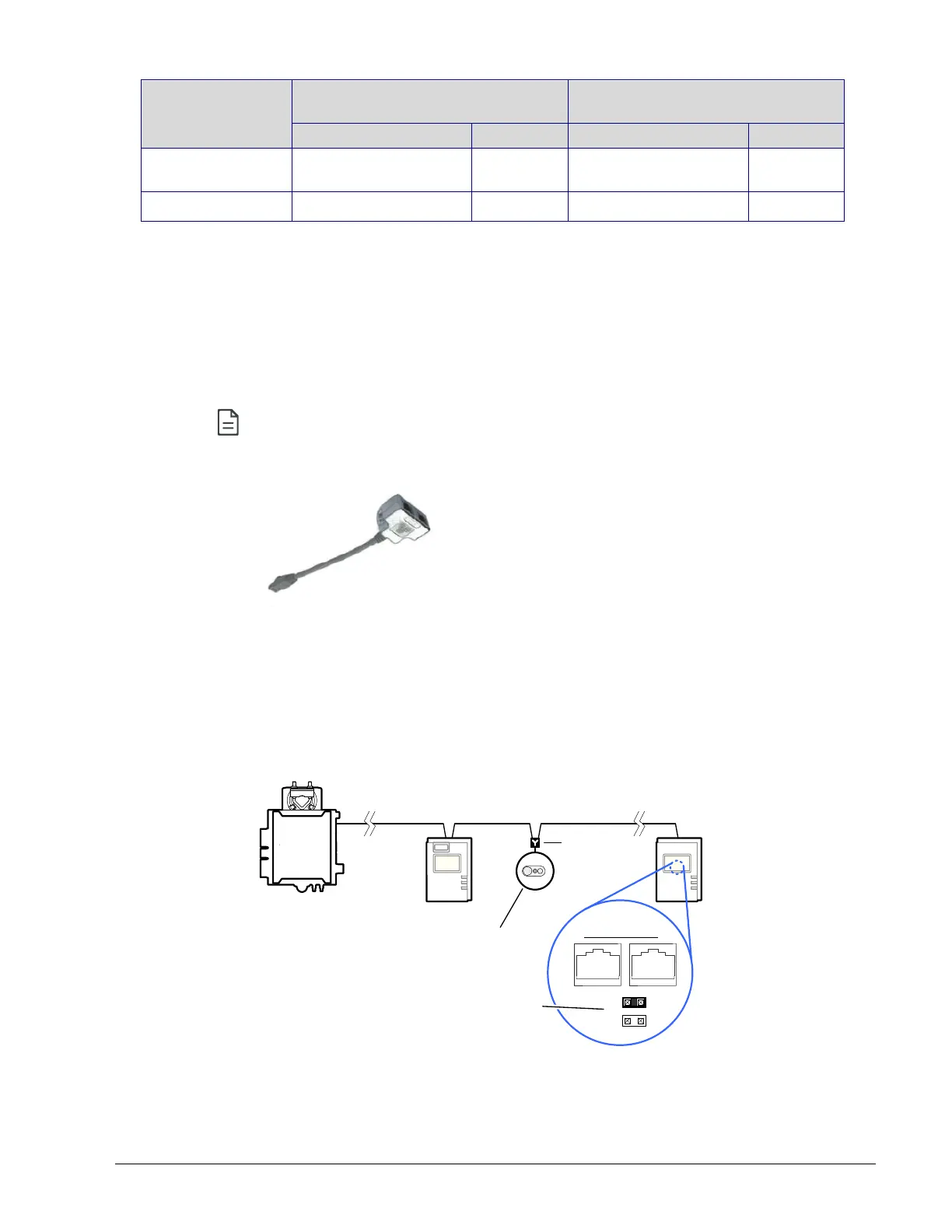
When one or more room devices are connected to the Subnet Port of an ECY-VAV series
controllers, only the EOL terminations of the last room device is set to ON. All other room
devices on the subnetwork data bus must have their EOL terminations set to OFF. The
controller must be the first device on the Cat 5e Cable Subnetwork data bus as its internal
EOL termination is permanently enabled.
Typical Room Devices
Cat 5e Cable Subnetwork Bus
EOL set to ON
at the last
sensor at the
end of the Bus
ON
EOL
OFF
Back of Allure
EC-Smart-Vue
Remove the
EOL jumper
ECx Subnet
Adapter
Typical ECLYPSE
Connected VAV
Controller
Figure 12-6: Setting the EOL Terminations on the Cat 5e Cable Subnetwork Data
Bus ECLYPSE Connected VAV Controllers



 To Next Page