Connecting IP Devices to an IP Network
50 ECLYPSE User Guide
Client to Hotspot Configuration
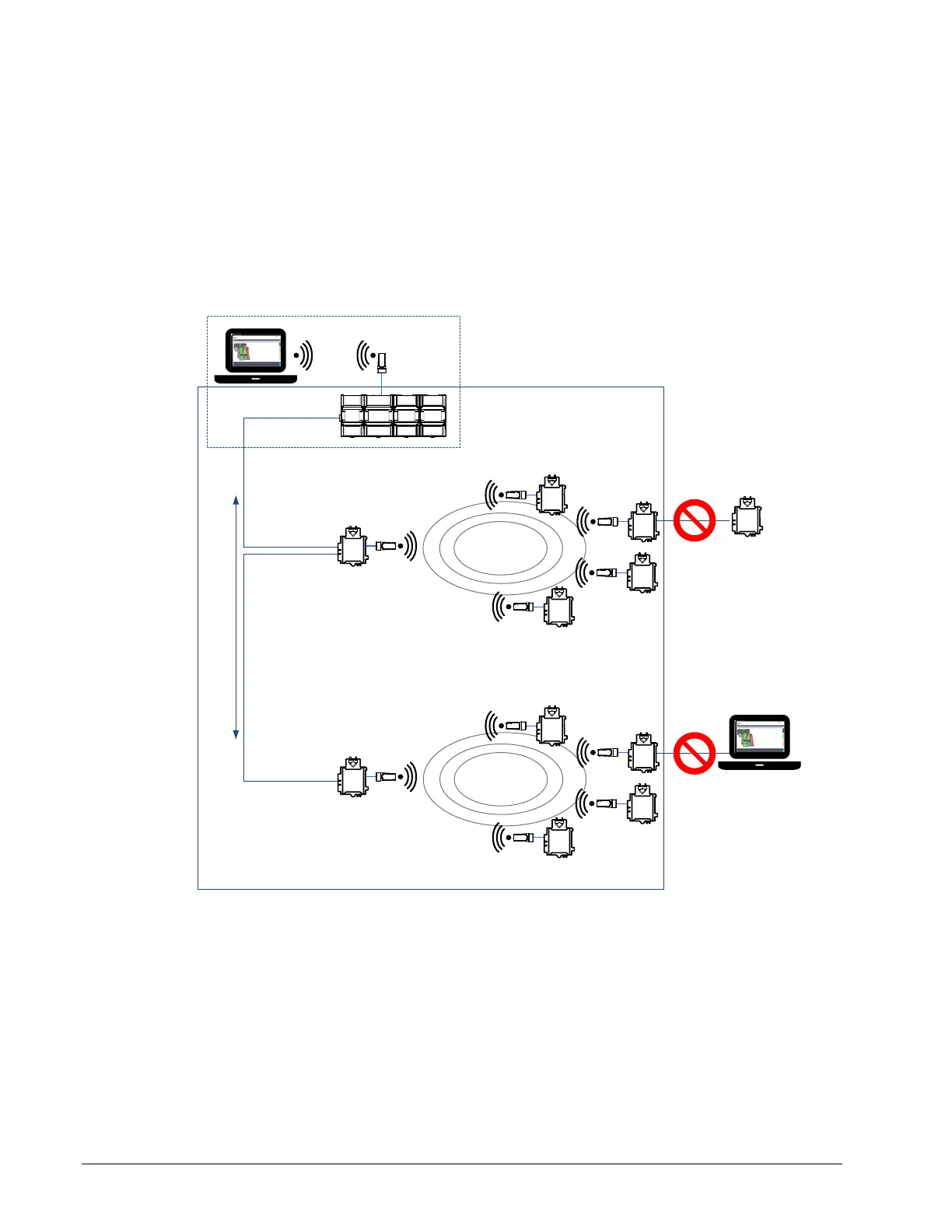
A laptop is connected through Wi-Fi, as a Wi-Fi client, to a Connected System Controller that
has its wireless settings configured as a Hotspot. The Connected VAV Controllers that are
part of the wired network are configured, on their wireless side as a Wi-Fi Access Point.
The other Connected VAV Controllers are configured as a Wi-Fi Client and are wirelessly
connected to an Access Point.
With this configuration, the laptop is on the same subnet as the Connected System
Controller (Subnet 2 created by the Hotspot), but all the Connected VAV Controllers are on a
different Subnet (Subnet 1), so the laptop user has access only to the Connected System
Controller.
Wi-Fi
Hotspot
Wi-Fi
Client
Subnet 2
Subnet 1
Wired IP
Daisy Chain
Maximum 30 controllers on the daisy chain
Wi-Fi
Access Point
Wi-Fi
Client
Wi-Fi
Client
Wi-Fi
Client
Wi-Fi
Client
Wi-Fi
Access Point
Wi-Fi
Client
Wi-Fi
Client
Wi-Fi
Client
Wi-Fi
Client
Figure 5-25: Client to Hotspot Configuration



 To Next Page