Connecting IP Devices to an IP Network
ECLYPSE User Guide 51
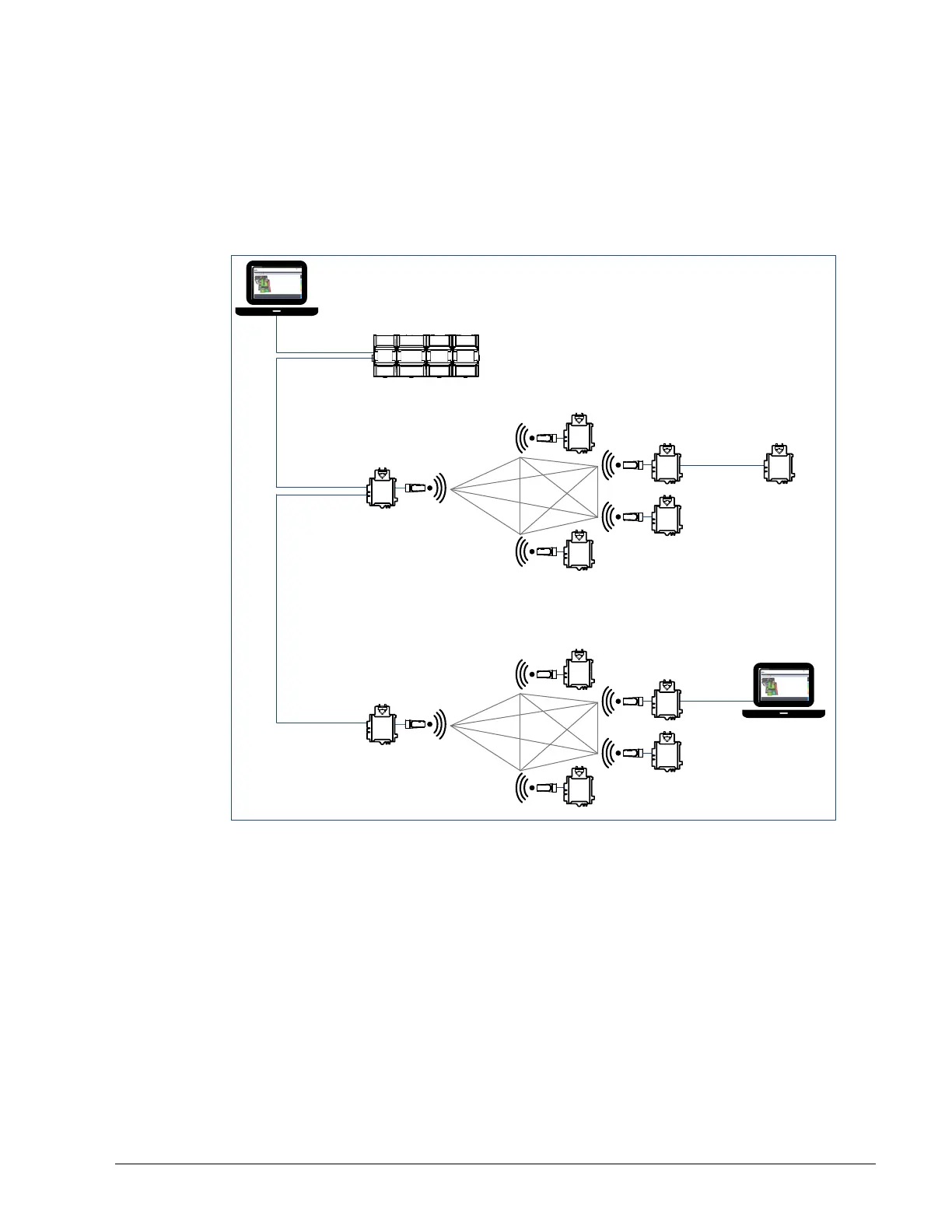
Mesh Configuration
The laptop is part of the wired IP daisy chain. The Connected VAV Controllers that are part
of the wired network are configured on their wireless side as Wi-Fi Mesh and they are
enabled as the Mesh Gate (see Wireless Configuration on page 73). The other Connected
VAV Controllers are configured as Wi-Fi Mesh.
With this configuration, the laptop and all the controllers are on the same subnet, so the
laptop user has access to all the controllers.
Wi-Fi Mesh
Wi-Fi Mesh
Wi-Fi Mesh
Wi-Fi Mesh
Wired IP
Daisy Chain
Maximum 30 devices
on the Mesh network
Subnet 1
Wi-Fi Mesh
Wi-Fi Mesh
Wi-Fi Mesh
Wi-Fi Mesh
Wi-Fi Mesh
Maximum 30 devices
on the Mesh network
Wi-Fi Mesh
Mesh Gate Enabled
Mesh Gate Enabled
Figure 5-26: Mesh Configuration



 To Next Page