EasyManua.ls Logo

Distech ECYPSE - Page 43

Default Icon
174 pages
Print Icon
To Next Page IconTo Next Page
To Previous Page IconTo Previous Page
Loading...
Connecting IP Devices to an IP Network
ECLYPSE User Guide 43
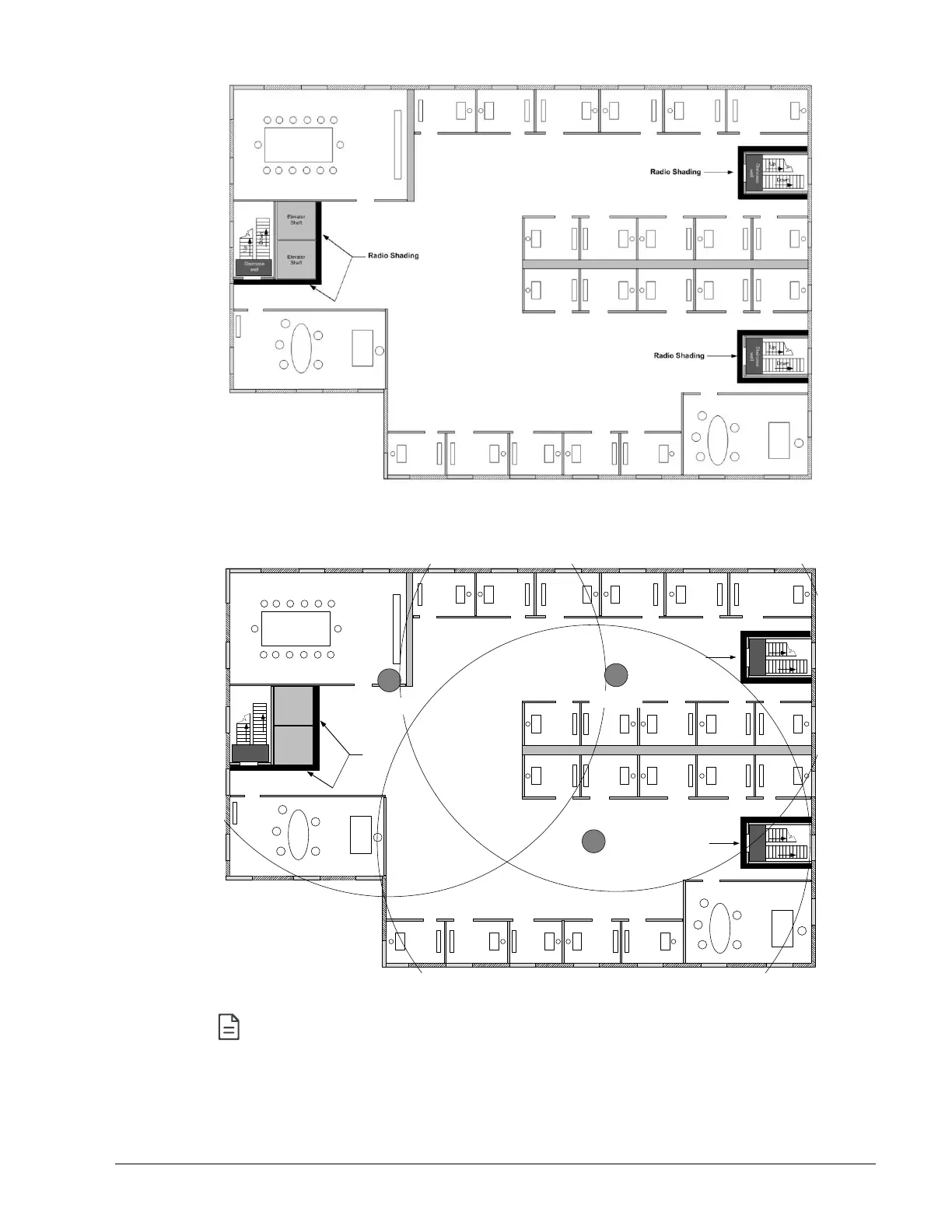
Figure 5-16: Mark relevant radio shadings
3. Draw circles to locate the ideal positions for your ECLYPSE Wi-Fi Adapter as shown
below:
Elevator
Shaft
Elevator
Shaft
Up
Down
Staircase
well
Up
Down
Staircase
well
Up
Down
Staircase
well
Radio Shading
Radio Shading
Radio Shading
Wi-Fi Hotspot
Channel 1
Wi-Fi Hotspot
Channel 6
Wi-Fi Hotspot
Channel 11
Figure 5-17: Radio ECLYPSE Wi-Fi Adapter Location
Make sure that the ECLYPSE Wi-Fi Adapter is positioned in a way such that no
screens block the connection to any corner inside the fire safety section (potential
sensor positions).

Table of Contents