Connecting IP Devices to an IP Network
48 ECLYPSE User Guide
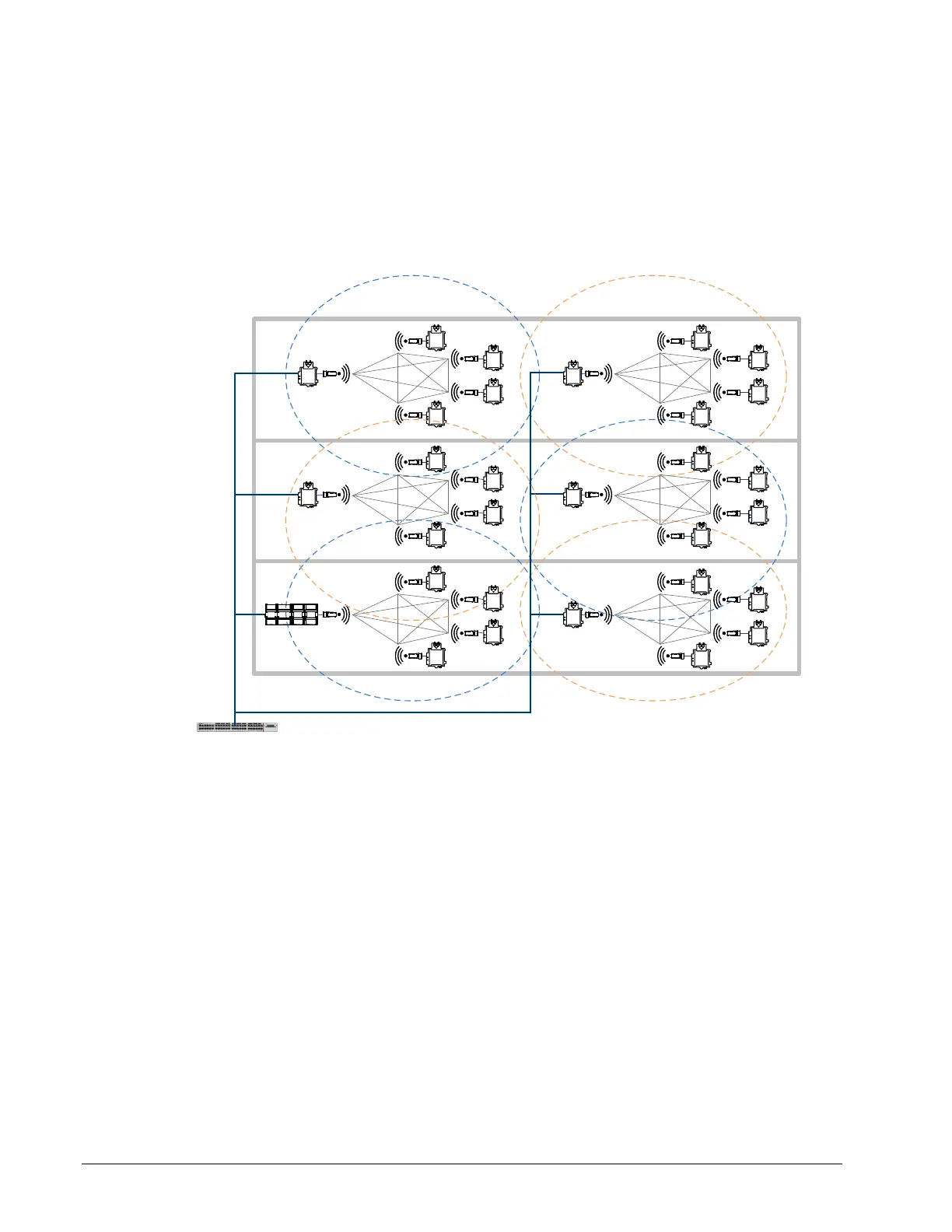
Alternate the Mesh Network Channel Number
When there is a need for more than 30 mesh network clients, two or more mesh network
are used as shown below. To reduce interference between mesh networks and increase
network throughput, it is important to alternate the mesh network’s channel number
between channel 1 and channel 3 for each mesh network that is next to another.
For example the following figure shows a 3-storey building that has a West wing and an
East wing. It shows Wi-Fi mesh channel number alternating between channel 1 and
channel 3 from wing to wing and floor to floor.
Wired IP Network – Star or Daisy Chain Connection
Floor 3
Floor 2
Floor 1
Wi-Fi Mesh
Channel 1
Max 30
devices
Wi-Fi Mesh
Channel 3
Max 30
devices
Wi-Fi Mesh
Channel 1
Max 30
devices
Wi-Fi Mesh
Channel 3
Max 30
devices
Wi-Fi Mesh
Channel 1
Max 30
devices
Wi-Fi Mesh
Channel 3
Max 30
devices
Wired IP Network – Star or Daisy Chain Connection
West Wing East Wing
Figure 5-23: Alternate the Mesh Network Channel Number



 To Next Page