Vigor2760 Series User’s Guide
110
Enable – Packets sending out through such port will be
tagged.
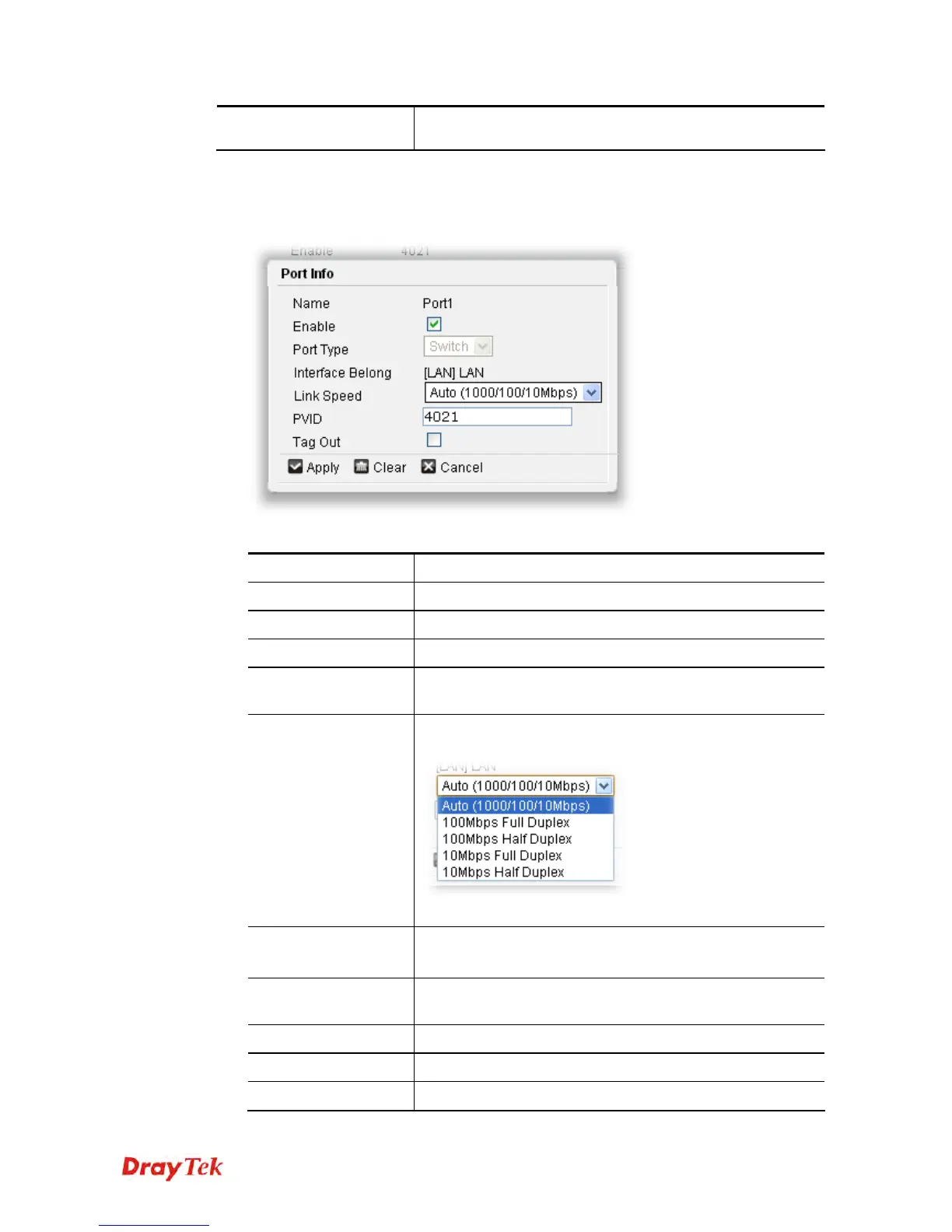
To edit the switch port setting, please do the following:
1. Choose the port you want and double click on it.
2. Click Edit to open the following page.
Available parameters are listed below:
Item Description
Name
Display the name of the physical port.
Enable
Check the box to enable such feature.
Port Type
At present, there is only one type for you to choose.
Interface Belong
Displays the name of the profile in which such physical port
is currently used.
Link Speed
Choose the line speed for downloading and uploading file.
Usually, keep the default setting will be better.
In default, Auto will be selected.
PVID
Type the port VLAN ID number for the untagged packets.
The default value is 4011.
Tag Out
If it is checked, all the packets will be transferred without
any tag number.
Apply
Click it to save the settings.
Clear
Click it to remove the modification of the web page.
Cancel
Click it to return to previous web page.











 To Next Page