Vigor2760 Series User’s Guide
238
Activating the UPnP function on your network may incur some security threats. You should
consider carefully these risks before activating the UPnP function.
Some Microsoft operating systems have found out the UPnP weaknesses and hence
you need to ensure that you have applied the latest service packs and patches.
Non-privileged users can control some router functions, including removing and
adding port mappings.
The UPnP function dynamically adds port mappings on behalf of some UPnP-aware
applications. When the applications terminate abnormally, these mappings may not be
removed.
4
4
.
.
9
9
.
.
4
4
I
I
G
G
M
M
P
P
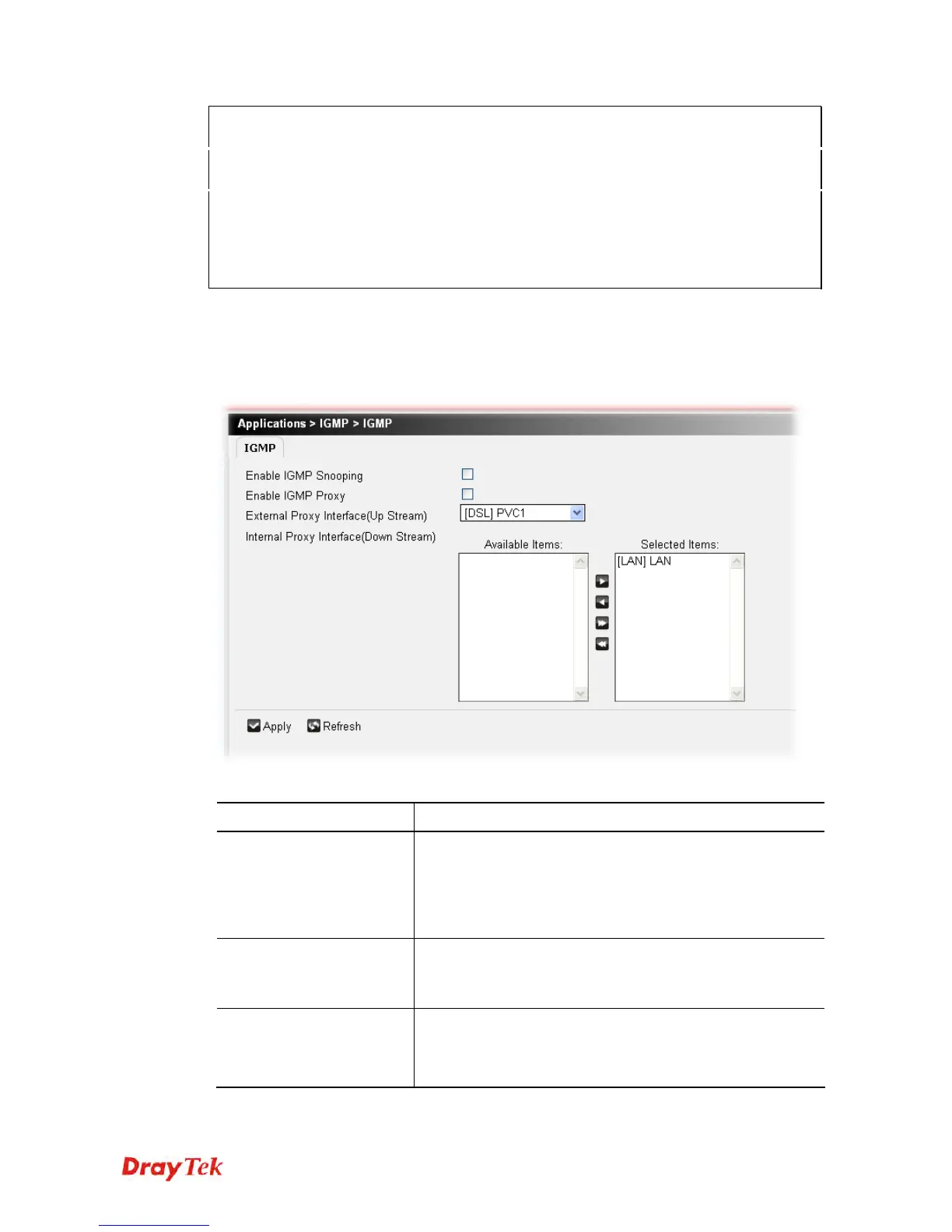
IGMP is the abbreviation of Internet Group Management Protocol. It is a communication
protocol which is mainly used for managing the membership of Internet Protocol multicast
groups.
Available parameters are listed below:
Item Description
Enable IGMP Snooping
Check this box to enable this profile.
Multicast traffic will be forwarded to ports that have
members of that group. Disabling IGMP snooping will make
multicast traffic treated in the same manner as broadcast
traffic.
Enable IGMP Proxy
Check this box to enable this profile.
The application of multicast will be executed through WAN
port. In addition, such function is available in NAT mode.
External Proxy Interface
(Up Stream)
Define which WAN interface shall receive the Multicast
Stream (IPTV Traffic) here.
The default setting is PVC1.











 To Next Page