Vigor2760 Series User’s Guide
268
Type
Display the type (e.g., request or certificated) of current
certificate.
Valid From
Display the starting point of the valid time of the certificate.
Valid To
Display the end point of the valid time of the certificate.
4
4
.
.
1
1
2
2
.
.
1
1
.
.
1
1
G
G
e
e
n
n
e
e
r
r
a
a
t
t
e
e
L
L
o
o
c
c
a
a
l
l
C
C
e
e
r
r
t
t
i
i
f
f
i
i
c
c
a
a
t
t
e
e
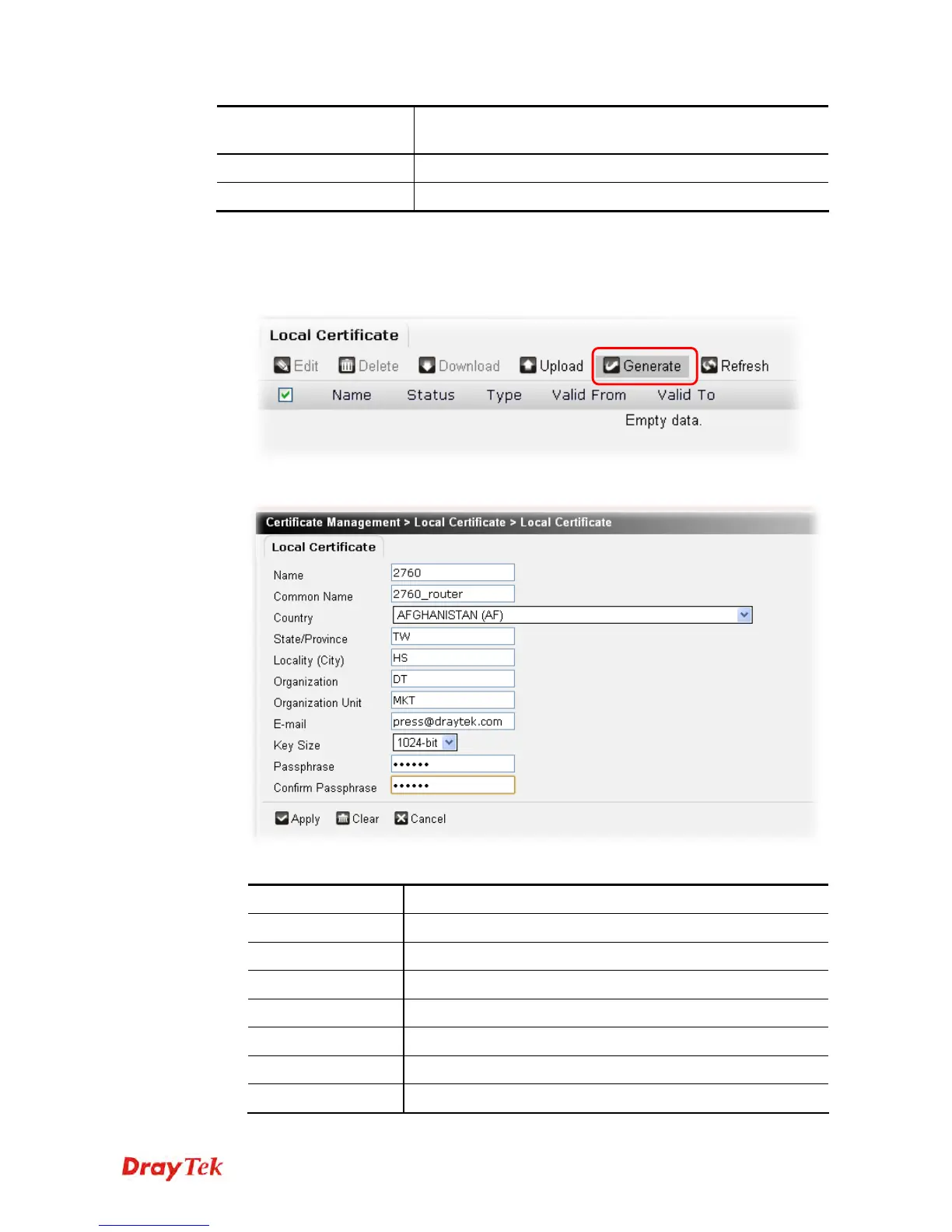
To generate a new certificate request profile, please do the following:
1. Click the Generate button.
2. The following setting page will appear.
Available parameters are listed as follows:
Item Description
Name
Type the name of the local certificate.
Common Name
Type the common name for such certificate.
Country
Type the name of the country that such certificate located.
State/Province
Type the name of the state /province for such certificate.
Locality (City)
Type the name of the city for such certificate.
Organization
Type the name of the organization.
Organization Unit
Type a description for the organization unit.











 To Next Page