Vigor2760 Series User’s Guide
278
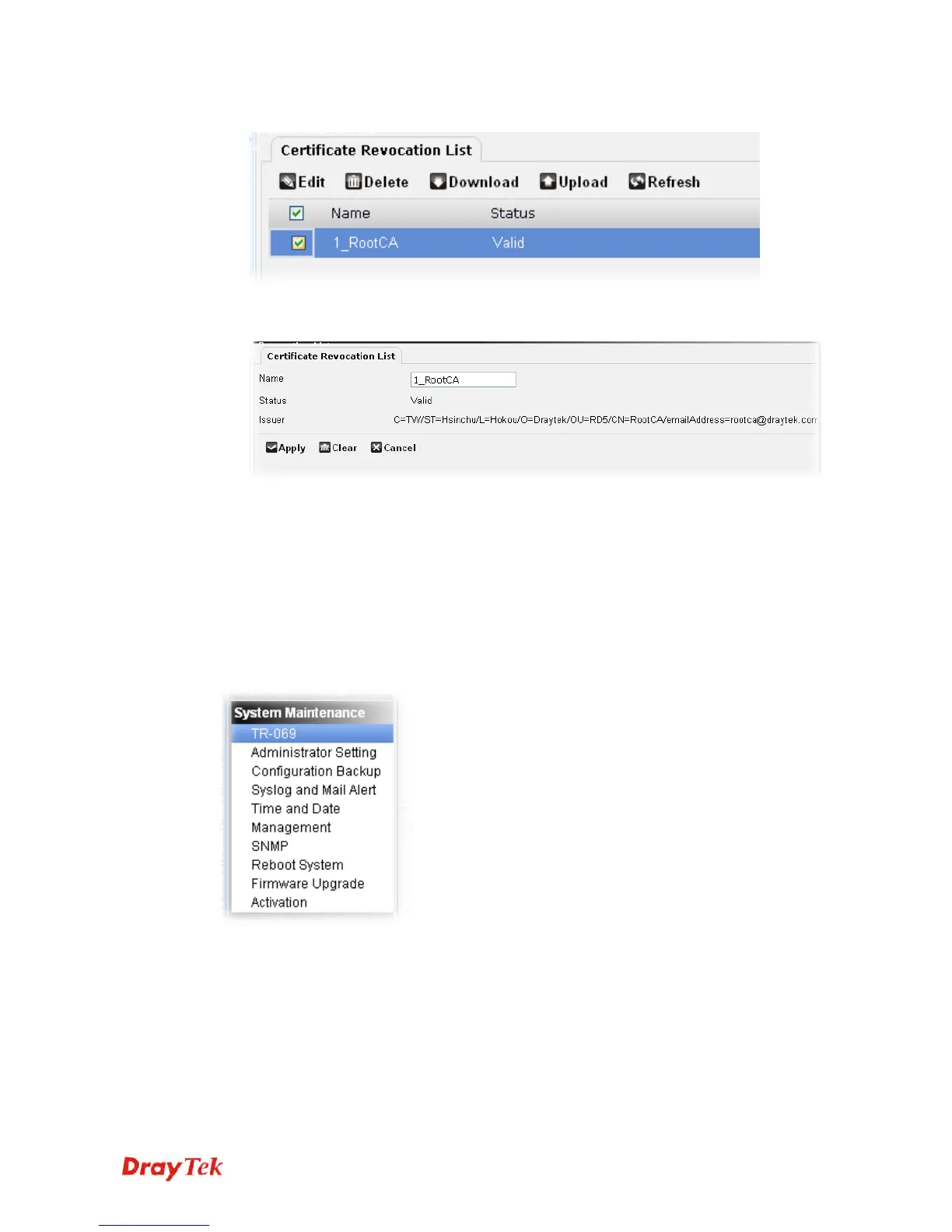
3. After finished the selection, click Apply to upload the file.
4. Select the one you just upload and click Edit to open the following page. This page
displays the issuer information for your reference.
5. If required, you can modify the name of the certificate (e.g., for identification) and click
Apply to save the change. If not, click Cancel to return to previous page.
4
4
.
.
1
1
3
3
S
S
y
y
s
s
t
t
e
e
m
m
M
M
a
a
i
i
n
n
t
t
e
e
n
n
a
a
n
n
c
c
e
e
For the system setup, there are several items that you have to know the way of configuration:
TR-069, Administrator Setting, Configuration Backup, Syslog and Mail Alert, time and Date,
Management, SNMP, Reboot System, Firmware Upgrade and Activation.
Below shows the menu items for System Maintenance.
4
4
.
.
1
1
3
3
.
.
1
1
T
T
R
R
-
-
0
0
6
6
9
9
Vigor router with TR-069 is available for matching with VigorACS server. Such page
provides VigorACS and CPE settings under TR-069 protocol. All the settings configured here
is for CPE to be controlled and managed with VigorACS server. Users need to type URL,
username and password for the VigorACS server that such device will be connected. However
URL, username and password under CPE client are fixed that users cannot change it. The
default CPE username and password are "vigor" and "password". You will need it when you
configure VigorACS server.











 To Next Page