Vigor2760 Series User’s Guide
60
Status
Display the status of such WAN connection.
Idle – the network connection has not established.
UP – the network connection is established successfully.
IP Address
Display the WAN IP address of the router.
MAC Address
Display the MAC address of the router.
UP Time
Display the network connection time via the WAN interface.
RX Packet
Display the total received packets via such WAN interface.
TX Packet
Display the total transmission packets via such WAN
interface.
4
4
.
.
1
1
.
.
1
1
.
.
7
7
W
W
A
A
N
N
E
E
t
t
h
h
e
e
r
r
n
n
e
e
t
t
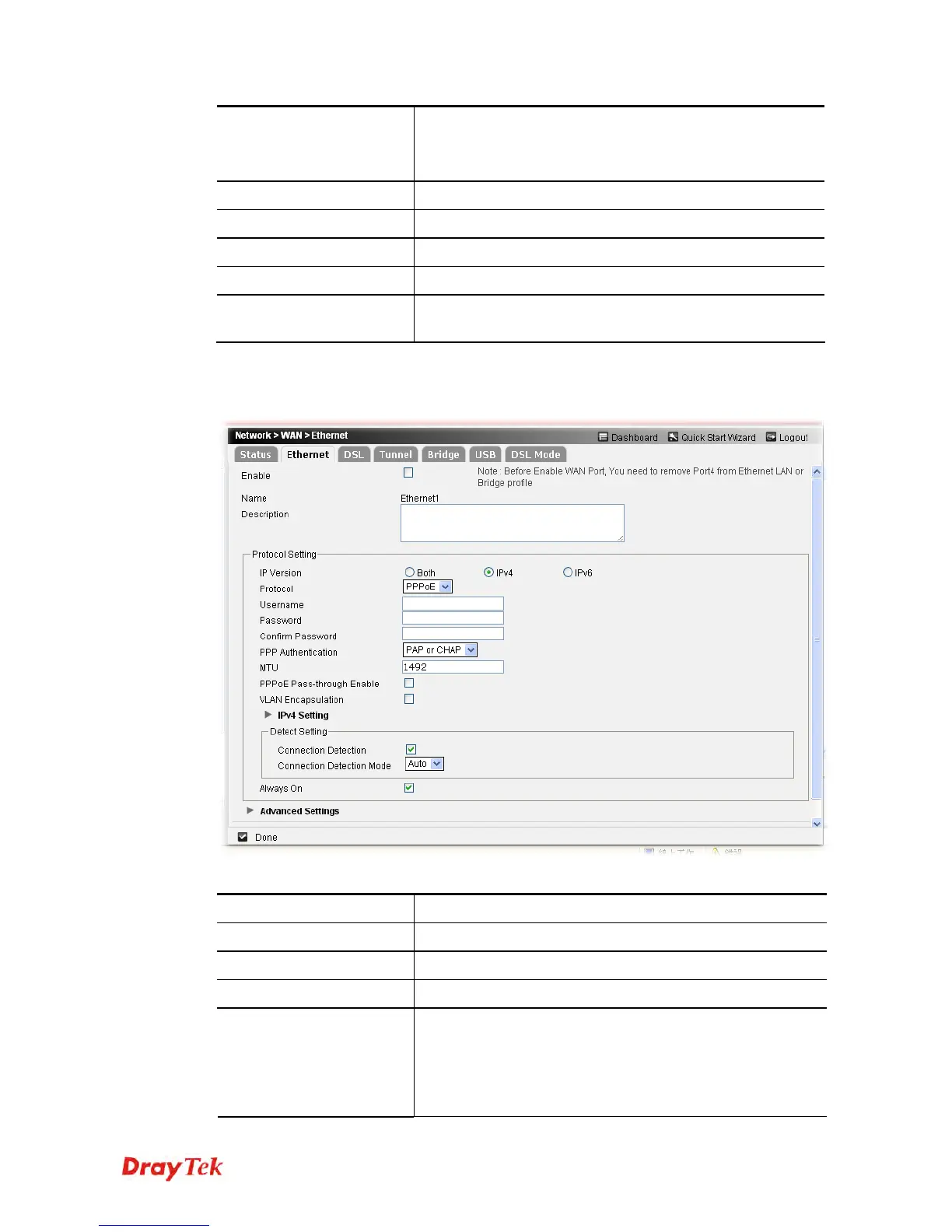
This page allows you to configure Ethernet settings for WAN connection.
Available parameters are listed below:
Item Description
Enable
Check the box to enable such profile.
Name
Display the name of Ethernet WAN.
Description
If required, type brief description for such profile.
Protocol Setting
IP Version - The type of the IP address is determined by the
option selected here.
Both – You have to type IP address based on IPv4
and IPv6 address(es) at the same time.
IPv4 – You have to type IP address based on











 To Next Page