Vigor2760 Series User’s Guide
41
2
2
.
.
5
5
D
D
a
a
s
s
h
h
b
b
o
o
a
a
r
r
d
d
I
I
n
n
t
t
r
r
o
o
d
d
u
u
c
c
t
t
i
i
o
o
n
n
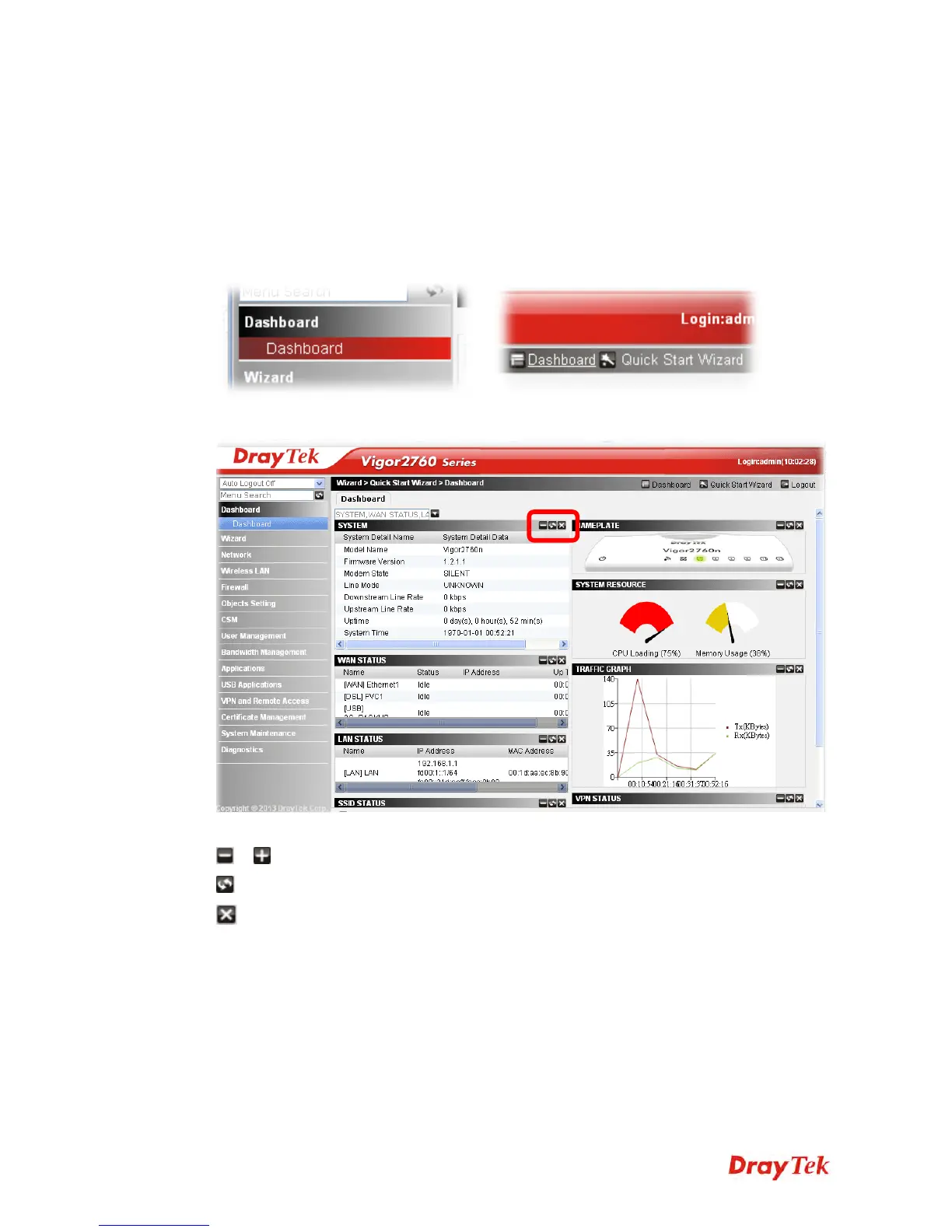
Dashboard shows the system status including System Information, DSL Information, System
Resource, Quick Access, Physical Port Status, WAN Status, LAN Status, WiFi Station List,
WiFi AP List, All VPN Status, IPSec Status, Traffic Graph, L2TP Status, PPTP Status, DDNS
Status, Routing Table, ARP Table, DHCP Table, Session Table and License Table.
Open Dashboard>>Dashboard from the main menu on the left side of the main page (or
click the Dashboard link on the top-right).
or
The Dashboard page will be displayed as follows:
Take a look at the icons on the top-right of each status display area.
/ - Click it to fold / unfold the specified status display area.
- Click it to re-display the specified status display area.
- Click it to close the specified status display area.











 To Next Page