Vigor2760 Series User’s Guide
285
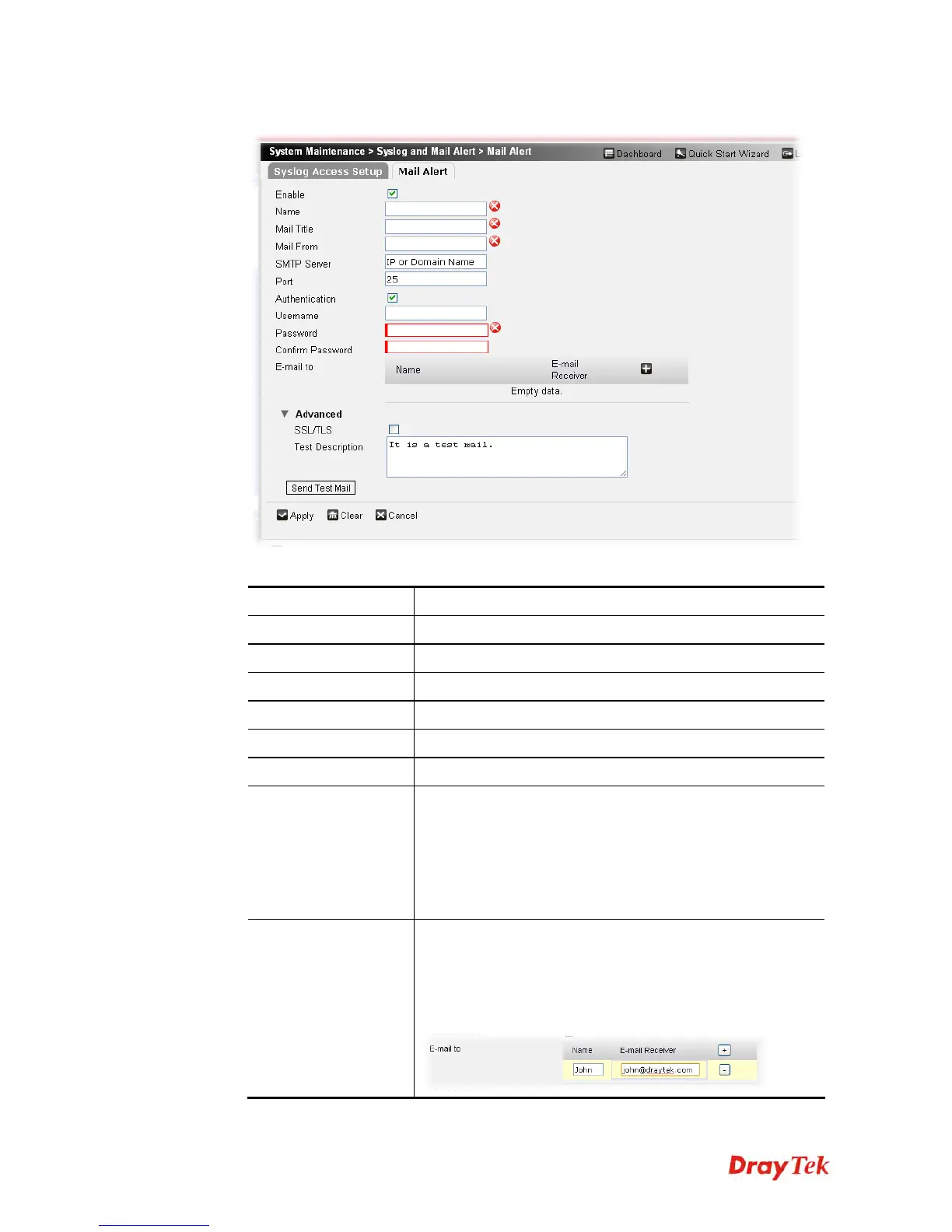
2. The following setting page will appear.
Available parameters are listed below:
Item Description
Enable
Check the box to enable such profile.
Name
Type a name for the mail alert profile.
Mail Title
Type a heading of the mail.
Mail From
Type a mail address for receiving the mail from outside.
SMTP Server
The IP address of the SMTP server.
Port
Type a port number for the mail alert.
Authentication
Check this box to activate this function while using e-mail
application.
User Name - Type the user name for authentication.
Password - Type the password for authentication.
Confirm Password – Type the password again for
confirmation.
E-mail to
Add the mail address for sending mails out. You can type
several mail addresses in this field. All of them will receive
the mail alert at the same time.
Name – Type a name of the receiver.
E-mail Receiver – Type the e-mail address of the receiver.











 To Next Page