4
Miscellaneous Functions
111
For details on functions that can be set by the user, see "Job Setting Memory Function" under user setup functions on
page 68.
Initial Setting Mode
Defaults are as follows:
• Print speed : Standard • Print size : A3
• Document mode : Text • Plate darkness : Standard
• Print darkness : Standard
These defaults can be changed to make operation easier for the user. Newly changed values can also be
returned to their defaults.
○○○○○○○○○○○○○○○○○○○○○○○○○○○○○○○○○○○○○○○○○○○○○○○○○○○○○○○○○○
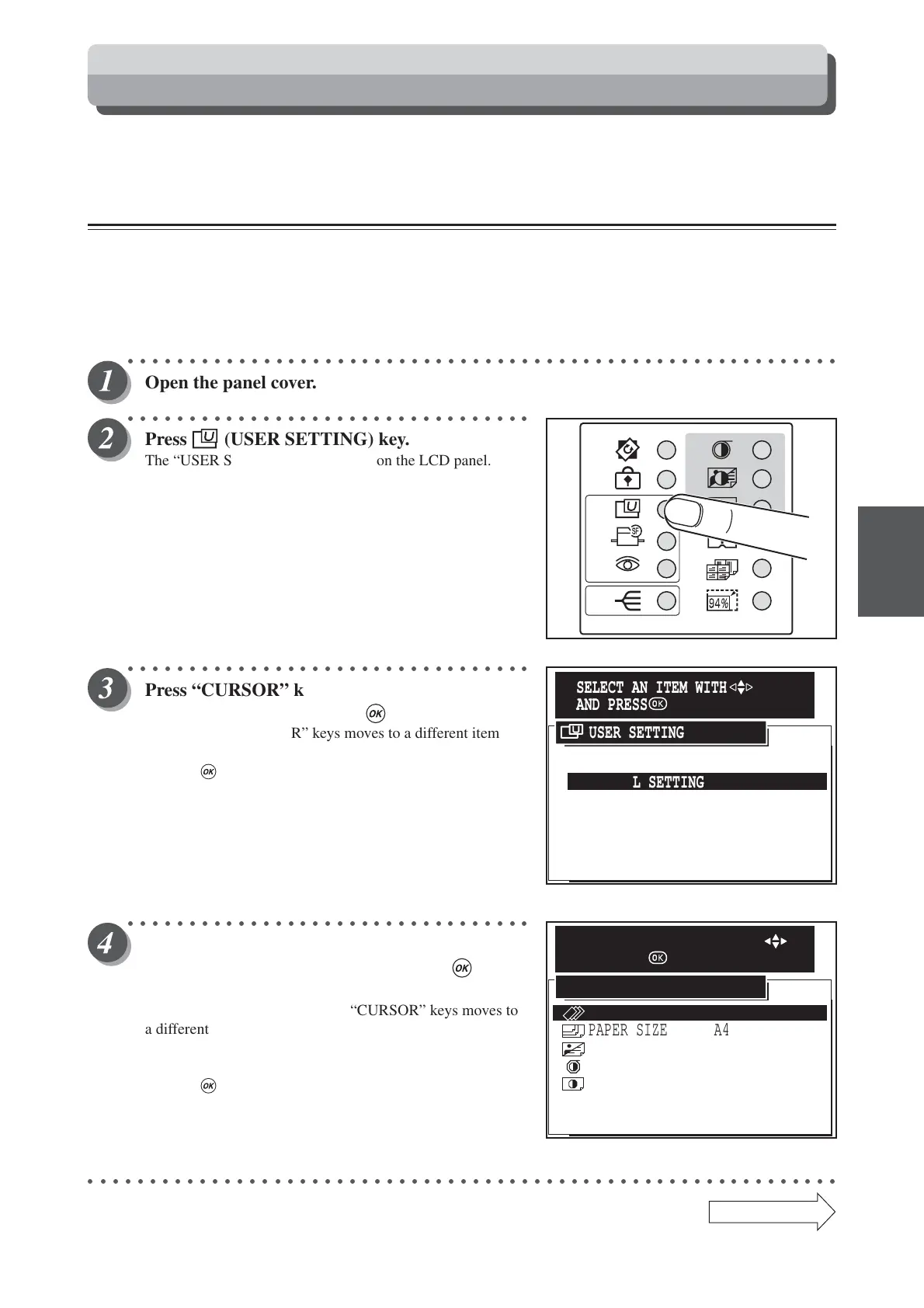
Open the panel cover.
○○○○○○○○○○○○○○○○○○○○○○○○○○○○○○○○○
Press (USER SETTING) key.
The “USER SETTING” is displayed on the LCD panel.
○○○○○○○○○○○○○○○○○○○○○○○○○○○○○○○○○
Press “CURSOR” keys to select “INITIAL
SETTING”, and then press (OK) key.
Each press of “CURSOR” keys moves to a different item and
that item is displayed highlighted.
Pressing (OK) key set the highlighted item.
○○○○○○○○○○○○○○○○○○○○○○○○○○○○○○○○○
Press “CURSOR” keys to select one item and to
change number of the item, then press (OK)
key.
Each press of the upper or lower “CURSOR” keys moves to
a different item and that item is displayed highlighted.
Each press of the left or right “CURSOR” keys changes the
numerical value of each item.
Pressing (OK) key set the highlighted item.
○○○○○○○○○○○○○○○○○○○○○○○○○○○○○○○○○○○○○○○○○○○○○○○○○○○○○○○○○○○○○
Continue Page
•••
User Setting Function
1.JOB SETTING MEMORY
5.DOCUMENT DENSITY DETECTION
4.DOCUMENT MEMORY
6.FEED HEAVY WEIGHT PAPER
7.END
3.OPTIMIZE PRINT
2.INITIAL SETTING
USER SETTING
SELECT AN ITEM WITH
AND PRESS
PAPER SIZE A4
IMAGE MODE
TEXT
0
PRINT DARKNESS
PLATE DARKNESS 0
DEFAULTS
CANCEL
PRINTING SPEED 4
>
>
>
>
>
INITIAL SETTING
SELECT/SET AN ITEM WITH
AND PRESS






 To Next Page