4
Miscellaneous Functions
89
After platemaking has finished, you can fine-tune the position of the printed image (±1.5cm in the vertical direction and
±1.0cm in the horizontal direction). This position adjustment can be performed in one of two ways: on the print position
screen and on the main screen.
Position Adjustment
○○○○○○○○○○○○○○○○○○○○○○○○○○○○○○○○○
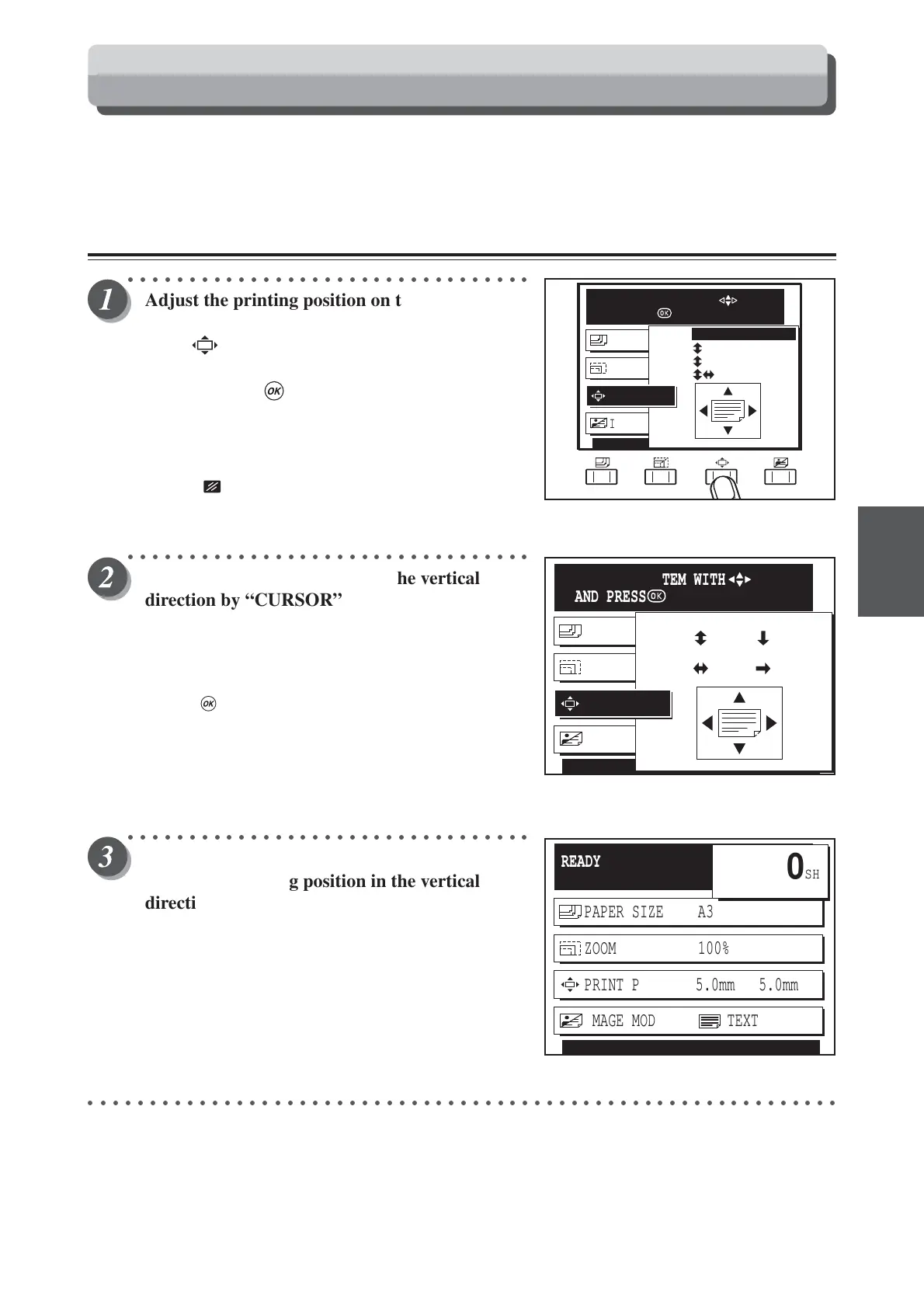
Adjust the printing position on the Print
Position screen.
Press (PRINT POSITION) key.
Press “CURSOR” keys to select “ADJUST”,
and then press (OK) key.
The printing position setting is displayed on the LCD panel.
Each press of “CURSOR” keys moves to a different item and
that item is displayed highlighted. The printing position
adjustment is set when the cursor is moved to “ADJUST”.
Pressing (CANCEL) key redisplays the main screen.
○○○○○○○○○○○○○○○○○○○○○○○○○○○○○○○○○
Adjust the printing position in the vertical
direction by “CURSOR” keys (up/down), and in
the horizontal direction by “
CURSOR
” keys
(left/right).
Each press of “CURSOR” keys changes the printing position
by 0.5mm.
Pressing (OK) key set the printing position.
○○○○○○○○○○○○○○○○○○○○○○○○○○○○○○○○○
Adjust the printing position on the main screen.
Adjust the printing position in the vertical
direction by “CURSOR” keys (up/down), and in
the horizontal direction by “
CURSOR
” keys
(left/right).
Each press of “CURSOR” keys changes the printing position
by 0.5mm.
○○○○○○○○○○○○○○○○○○○○○○○○○○○○○○○○○○○○○○○○○○○○○○○○○○○○○○○○○○○○○
IMAGE MODE TEXT
PAPER SIZE A3
PAPER SIZE A3
DIECT
DIECT
10.0mm
10.0mm
PRINT POS.
SELECT AN ITEM WITH
AND PRESS
READY
PAPER SIZE A3
ZOOM 100%
PRINT POS. 5.0mm 5.0mm
SHT
1
SET
×
IMAGE MODE TEXT
0
IMAGE MODE TEXT
PAPER SIZE A3
PAPER SIZE A3
RESET
RESET
RESET
ADJUST
PRINT POS.
SELECT AN ITEM WITH
AND PRESS
Printing Position Adjustment Function






 To Next Page