1
Before Using This Machine
19
B
A
C
D
E
F
G
H
I
N
O
L
J
M
K
Part Names and Their Functions
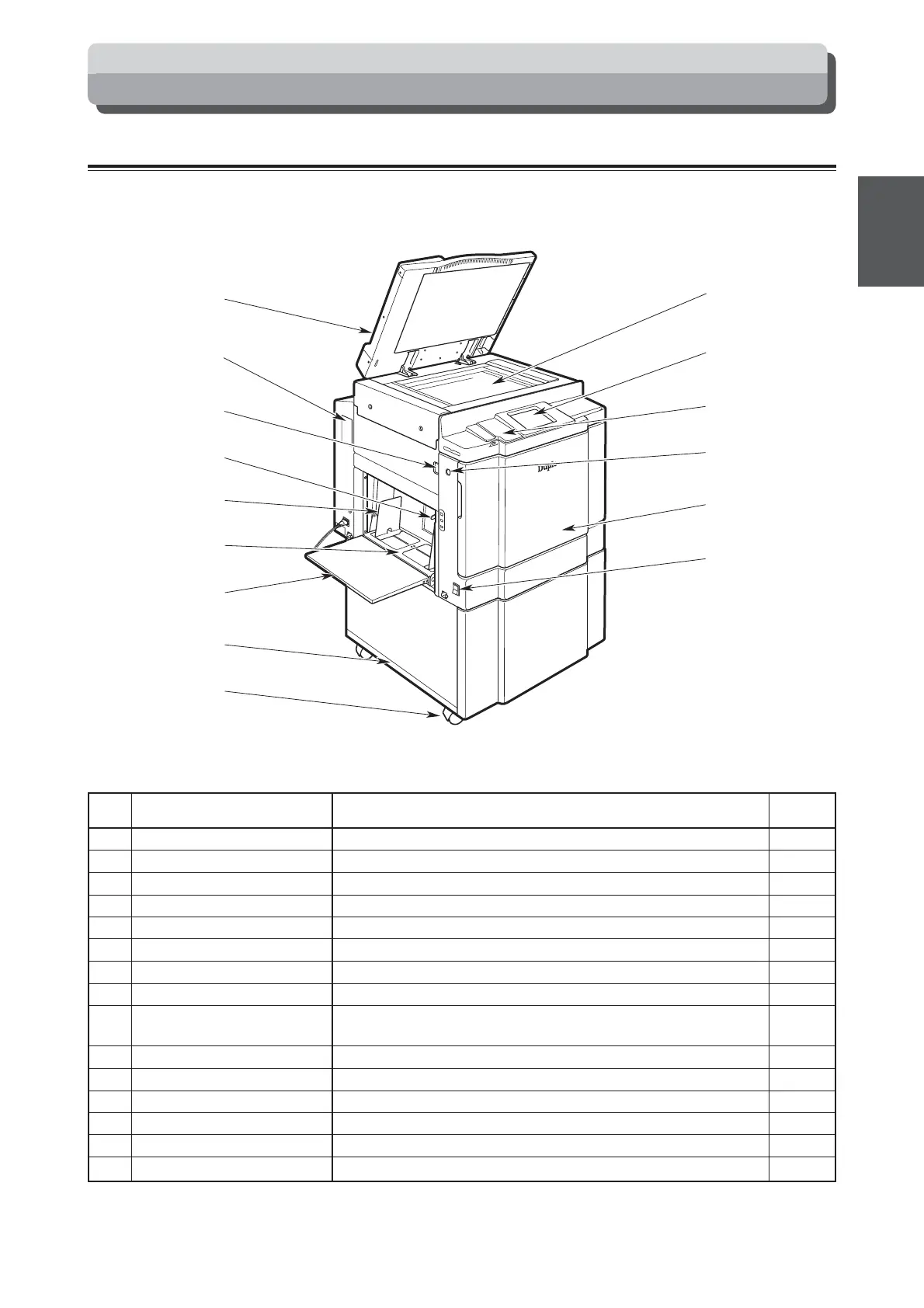
Printer Appearance
No. Name Function
A
Document cover Keeps the document in contact with the document glass plate.
B
Connector Connector for connecting to a personal computer.
C
Lever Lock the scanner of the printer.
D
Feed pressure adjuster lever Use to adjust the paper feed pressure.
E
Side guides Slide to match the width of the paper.
F
Feed tray Load paper in this tray.
G
Support tray Pull out when using paper sizes.
H
Cabinet (option) Place the printer on this stand.
I
Castor locks Lock the cabinet in position on the floor. Always lock the castor
locks when installing the printer.
J
Power switch Press to switch the power on and off.
K
Front cover Open this cover to replace the ink pack, drum unit and master roll.
L
Feed tray descend switch Press to lower the feed tray.
M
Panel cover Open to operate the keys inside the panel.
N
Control panel Displays operations and statuses, and sets functions.
O
Document Glass Plate The document is placed on this glass.
Reference
page
37
118
124
35
35
35
35
—
—
25, 26
122, 127
138, 140
24
24
32






 To Next Page