129
5
Replacing Consumables
Removing the Drum Unit
WARNING
•Avoid pressing and damaging the drum surface with fingers etc. It can stain your clothes,
and the warp in the drum surface may cause bad prints.
• Always place the drum unit on flat and stable surface. Otherwise, the drum surface may be
damaged or warped and may cause bad prints.
○○○○○○○○○○○○○○○○○○○○○○○○○○○○○○○○○
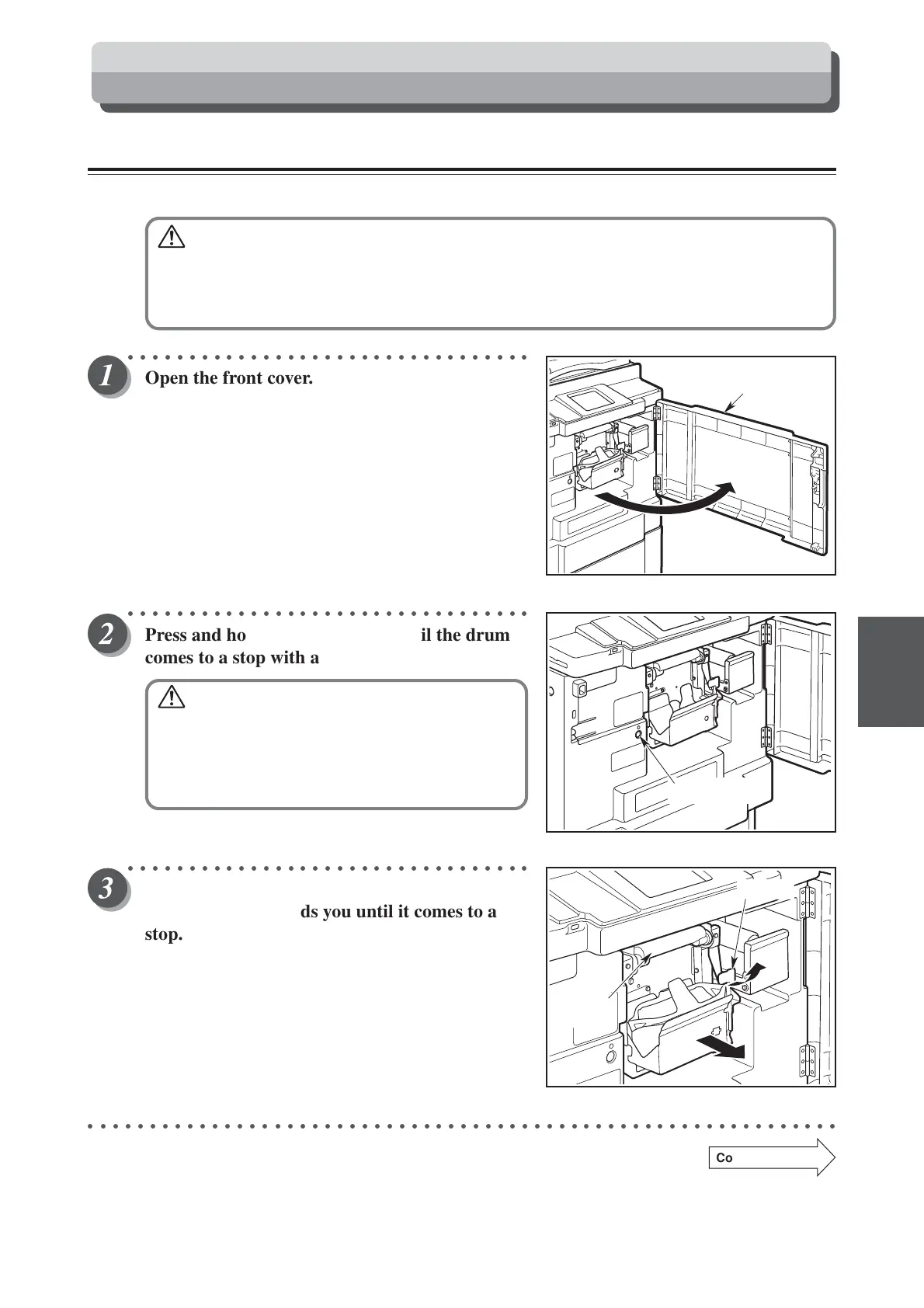
Open the front cover.
○○○○○○○○○○○○○○○○○○○○○○○○○○○○○○○○○
Press and hold the JOG switch until the drum
comes to a stop with a beep.
WARNING
• Do not touch the drum or rollers when you
operate the JOG switch.
• Do not put your hands or fingers inside the
machine while it is operating. Your hands
may be pulled in or nipped.
○○○○○○○○○○○○○○○○○○○○○○○○○○○○○○○○○
Pull up the lever towards you, and hold and pull
out the drum towards you until it comes to a
stop.
○○○○○○○○○○○○○○○○○○○○○○○○○○○○○○○○○○○○○○○○○○○○○○○○○○○○○○○○○○○○○
Continue Page
•••
Front cover
JOG switch
Lever
Drum
handle
Replacing the Drum Unit



 To Next Page