141
6
Troubleshooting
Paper Jams
When “PAPER JAM ON THE FEEDER SIDE” is displayed (Feed Tray Side)
When a paper jam occurs in the feed tray side, the message “PAPER JAM ON THE FEEDER SIDE” is
displayed on the LCD. Follow the procedure below to remove the jammed paper.
○○○○○○○○○○○○○○○○○○○○○○○○○○○○○○○○
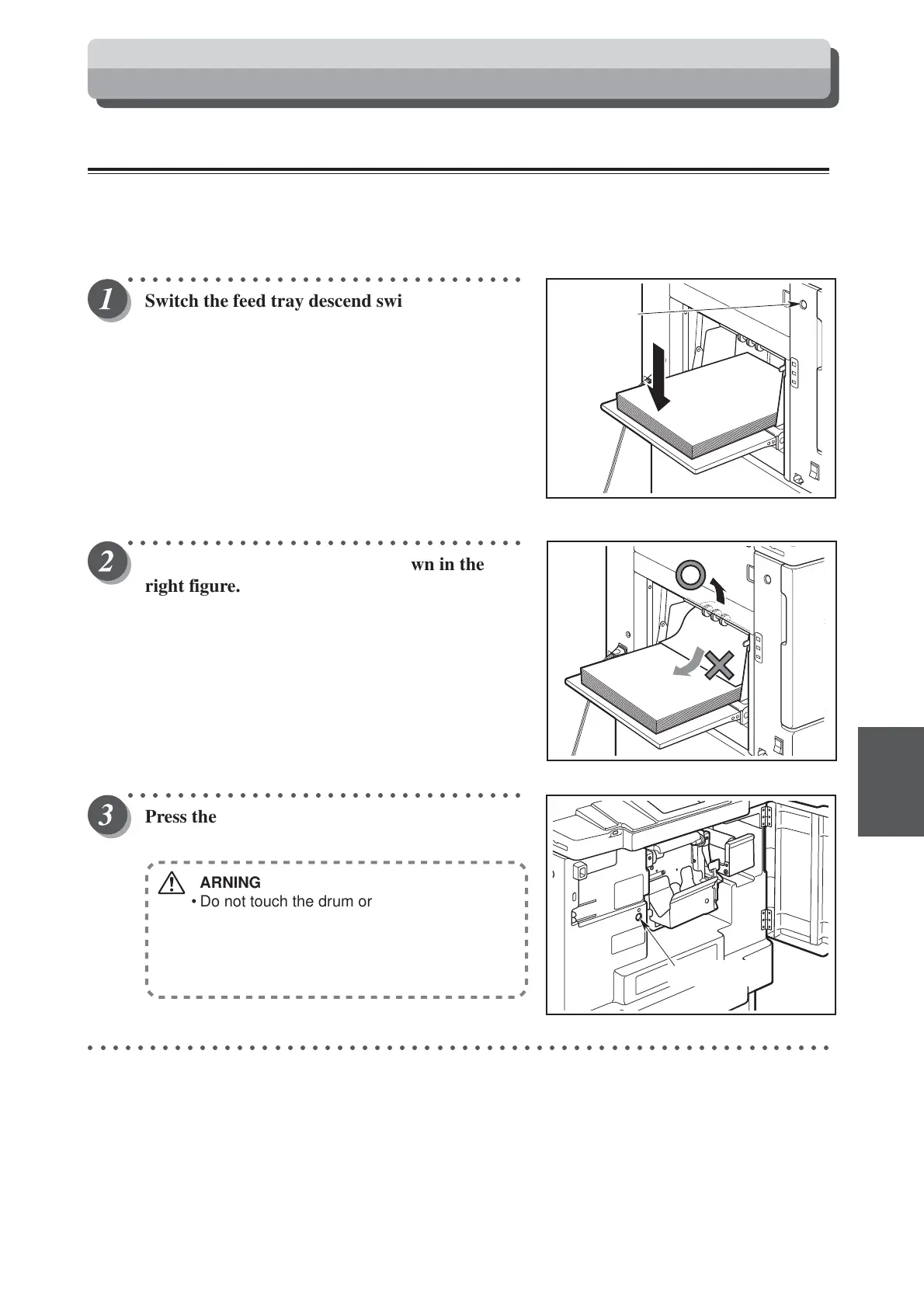
Switch the feed tray descend switch to lower
the feed tray slightly.
The feed tray is lowered for the time that the swithc is
pressed.
○○○○○○○○○○○○○○○○○○○○○○○○○○○○○○○○
Pull out the jammed paper as shown in the
right figure.
○○○○○○○○○○○○○○○○○○○○○○○○○○○○○○○○
Press the JOG switch until the drum comes to
a stop with a beep.
WARNING
• Do not touch the drum or rollers when you
operate the jog switch.
• Do not put hands inside machine while it is
operating. Hands could get caught up or
crushed.
○○○○○○○○○○○○○○○○○○○○○○○○○○○○○○○○○○○○○○○○○○○○○○○○○○○○○○○○○○○○
Feed tray
descend
switch
JOG switch






 To Next Page