142
When “PAPER JAM ON THE EJECTION SIDE” is displayed (Print Tray Side)
When a paper jams in the print tray side, “PAPER JAM ON THE EJECTION SIDE” is displayed on the LCD
panel. Follow the procedure below to remove the jammed paper.
○○○○○○○○○○○○○○○○○○○○○○○○○○○○○○○○○
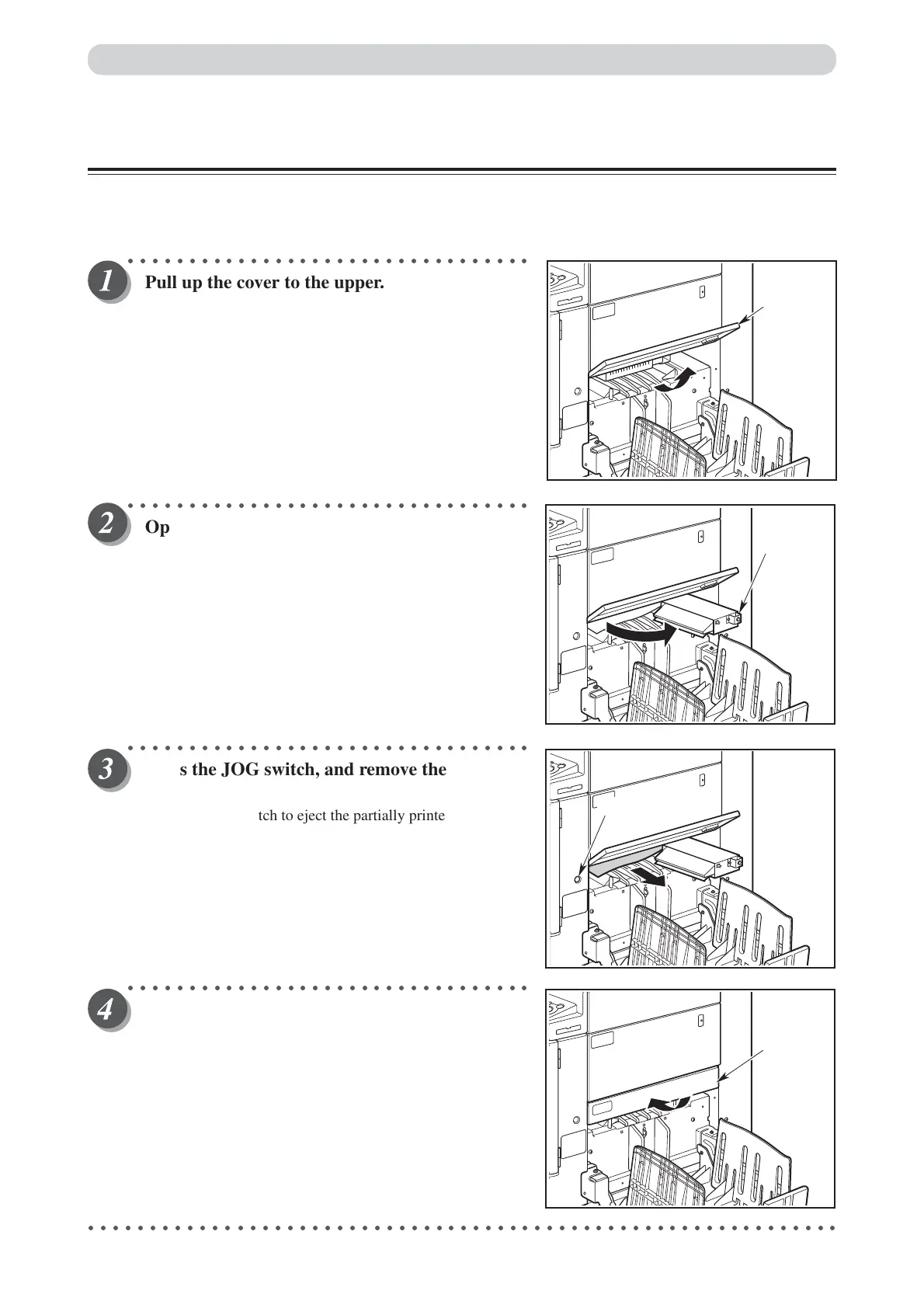
Pull up the cover to the upper.
○○○○○○○○○○○○○○○○○○○○○○○○○○○○○○○○○
Open the top fan towards you.
○○○○○○○○○○○○○○○○○○○○○○○○○○○○○○○○○
Press the JOG switch, and remove the jammed
paper.
Press the JOG switch to eject the partially printed paper.
○○○○○○○○○○○○○○○○○○○○○○○○○○○○○○○○○
Move the top fan to the set position, and close
the cover.
○○○○○○○○○○○○○○○○○○○○○○○○○○○○○○○○○○○○○○○○○○○○○○○○○○○○○○○○○○○○○
Paper Jams
Top fan
Cover
Cover
JOG switch






 To Next Page