143
6
Troubleshooting
○○○○○○○○○○○○○○○○○○○○○○○○○○○○○○○○○
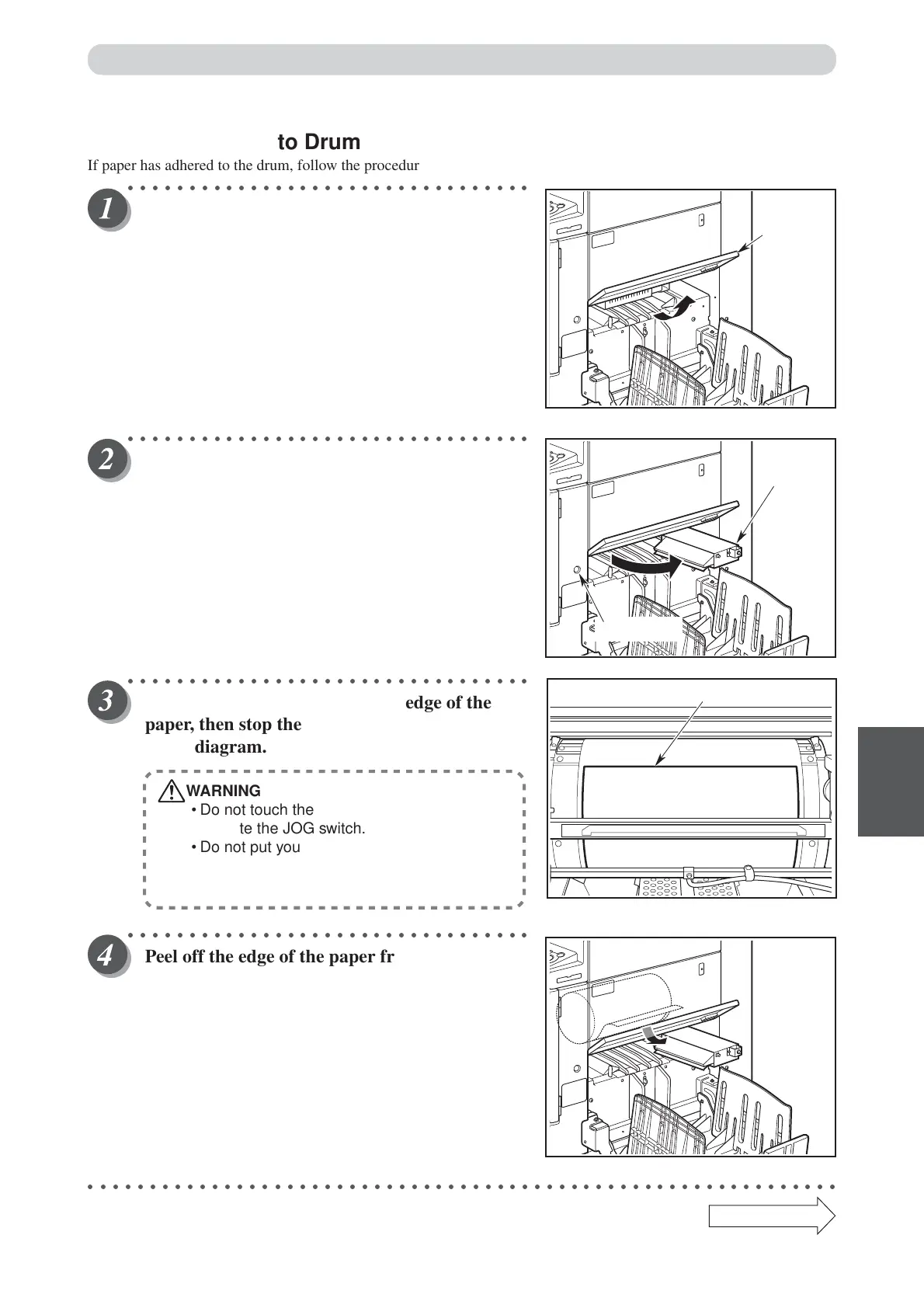
Peel off the edge of the paper from the drum.
○○○○○○○○○○○○○○○○○○○○○○○○○○○○○○○○○○○○○○○○○○○○○○○○○○○○○○○○○○○○○
Continue Page
•••
■ Paper Adhering to Drum
If paper has adhered to the drum, follow the procedure below to remove it.
○○○○○○○○○○○○○○○○○○○○○○○○○○○○○○○○○
Pull up the cover to the upper.
○○○○○○○○○○○○○○○○○○○○○○○○○○○○○○○○○
Open the top fan towards you.
○○○○○○○○○○○○○○○○○○○○○○○○○○○○○○○○○
Press the JOG switch to find the edge of the
paper, then stop the drum at the position shown
in the diagram.
WARNING
• Do not touch the drum or rollers when you
operate the JOG switch.
• Do not put your hands inside the machine
while it is operating. Your hands may be
pulled in or nipped.
Paper Jams
Edge of the paper
Cover
Top fan
JOG switch



 To Next Page